







Question: Need help with the formulas please 2nd screenshot is how the spreadsheet looks but is not the full sheet Date: data of transactions Channel The
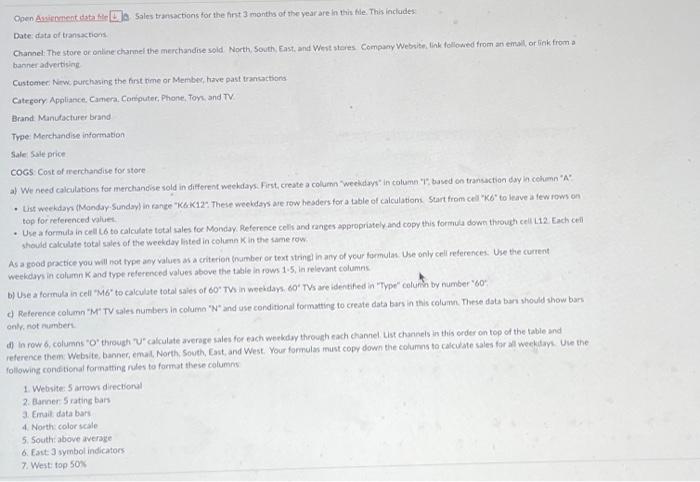
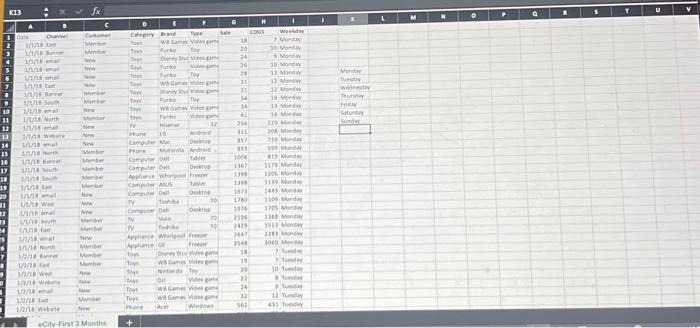
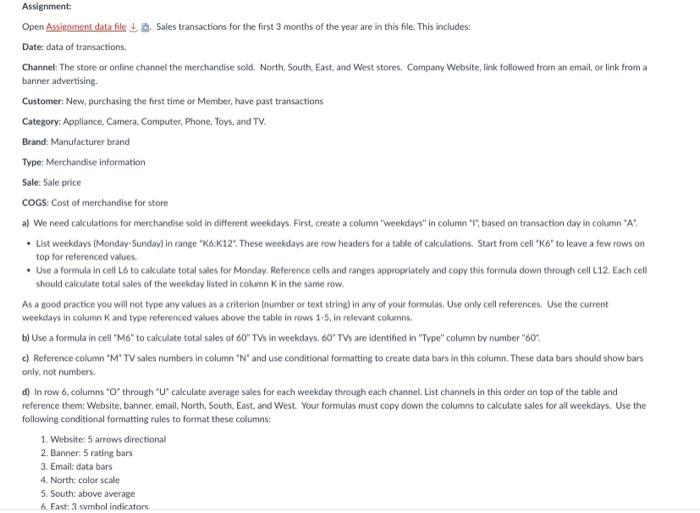
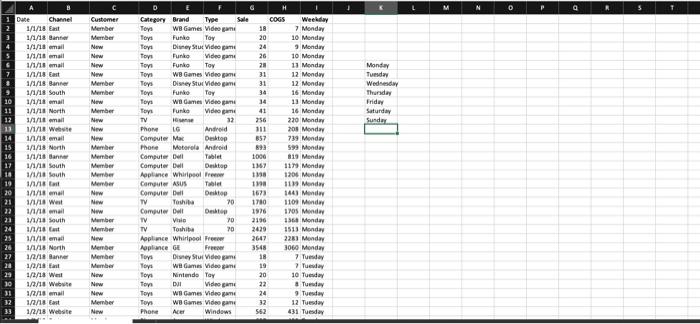
Date: data of transactions Channel The store or online charnel the merchandise sold Worth, South, East, and Wert stares Company Website. link followed trom an eirbl, of Gink from a banneradvertising Custeger, Nrwe purchaing the first pime or Membiv, have past tranicactiond Catrgory Appliance: Camera. Consputer, Phone, Tonk and TV Brand. Manutacturer brand Tree: Morchandise informakion Sale Ssle price COCS: Cost of irerchandise for store a) We need calculations for merchandise sold in different weehdays. First create a colume "weeldays" in column "T". based on transuction day in cohmn "A" - Use a formula in crel L6 to calculate total cales for Monday. Referecce cells and ranges appropriately and copy this formula dowe through cell L12. Each cell top for referenced vaiuet. should calculate total sales of the weekday listed in column X in the same row As a good practice you will not type any values as a criterion trimber or text stringl in any of your formulas. Use only cell retecences. Use the current weekdari in column K and type referenced values above the table in rows 1.5, in relevant columns b) Use a formula in cell "M6" to calculate total saies of 60. Thin weehdays. 60 T Ths are identafed in "Type" columin by number "60": c) Reference column "M" TY sales numbers in column " N and use conditional formatting to create data bars in this calumm. These dati bari should show bars onl, not nuamber. reference them Website, banner, emal, North. Sovth, Cast, and West. Your formulas must copy down the columas to calcuate sales for all weekitayk. Uve the following cond tional formating rules to format these columns 1. Websites 5 arrow diectional 2. Barner 5 rating bars 3. Erail data bari 4. North color scale 5. 5outhiabove average 6. Eant 9 symbol indicators 7. West: top sook Assignment Open Assignment data file \&. B. Sales transactions for the first 3 months of the year are in this file. This includes: Date. data of transactions. Channel: The store or online channel the merchandise sold. North. South, East, and West stores. Company Website, Fink followed from an email, or link from a banner advertising. Customer: New, purchasing the first time or Member, have past transactions Category: Appliance, Camera, Computer, Phone, Tovs, and TV. Brand: Manufacturer brand Type: Merchandise information Sale: Sale price COGS: Cost of merchandise for store a) We need calculations for merchandise sold in different weekdays. First, create a column "Weeldays" in column "i"; based on transaction day in column "A* - List weekdays (Monday-Sunday) in range "K6:K12". These weekdays are row headers for a table of calculations. Start from cell "K6' to leave a few rows on top for referenced values - Use a fommala in cell Lb to cakculate total sales for Monday. Reference cells and ranges appropriately and copy this formula down through cell L12. Each cell should caiculate total sales of the weekday listed in column K in the same row. As a good practice you will not type any values as a criterion (number or text string) in any of your formulas. Use only cell references. Use the current weeludays in column K and type referenced values above the table in rows 1.5 , in relevant columns. b) Use a formula in cell "M6" to calculate total sales of 60 " TSs in weekdays. 60 " TVs are identified in "Type" column by number "60". c) Reference column " M " TV sales numbers in column " N " and use conditional formatting to create data bars in this column. These data bars should show bars only, not numbers. reference them: Website, banner, email, North, South. East, and West. Your formulas must copy down the columns to calculate sales for all weekdays. Use the following conditional formatting rules to format these columns: 1. Website: 5 arrows directional 2. Banner. 5 rating bars 3. Email: data bars 4. North: color scale 5. South: above average 6. Fast: 3 sumbol indirators Date: data of transactions Channel The store or online charnel the merchandise sold Worth, South, East, and Wert stares Company Website. link followed trom an eirbl, of Gink from a banneradvertising Custeger, Nrwe purchaing the first pime or Membiv, have past tranicactiond Catrgory Appliance: Camera. Consputer, Phone, Tonk and TV Brand. Manutacturer brand Tree: Morchandise informakion Sale Ssle price COCS: Cost of irerchandise for store a) We need calculations for merchandise sold in different weehdays. First create a colume "weeldays" in column "T". based on transuction day in cohmn "A" - Use a formula in crel L6 to calculate total cales for Monday. Referecce cells and ranges appropriately and copy this formula dowe through cell L12. Each cell top for referenced vaiuet. should calculate total sales of the weekday listed in column X in the same row As a good practice you will not type any values as a criterion trimber or text stringl in any of your formulas. Use only cell retecences. Use the current weekdari in column K and type referenced values above the table in rows 1.5, in relevant columns b) Use a formula in cell "M6" to calculate total saies of 60. Thin weehdays. 60 T Ths are identafed in "Type" columin by number "60": c) Reference column "M" TY sales numbers in column " N and use conditional formatting to create data bars in this calumm. These dati bari should show bars onl, not nuamber. reference them Website, banner, emal, North. Sovth, Cast, and West. Your formulas must copy down the columas to calcuate sales for all weekitayk. Uve the following cond tional formating rules to format these columns 1. Websites 5 arrow diectional 2. Barner 5 rating bars 3. Erail data bari 4. North color scale 5. 5outhiabove average 6. Eant 9 symbol indicators 7. West: top sook Assignment Open Assignment data file \&. B. Sales transactions for the first 3 months of the year are in this file. This includes: Date. data of transactions. Channel: The store or online channel the merchandise sold. North. South, East, and West stores. Company Website, Fink followed from an email, or link from a banner advertising. Customer: New, purchasing the first time or Member, have past transactions Category: Appliance, Camera, Computer, Phone, Tovs, and TV. Brand: Manufacturer brand Type: Merchandise information Sale: Sale price COGS: Cost of merchandise for store a) We need calculations for merchandise sold in different weekdays. First, create a column "Weeldays" in column "i"; based on transaction day in column "A* - List weekdays (Monday-Sunday) in range "K6:K12". These weekdays are row headers for a table of calculations. Start from cell "K6' to leave a few rows on top for referenced values - Use a fommala in cell Lb to cakculate total sales for Monday. Reference cells and ranges appropriately and copy this formula down through cell L12. Each cell should caiculate total sales of the weekday listed in column K in the same row. As a good practice you will not type any values as a criterion (number or text string) in any of your formulas. Use only cell references. Use the current weeludays in column K and type referenced values above the table in rows 1.5 , in relevant columns. b) Use a formula in cell "M6" to calculate total sales of 60 " TSs in weekdays. 60 " TVs are identified in "Type" column by number "60". c) Reference column " M " TV sales numbers in column " N " and use conditional formatting to create data bars in this column. These data bars should show bars only, not numbers. reference them: Website, banner, email, North, South. East, and West. Your formulas must copy down the columns to calculate sales for all weekdays. Use the following conditional formatting rules to format these columns: 1. Website: 5 arrows directional 2. Banner. 5 rating bars 3. Email: data bars 4. North: color scale 5. South: above average 6. Fast: 3 sumbol indirators
Step by Step Solution
There are 3 Steps involved in it

Get step-by-step solutions from verified subject matter experts
 Study Help