Question: need help with the python problem these are appendix for solving this question 2. Part B, A1B (10 marks) Write a Python program, with the
need help with the python problem
these are appendix for solving this question
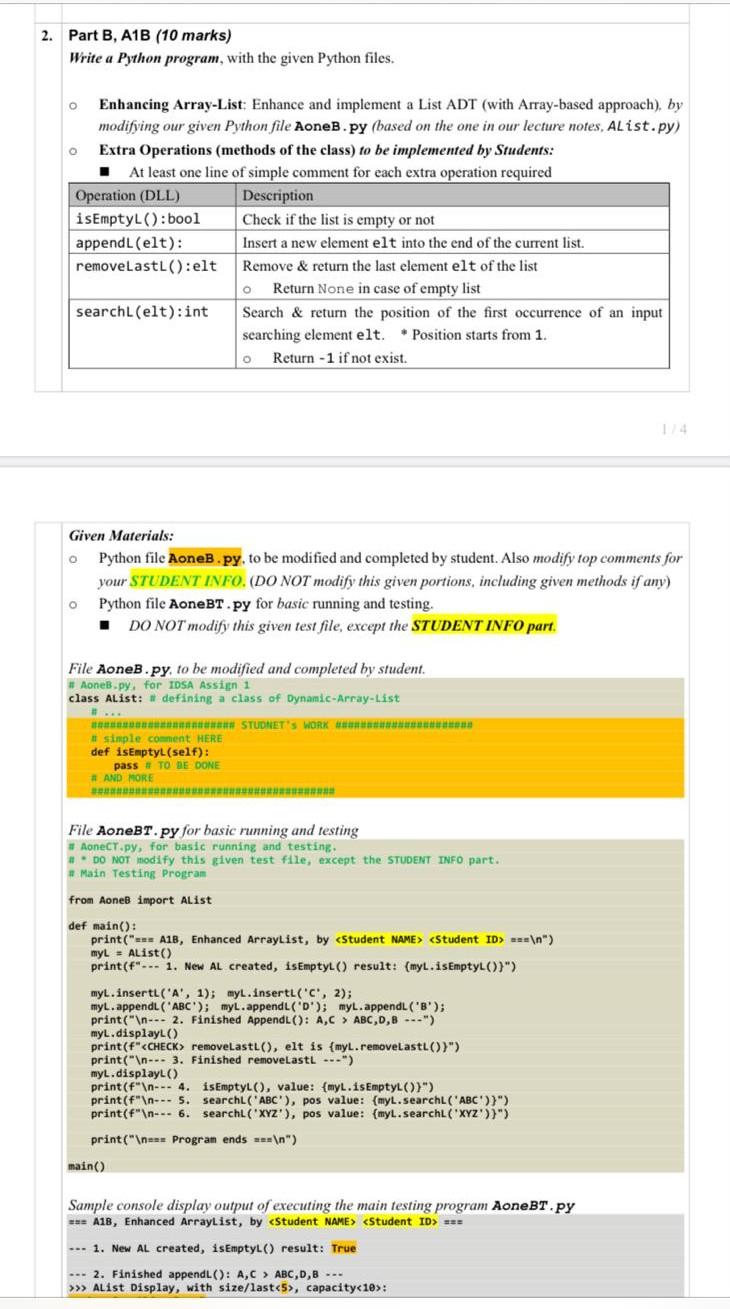
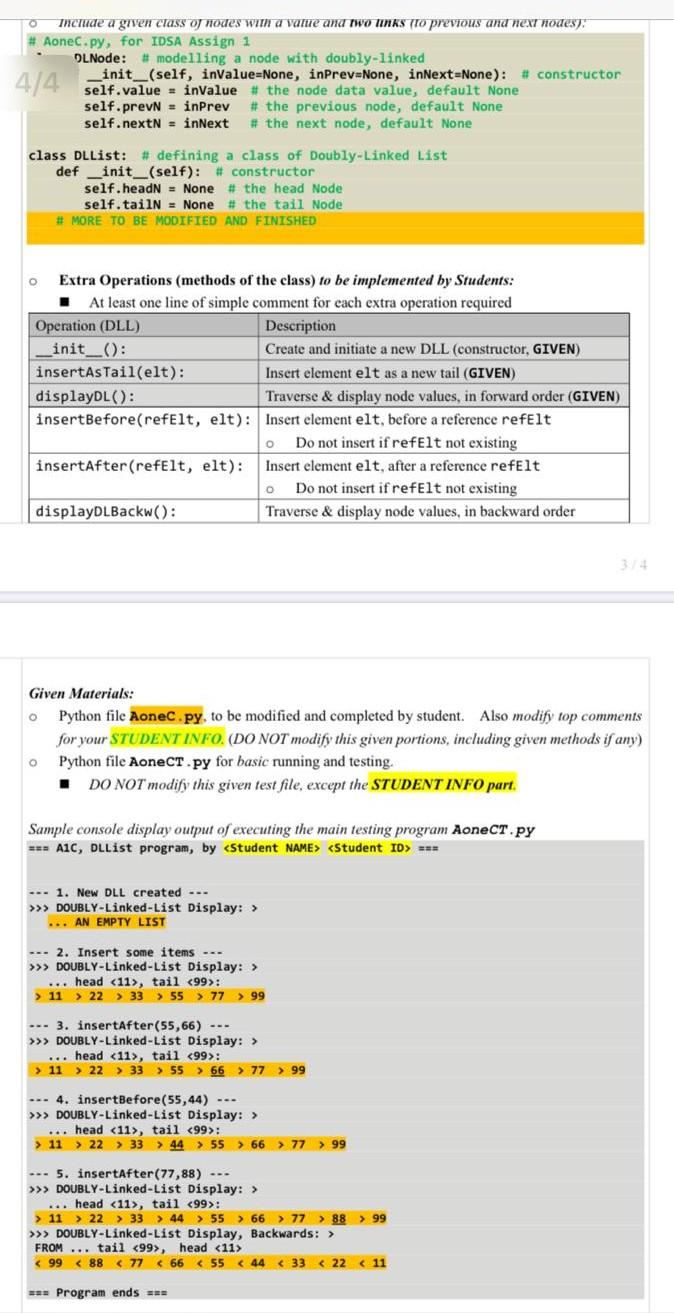
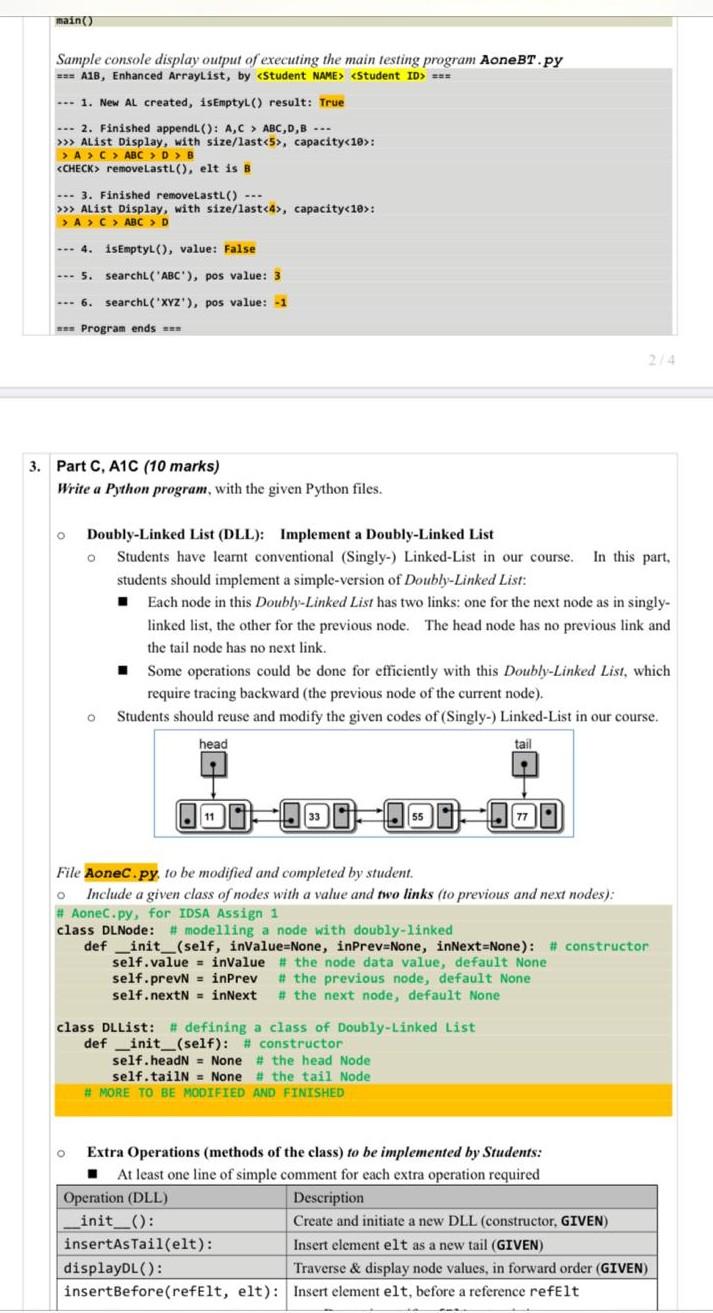
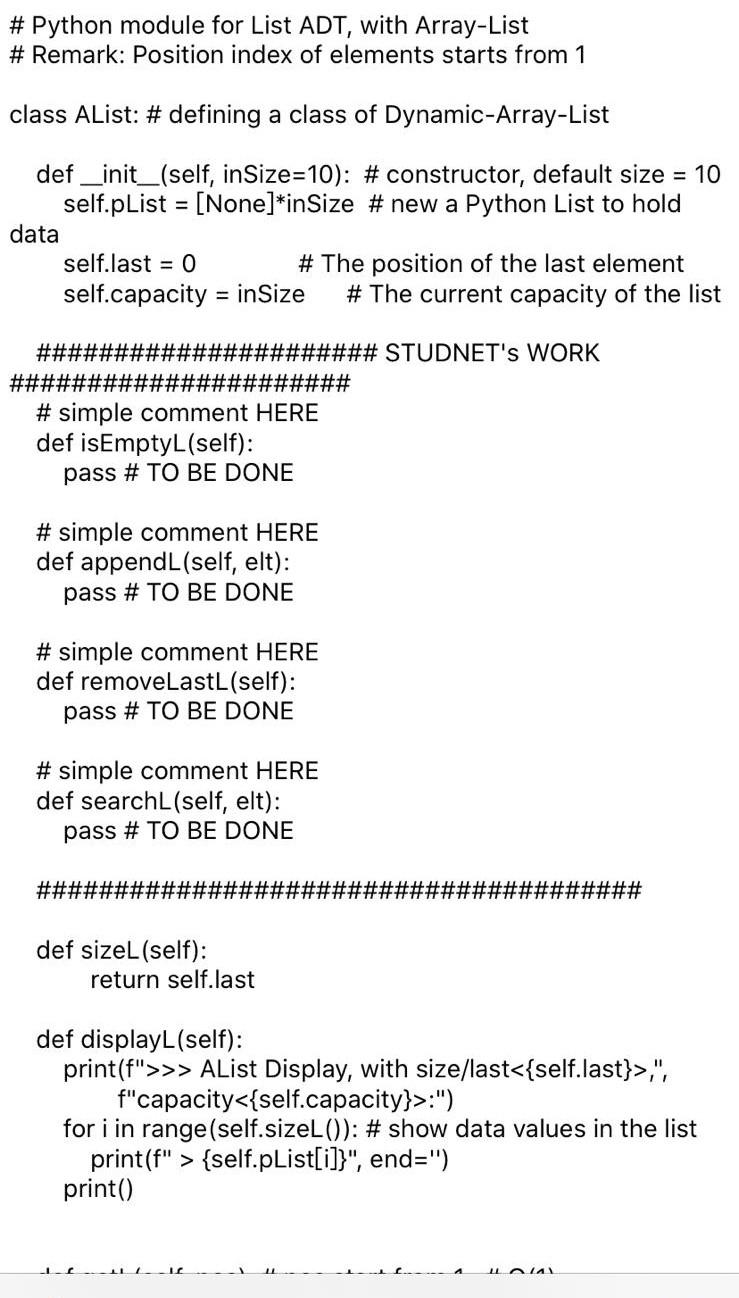
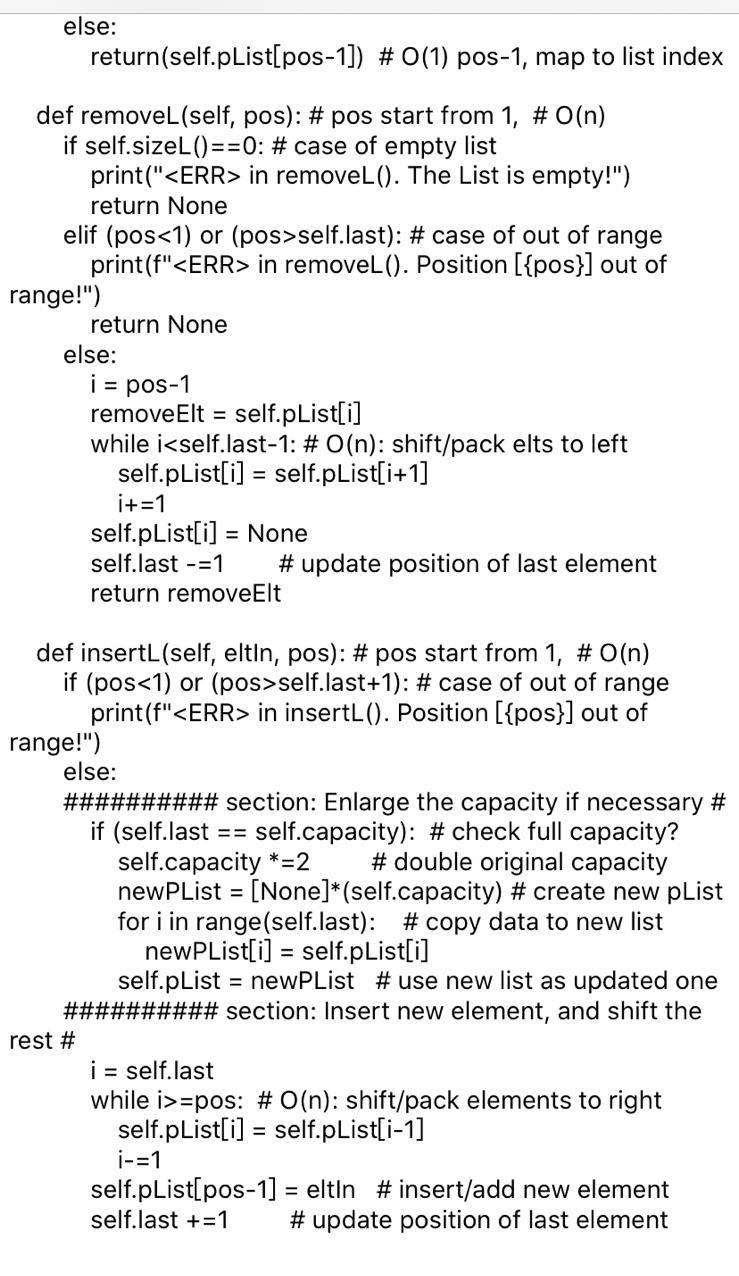
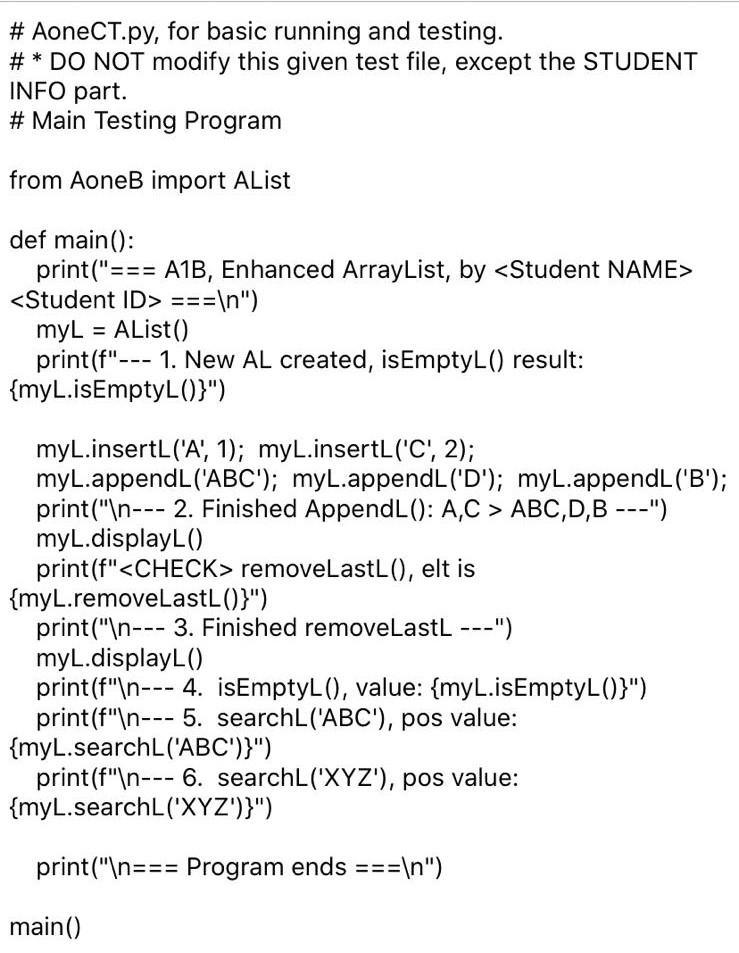
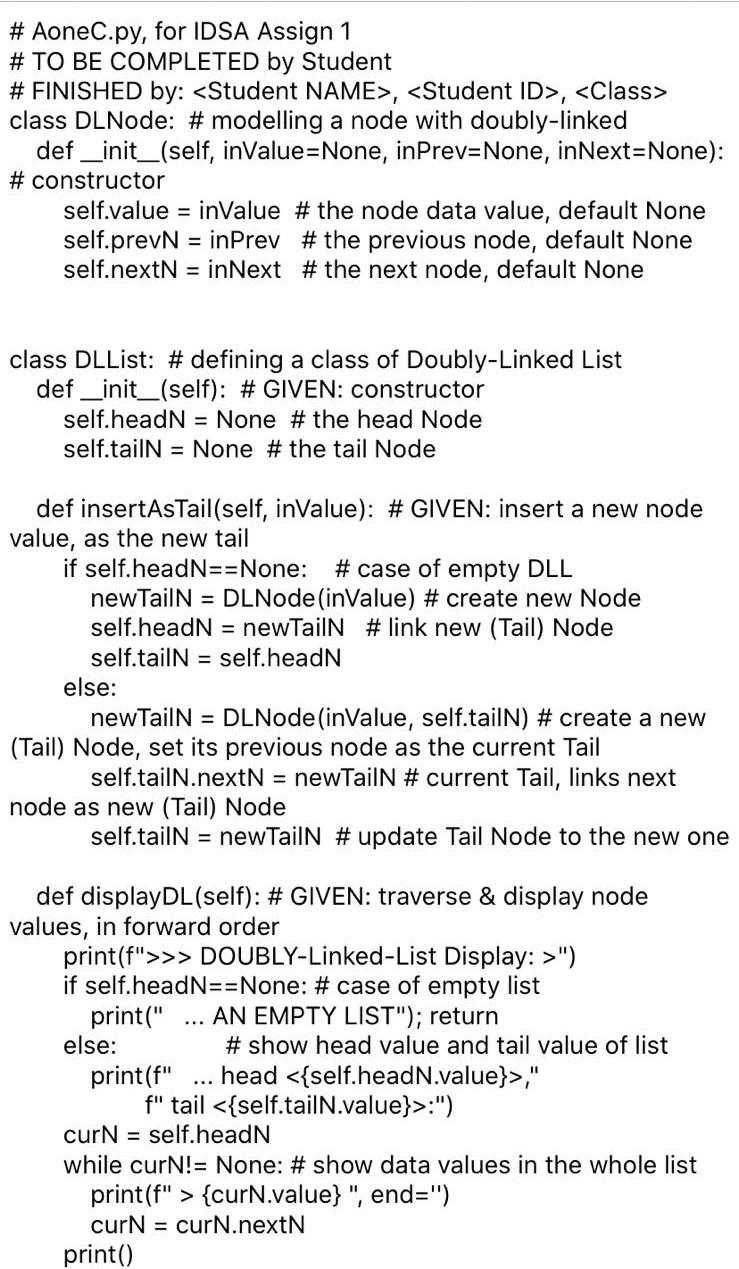
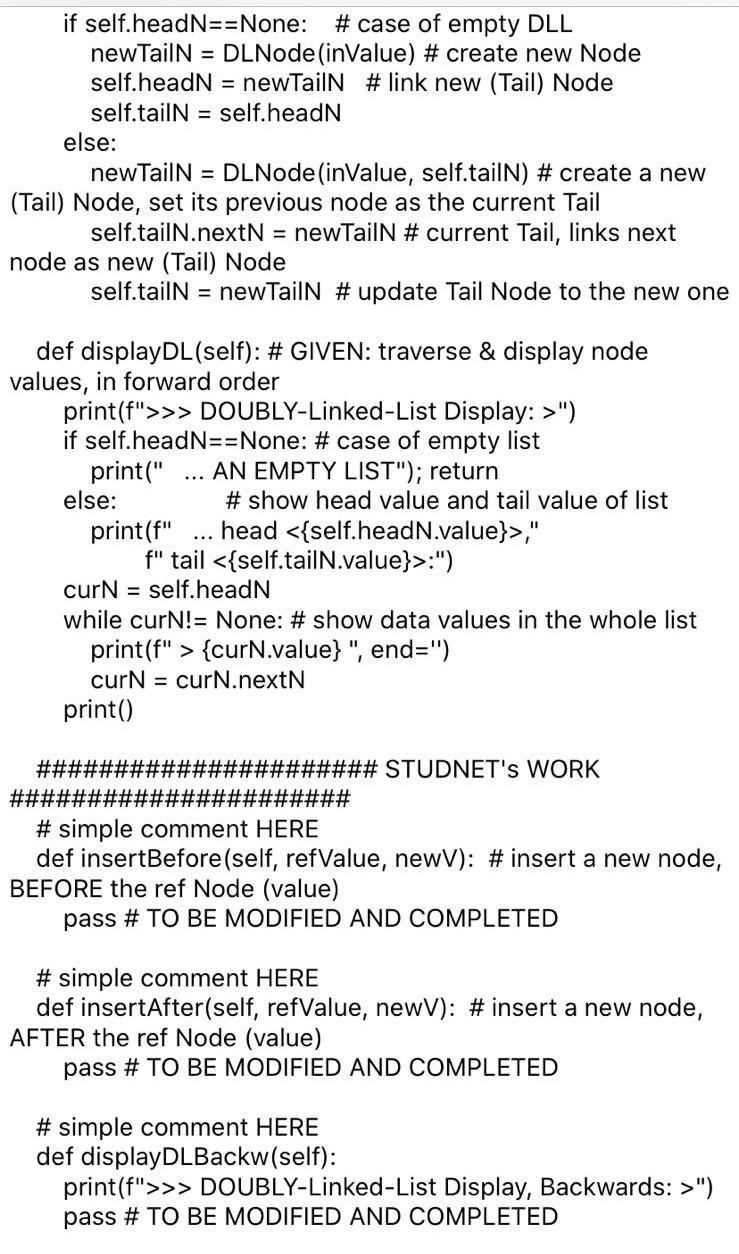
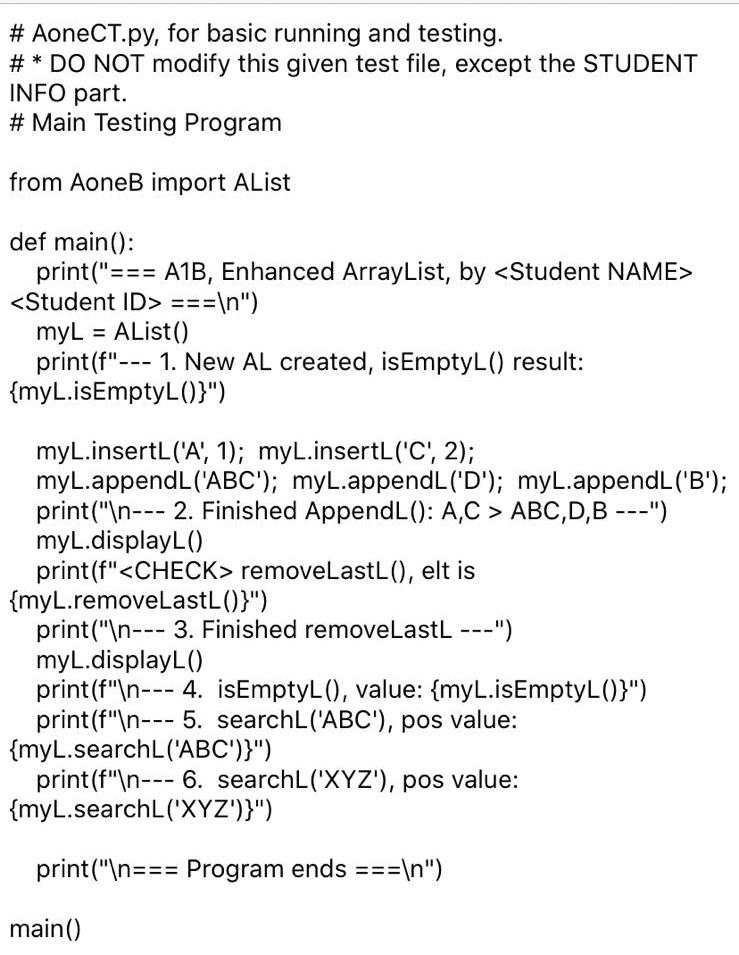
2. Part B, A1B (10 marks) Write a Python program, with the given Python files. O O Enhancing Array-List: Enhance and implement a List ADT (with Array-based approach), by modifying our given Python file AoneB.py (based on the one in our lecture notes, Alist.py) Extra Operations (methods of the class) to be implemented by Students: At least one line of simple comment for each extra operation required Operation (DLL) Description isEmptyL(): bool Check if the list is empty or not appendL(elt): Insert a new element elt into the end of the current list. removeLastL():elt Remove & return the last element elt of the list o Return None in case of empty list searchl (elt):int Search & return the position of the first occurrence of an input searching element elt. Position starts from 1. Return - 1 if not exist. O Given Materials: Python file AoneB.py. to be modified and completed by student. Also modify top comments for your STUDENT INFO. (DO NOT modify this given portions, including given methods if any) Python file Aone BT.py for basic running and testing. DO NOT modify this given test file, except the STUDENT INFO part. File AoneB.py, to be modified and completed by student. # Aoneb.py, for IDSA Assign 1 class Alist: # defining a class of Dynamic-Array-List * STUDNET'S WORK # simple comment HERE def isEmptyL(self): pass # TO DE DONE # AND MORE File AoneBT.py for basic running and testing #AoneCT.py, for basic running and testing. # DO NOT modify this given test file, except the STUDENT INFO part. # Main Testing Program from Aones import Alist def main(): print("s A1B, Enhanced ArrayList, by == ") myl - Alist() print("--- 1. New AL created, isEmptyl() result: (myl.isEmptyL())") myL.insertl('A', 1); myl.insertL('C', 2); myL.appendL (ABC); myl.append('D'); myL.append('B'); print(" --- 2. Finished Append(): A,C > ABC,D,B -..") myl.displayl() print (f" removeLastL(), elt is {myl.removeLastL())") print(" --- 3. Finished removeLastL ---") myL.displayL() print(" --- 4. isEmptyl(), value: {myL.isEmptyL()}") print(" --- 5. searchL('ABC'), pos value: {myl.searchL('ABC'))") print(" --- 6. searchL('XYZ), pos value: (myl.searchL("XYZ'))") print(" ess Program ends an ") main() Sample console display output of executing the main testing program AoneBT.py *-- A1B, Enhanced ArrayList, by ses --- 1. New AL created, isEmptyL() result: True --- 2. Finished appendL(): A,C > ABC,D,B --- >>> AList Display, with size/last: Thclude a given class of nodes with a value and two links to previous and next hodes): # Aonec.py, for IDSA Assign 1 DLNode: # modelling a node with doubly-linked _init_(self, invalue=None, inPrev=None, inNext=None): # constructor 4/4 self.value="invalue the node data value, default None self.prevN = inPrev self.next = inNext # the previous node, default None # the next node, default None class DLList: # defining a class of Doubly-Linked List def __init_(self): # constructor self.headN = None # the head Node self.tailN = None # the tail Node # MORE TO BE MODIFIED AND FINISHED 0 Extra Operations (methods of the class) to be implemented by Students: At least one line of simple comment for each extra operation required Operation (DLL) Description _init__(): Create and initiate a new DLL (constructor, GIVEN) insertAsTail(elt): Insert element elt as a new tail (GIVEN) displayDL(): Traverse & display node values, in forward order (GIVEN) insertBefore(refelt, elt): Insert element elt, before a reference refelt Do not insert if refelt not existing insertAfter (refelt, elt): Insert element elt, after a reference refelt Do not insert if refelt not existing displayDlBackw(): Traverse & display node values, in backward order 0 O Given Materials: Python file Aonec.py. to be modified and completed by student. Also modify top comments for your STUDENT INFO. (DO NOT modify this given portions, including given methods if any) Python file Aonect.py for basic running and testing. DO NOT modify this given test file, except the STUDENT INFO part. o Sample console display output of executing the main testing program AoneCT.py *-- A1C, DLList program, by -- --- 1. New DLL created -- >>> DOUBLY-Linked-List Display: > ... AN EMPTY LIST --- 2. Insert some items -- >>> DOUBLY-Linked-List Display: > ... head (11>, tail : > 11 > 22 > 33 55 > 77 > 99 --- 3. insertAfter(55,66) --- >>> DOUBLY-Linked-List Display: > ... head , tail : > 11 > 22 > 33 > 55 > 66 > 77 99 ... 4. insertBefore(55,44) --. >>> DOUBLY-Linked-List Display: > ... head , tail 99): > 11 > 22 > 33 > 44 > 55 > 66 > 77 > 99 --- 5. insertAfter(77,88) --- >>> DOUBLY-Linked-List Display: > ... head , tail 99): > 11 > 22 > 33 > 44 > 55 > 66 > 77 > 88 > 99 >>> DOUBLY-Linked-List Display, Backwards: > FROM ... tail 99, head === --- 1. New AL created, isEmptyL() result: True --- 2. Finished append(): A,C > ABC,D,B --- >>> AList Display, with size/last, capacity A > C > ABC > D > B removeLastL(), elt is B --- 3. Finished removeLastL() --- >>> AList Display, with size/last, capacity A > C > ABCD --- 4. isEmptyL(), value: False --- 5. searchL'ABC'), pos value: 3 --- 6. searchl('XYZ'), pos value: -1 *** Program ends aan 3. Part C, A1C (10 marks) Write a Python program, with the given Python files. O . Doubly-Linked List (DLL): Implement a Doubly-Linked List Students have learnt conventional (Singly-) Linked-List in our course. In this part. students should implement a simple-version of Doubly-Linked List: Each node in this Doubly-Linked List has two links: one for the next node as in singly- linked list, the other for the previous node. The head node has no previous link and the tail node has no next link. Some operations could be done for efficiently with this Doubly-Linked List, which require tracing backward (the previous node of the current node). Students should reuse and modify the given codes of (Singly-) Linked-List in our course. head tail 11 0 77 File Aonec.py to be modified and completed by student. Include a given class of nodes with a value and two links (to previous and next nodes): # Aonec.py, for IDSA Assign 1 class DL Node: # modelling a node with doubly-linked def __init__(self, invalue=None, inPrev=None, inNext=None): # constructor self.value = inValue # the node data value, default None self.prevN - inPrev # the previous node, default None self.nextN = inNext # the next node, default None class DLList: # defining a class of Doubly-Linked List def __init__(self): #. constructor self.headN = None # the head Node self.tailN = None # the tail Node # MORE TO BE MODIFIED AND FINISHED Extra Operations (methods of the class) to be implemented by Students: At least one line of simple comment for each extra operation required Operation (DLL) Description init__(): Create and initiate a new DLL (constructor, GIVEN) insertAsTail(elt): Insert element elt as a new tail (GIVEN) displayDL(): Traverse & display node values, in forward order (GIVEN) insertBefore(refelt, elt): Insert element elt, before a reference refelt # Python module for List ADT, with Array-List # Remark: Position index of elements starts from 1 class Alist: # defining a class of Dynamic-Array-List def __init__(self, inSize=10): #constructor, default size = 10 self.pList = [None]*inSize #new a Python List to hold data self.last = 0 # The position of the last element self.capacity = in Size # The current capacity of the list ###################### STUDNET'S WORK %E3%23%23%23%23%23%23%23%23%23%23%23%23%23%23%23%23%23%23%23%23 # simple comment HERE def isEmptyL(self): pass # TO BE DONE # simple comment HERE def appendL(self, elt): pass # TO BE DONE # simple comment HERE def removeLastL(self): pass # TO BE DONE # simple comment HERE def searchL(self, elt): pass # TO BE DONE ###### ## def sizeL(self): return self.last def displayL(self): print(f">>> AList Display, with size/last,", f"capacity:") for i in range(self.sizeL()): # show data values in the list print(f" > {self.pList[i]}", end=") print() Lala else: return(self.pList[pos-1]) # 0(1) pos-1, map to list index def removeL(self, pos): # pos start from 1, # O(n) if self.sizeL()==0: # case of empty list print(" in removeL(). The List is empty!") return None elif (posself.last): # case of out of range print(f" in removeL(). Position [{pos}] out of range!") return None else: i = pos-1 removeElt = self.pList[i] while iself.last+1): # case of out of range print(f" in insertL(). Position [{pos}] out of range!") else: ########## section: Enlarge the capacity if necessary # if (self.last self.capacity): # check full capacity? self.capacity *=2 #double original capacity newPList = [None]*(self.capacity) # create new pList for i in range(self.last): # copy data to new list newPList[i] = self.pList[i] self.pList = newPList #use new list as updated one ## ###### section: Insert new element, and shift the rest # i = self.last while i>=pos: # O(n): shift/pack elements to right self.pList[i] = self.pList[i-1] i-=1 self.pList[pos-1] = eltin #insert/add new element self.last += 1 # update position of last element # AoneCT.py, for basic running and testing. #* DO NOT modify this given test file, except the STUDENT INFO part. # Main Testing Program from AoneB import AList def main(): print("=; '=== A1B, Enhanced ArrayList, by === ") myL = AList() print(f"--- 1. New AL created, isEmptyL() result: {myL.isEmptyL()}") myL.insertL('A', 1); myL.insertL('C', 2); myL.appendL('ABC'); myL.appendL('D'); myL.appendL('B'); print(" --- 2. Finished AppendL(): A,C > ABC,D,B ---") myL.displayL() print(f" removeLastL(), elt is {myL.removeLastL()}") print(" --- 3. Finished removeLastL ---") myL.displayL() print(f" --- 4. isEmptyL(), value: {myL.isEmptyL()}") print(f" --- 5. searchL('ABC'), pos value: {myL.searchL('ABC')}") print(f" --- 6. searchL('XYZ"), pos value: {myL.searchL('XYZ')}") print(" === Program ends === ") main() # AoneC.py, for IDSA Assign 1 # TO BE COMPLETED by Student # FINISHED by: , , class DLNode: # modelling a node with doubly-linked def __init__(self, inValue=None, inPrev=None, inNext=None): # constructor self.value = inValue # the node data value, default None self.prevN = inPrev # the previous node, default None self.nextN = inNext # the next node, default None class DLList: # defining a class of Doubly-Linked List def __init__(self): # GIVEN: constructor self.headN = None # the head Node self.tailN = None # the tail Node def insertAsTail(self, inValue): # GIVEN: insert a new node value, as the new tail if self.headN==None: # case of empty DLL new TailN = DL Node (inValue) # create new Node self.headN = newTailN # link new (Tail) Node self.tailN = self.headN else: newTailN = DLNode(inValue, self.tailN) # create a new (Tail) Node, set its previous node as the current Tail self.tailN.nextN = newTailN # current Tail, links next node as new (Tail) Node self.tailN = new TailN # update Tail Node to the new one def displayDL(self): # GIVEN: traverse & display node values, in forward order print(f">>> DOUBLY-Linked-List Display: >") if self.headN==None: #case of empty list print(" AN EMPTY LIST"); return else: # show head value and tail value of list print(f" ... head ," f" tail :") curN = self.heads while curN!= None: # show data values in the whole list print(f" > {curN.value}", end=") curN = curN.nextN print() if self.headN==None: # case of empty DLL newTailN = DLNode (inValue) # create new Node self.headN = newTailN # link new (Tail) Node self.tailN = self.headN else: new TailN = DLNode (inValue, self.tailN) # create a new (Tail) Node, set its previous node as the current Tail self.tailN.nextN = newTailN # current Tail, links next node as new (Tail) Node self.tailN = new TailN # update Tail Node to the new one def displayDL(self): # GIVEN: traverse & display node values, in forward order print(f">>> DOUBLY-Linked-List Display: >") if self.headN==None: # case of empty list print(" ... AN EMPTY LIST"); return else: # show head value and tail value of list print(f" head ," f" tail :") curN = self.headN while curN!= None: # show data values in the whole list print(f" > {curN.value}", end=") curN = curN.nextN print() #### ######### STUDNET'S WORK ###################### # simple comment HERE def insertBefore(self, refValue, newV): # insert a new node, BEFORE the ref Node (value) pass # TO BE MODIFIED AND COMPLETED # simple comment HERE def insertAfter(self, refValue, newV): # insert a new node, AFTER the ref Node (value) pass # TO BE MODIFIED AND COMPLETED # simple comment HERE def displayDLBackw(self): print(f">>> DOUBLY-Linked-List Display, Backwards: >") pass # TO BE MODIFIED AND COMPLETED # AoneCT.py, for basic running and testing. # * DO NOT modify this given test file, except the STUDENT INFO part. # Main Testing Program from AoneB import AList def main(): print("=== A1B, Enhanced ArrayList, by === ") myL = AList() print(f"--- 1. New AL created, isEmptyL() result: {myL.isEmptyL()}") myL.insertL('A', 1); myL.insertL('C', 2); myL.appendL('ABC'); myL.appendL('D'); myL.appendL('B'); print(" --- 2. Finished AppendL(): A,C > ABC,D,B ---") myL.displayL() print(f" removeLastL(), elt is {myL.removeLastL()}") print(" --- 3. Finished removeLastL ---") myL.displayL() print(f" --- 4. isEmptyL(), value: {myL.isEmptyL()}") print (f" --- 5. searchL('ABC'), pos value: {myL.searchL('ABC')}") print(f" --- 6. searchL('XYZ'), pos value: {myL.searchL('XYZ')}") print(" === Program ends === ") main()









 Study Help