







Question: Need help with the second part of task 3 after calling the function. Its saying I have too many inputs for the user Task 3:
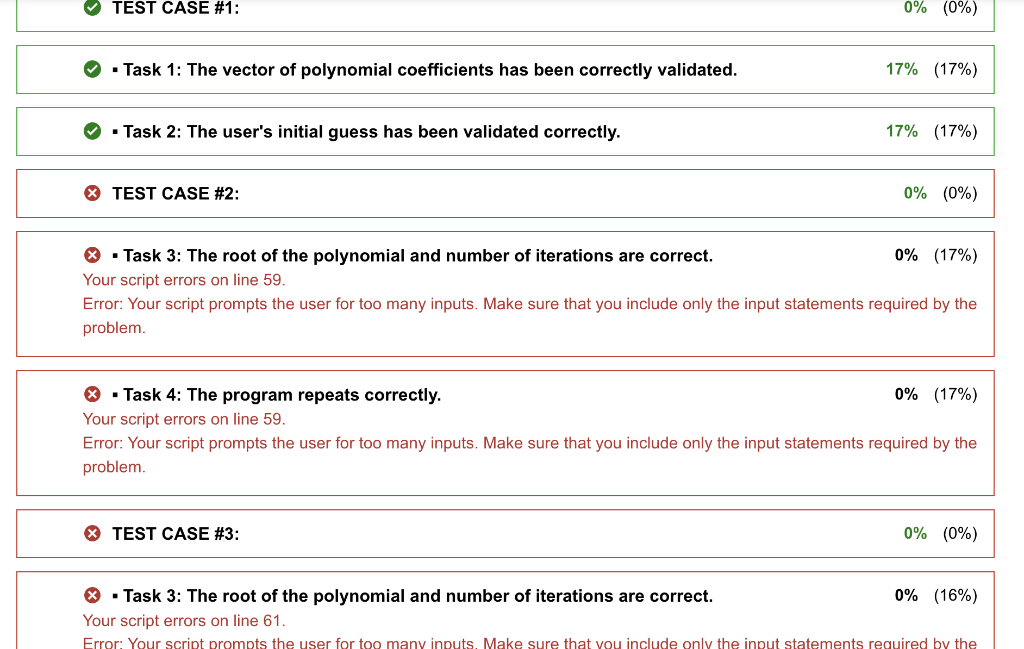
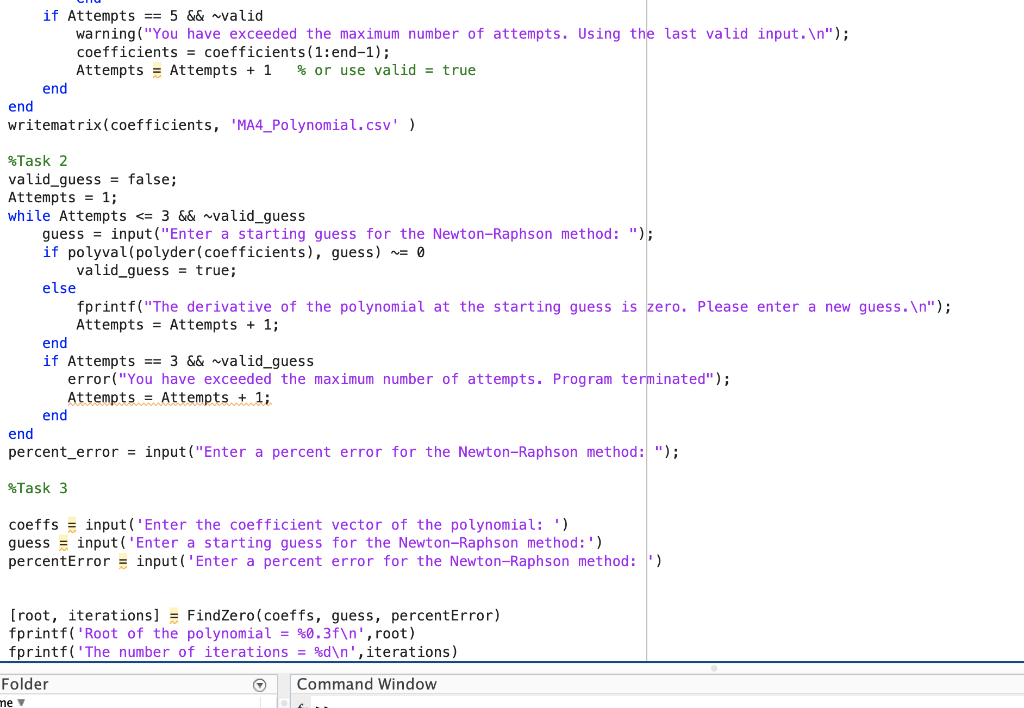
Need help with the second part of task 3 after calling the function. Its saying I have too many inputs for the user
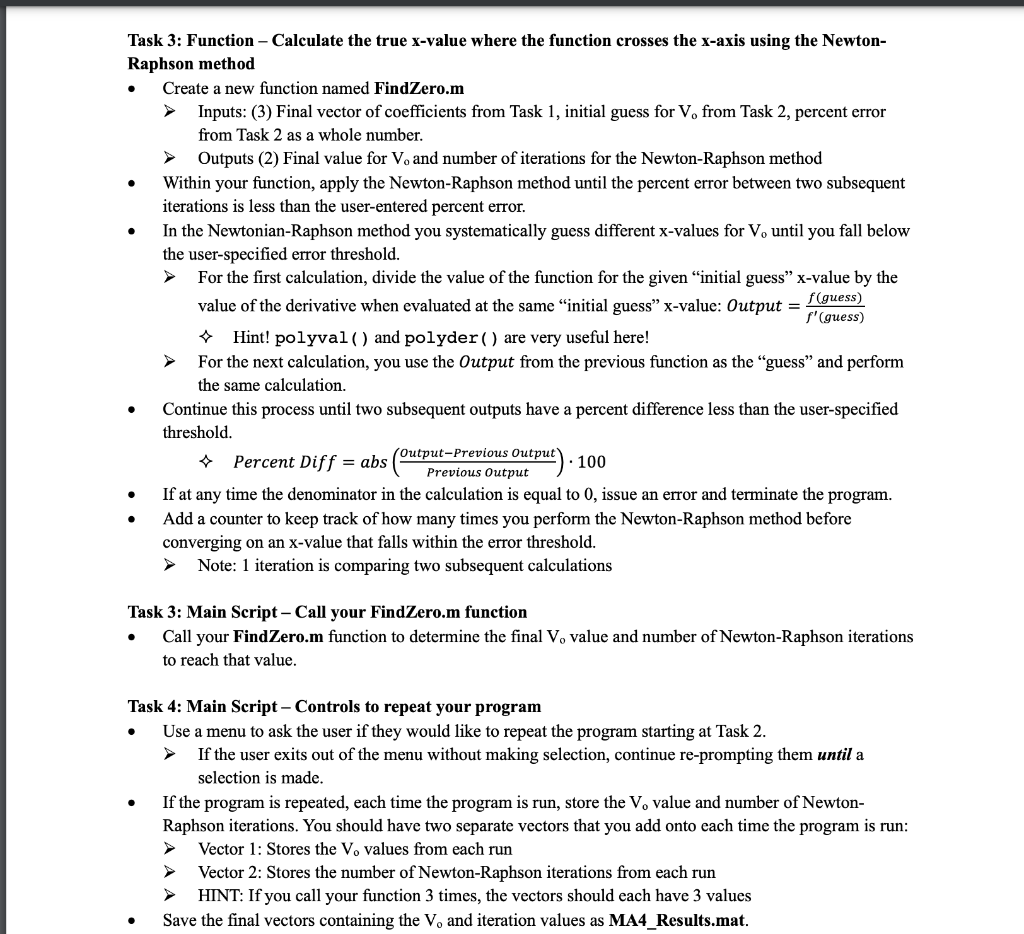
Task 3: Function - Calculate the true x-value where the function crosses the x-axis using the NewtonRaphson method - Create a new function named FindZero.m Inputs: (3) Final vector of coefficients from Task 1, initial guess for Vo from Task 2, percent error from Task 2 as a whole number. Outputs (2) Final value for Vo and number of iterations for the Newton-Raphson method - Within your function, apply the Newton-Raphson method until the percent error between two subsequent iterations is less than the user-entered percent error. - In the Newtonian-Raphson method you systematically guess different x-values for Vo until you fall below the user-specified error threshold. For the first calculation, divide the value of the function for the given "initial guess" x-value by the value of the derivative when evaluated at the same "initial guess" x-value: Output =f(guess)f(guess) Hint! polyval ( ) and polyder ( ) are very useful here! For the next calculation, you use the Output from the previous function as the "guess" and perform the same calculation. - Continue this process until two subsequent outputs have a percent difference less than the user-specified threshold. PercentDiff=abs(PreviousOutputOutput-PreviousOutput)100 - If at any time the denominator in the calculation is equal to 0, issue an error and terminate the program. - Add a counter to keep track of how many times you perform the Newton-Raphson method before converging on an x-value that falls within the error threshold. Note: 1 iteration is comparing two subsequent calculations Task 3: Main Script - Call your FindZero.m function - Call your FindZero.m function to determine the final Vo value and number of Newton-Raphson iterations to reach that value. Task 4: Main Script - Controls to repeat your program - Use a menu to ask the user if they would like to repeat the program starting at Task 2. If the user exits out of the menu without making selection, continue re-prompting them until a selection is made. - If the program is repeated, each time the program is run, store the V0 value and number of NewtonRaphson iterations. You should have two separate vectors that you add onto each time the program is run: Vector 1: Stores the Vo values from each run Vector 2: Stores the number of Newton-Raphson iterations from each run HINT: If you call your function 3 times, the vectors should each have 3 values - Save the final vectors containing the V and iteration values as MA4 Results.mat. - Task 2: The user's initial guess has been validated correctly. 17%(17%) TEST CASE \#2: 0%(0%) - Task 3: The root of the polynomial and number of iterations are correct. 0%(17%) Your script errors on line 59. Error: Your script prompts the user for too many inputs. Make sure that you include only the input statements required by the problem. - Task 4: The program repeats correctly. 0%(17%) Your script errors on line 59. Error: Your script prompts the user for too many inputs. Make sure that you include only the input statements required by the problem. TEST CASE \#3: 0%(0%) - Task 3: The root of the polynomial and number of iterations are correct. 0%(16%) Your script errors on line 61. Folder Task 3: Function - Calculate the true x-value where the function crosses the x-axis using the NewtonRaphson method - Create a new function named FindZero.m Inputs: (3) Final vector of coefficients from Task 1, initial guess for Vo from Task 2, percent error from Task 2 as a whole number. Outputs (2) Final value for Vo and number of iterations for the Newton-Raphson method - Within your function, apply the Newton-Raphson method until the percent error between two subsequent iterations is less than the user-entered percent error. - In the Newtonian-Raphson method you systematically guess different x-values for Vo until you fall below the user-specified error threshold. For the first calculation, divide the value of the function for the given "initial guess" x-value by the value of the derivative when evaluated at the same "initial guess" x-value: Output =f(guess)f(guess) Hint! polyval ( ) and polyder ( ) are very useful here! For the next calculation, you use the Output from the previous function as the "guess" and perform the same calculation. - Continue this process until two subsequent outputs have a percent difference less than the user-specified threshold. PercentDiff=abs(PreviousOutputOutput-PreviousOutput)100 - If at any time the denominator in the calculation is equal to 0, issue an error and terminate the program. - Add a counter to keep track of how many times you perform the Newton-Raphson method before converging on an x-value that falls within the error threshold. Note: 1 iteration is comparing two subsequent calculations Task 3: Main Script - Call your FindZero.m function - Call your FindZero.m function to determine the final Vo value and number of Newton-Raphson iterations to reach that value. Task 4: Main Script - Controls to repeat your program - Use a menu to ask the user if they would like to repeat the program starting at Task 2. If the user exits out of the menu without making selection, continue re-prompting them until a selection is made. - If the program is repeated, each time the program is run, store the V0 value and number of NewtonRaphson iterations. You should have two separate vectors that you add onto each time the program is run: Vector 1: Stores the Vo values from each run Vector 2: Stores the number of Newton-Raphson iterations from each run HINT: If you call your function 3 times, the vectors should each have 3 values - Save the final vectors containing the V and iteration values as MA4 Results.mat. - Task 2: The user's initial guess has been validated correctly. 17%(17%) TEST CASE \#2: 0%(0%) - Task 3: The root of the polynomial and number of iterations are correct. 0%(17%) Your script errors on line 59. Error: Your script prompts the user for too many inputs. Make sure that you include only the input statements required by the problem. - Task 4: The program repeats correctly. 0%(17%) Your script errors on line 59. Error: Your script prompts the user for too many inputs. Make sure that you include only the input statements required by the problem. TEST CASE \#3: 0%(0%) - Task 3: The root of the polynomial and number of iterations are correct. 0%(16%) Your script errors on line 61. Folder
Step by Step Solution
There are 3 Steps involved in it

Get step-by-step solutions from verified subject matter experts
 Study Help