







Question: need help with this python code # prompts amount from user amount = float(input(Enter the total purchase Amount : )) # propmts the Customer a
need help with this python code
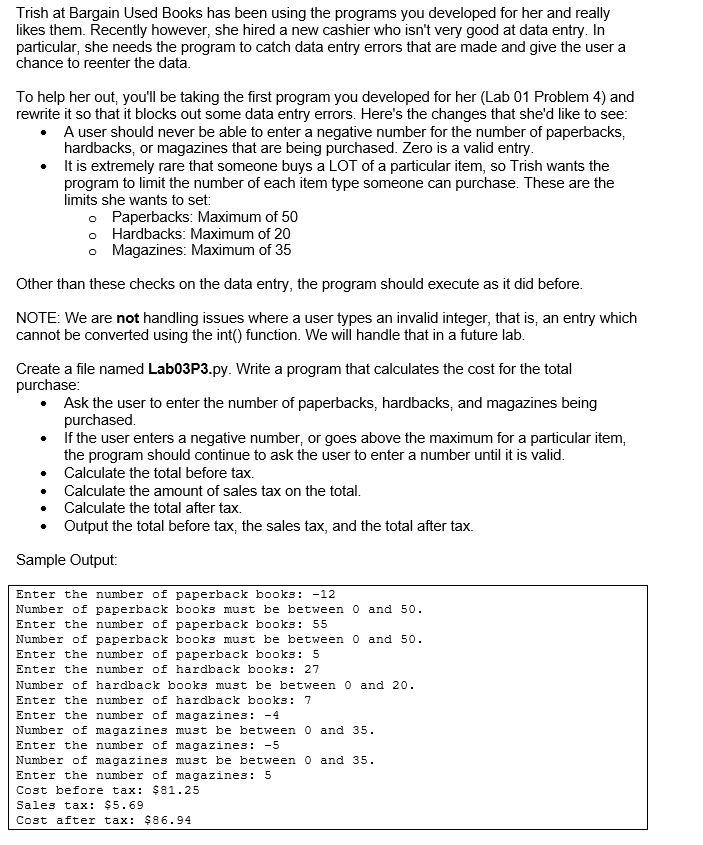
# prompts amount from user amount = float(input("Enter the total purchase Amount : ")) # propmts the Customer a loyality program member member = input("Is the Customer a loyality program member (Y/N) : ") # calculate the amount if member == 'y' and amount Trish at Bargain Used Books has been using the programs you developed for her and really likes them. Recently however, she hired a new cashier who isn't very good at data entry. In particular, she needs the program to catch data entry errors that are made and give the user a chance to reenter the data. To help her out, you'll be taking the first program you developed for her (Lab 01 Problem 4) and rewrite it so that it blocks out some data entry errors. Here's the changes that she'd like to see: A user should never be able to enter a negative number for the number of paperbacks, hardbacks, or magazines that are being purchased. Zero is a valid entry. It is extremely rare that someone buys a LOT of a particular item, so Trish wants the program to limit the number of each item type someone can purchase. These are the limits she wants to set: o Paperbacks: Maximum of 50 o Hardbacks: Maximum of 20 o Magazines: Maximum of 35 Other than these checks on the data entry, the program should execute as it did before. NOTE: We are not handling issues where a user types an invalid integer, that is, an entry which cannot be converted using the int() function. We will handle that in a future lab. Create a file named Lab03P3.py. Write a program that calculates the cost for the total purchase: Ask the user to enter the number of paperbacks, hardbacks, and magazines being purchased If the user enters a negative number, or goes above the maximum for a particular item, the program should continue to ask the user to enter a number until it is valid. Calculate the total before tax. Calculate the amount of sales tax on the total. Calculate the total after tax. Output the total before tax, the sales tax, and the total after tax. Sample Output: Enter the number of paperback books: -12 Number of paperback books must be between 0 and 50. Enter the number of paperback books: 55 Number of paperback books must be between 0 and 50. Enter the number of paperback books: 5 Enter the number of hardback books: 27 Number of hardback books must be between 0 and 20. Enter the number of hardback books: 7 Enter the number of magazine3: -4 Number of magazines must be between 0 and 35. Enter the number of magazines: -5 Number of magazines must be between 0 and 35. Enter the number of magazines: 5 Cost before tax: $81.25 Sales tax: $5.69 Cost after tax: $86.94 Trish at Bargain Used Books has been using the programs you developed for her and really likes them. Recently however, she hired a new cashier who isn't very good at data entry. In particular, she needs the program to catch data entry errors that are made and give the user a chance to reenter the data. To help her out, you'll be taking the first program you developed for her (Lab 01 Problem 4) and rewrite it so that it blocks out some data entry errors. Here's the changes that she'd like to see: A user should never be able to enter a negative number for the number of paperbacks, hardbacks, or magazines that are being purchased. Zero is a valid entry. It is extremely rare that someone buys a LOT of a particular item, so Trish wants the program to limit the number of each item type someone can purchase. These are the limits she wants to set: o Paperbacks: Maximum of 50 o Hardbacks: Maximum of 20 o Magazines: Maximum of 35 Other than these checks on the data entry, the program should execute as it did before. NOTE: We are not handling issues where a user types an invalid integer, that is, an entry which cannot be converted using the int() function. We will handle that in a future lab. Create a file named Lab03P3.py. Write a program that calculates the cost for the total purchase: Ask the user to enter the number of paperbacks, hardbacks, and magazines being purchased If the user enters a negative number, or goes above the maximum for a particular item, the program should continue to ask the user to enter a number until it is valid. Calculate the total before tax. Calculate the amount of sales tax on the total. Calculate the total after tax. Output the total before tax, the sales tax, and the total after tax. Sample Output: Enter the number of paperback books: -12 Number of paperback books must be between 0 and 50. Enter the number of paperback books: 55 Number of paperback books must be between 0 and 50. Enter the number of paperback books: 5 Enter the number of hardback books: 27 Number of hardback books must be between 0 and 20. Enter the number of hardback books: 7 Enter the number of magazine3: -4 Number of magazines must be between 0 and 35. Enter the number of magazines: -5 Number of magazines must be between 0 and 35. Enter the number of magazines: 5 Cost before tax: $81.25 Sales tax: $5.69 Cost after tax: $86.94 Step by Step Solution
There are 3 Steps involved in it
1 Expert Approved Answer
Step: 1 Unlock

Question Has Been Solved by an Expert!
Get step-by-step solutions from verified subject matter experts
Step: 2 Unlock
Step: 3 Unlock
 Study Help