







Question: need help woth this ASAP! please ACCT 201 Case Spring 2019 4. Financial Stetements Based on the adjusted trial balance on the next poge, prepare
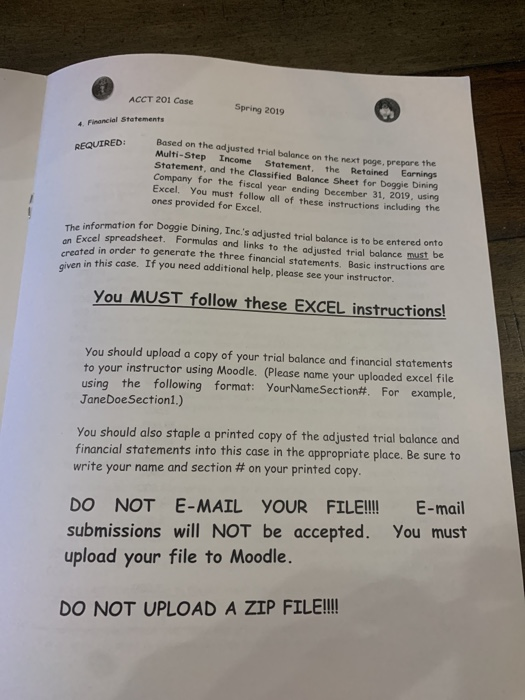
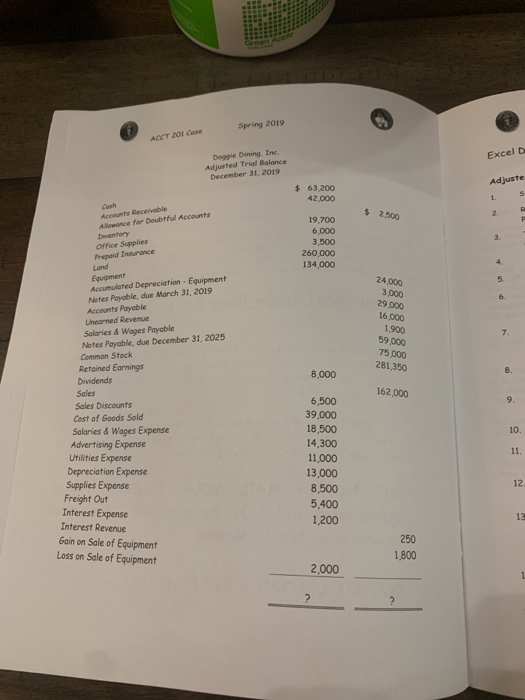
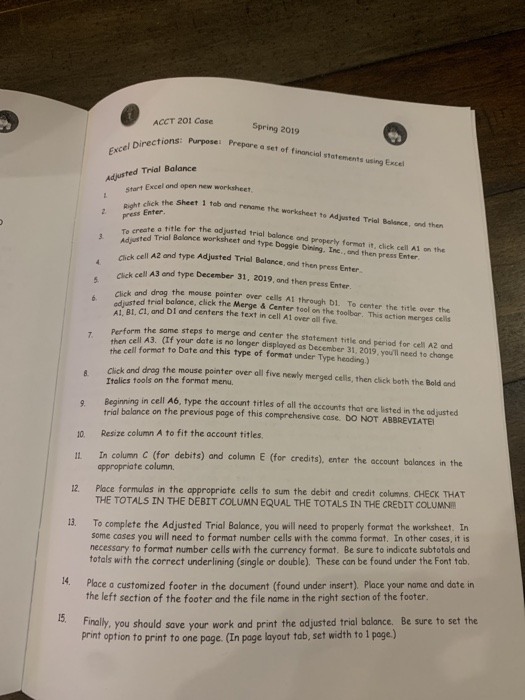
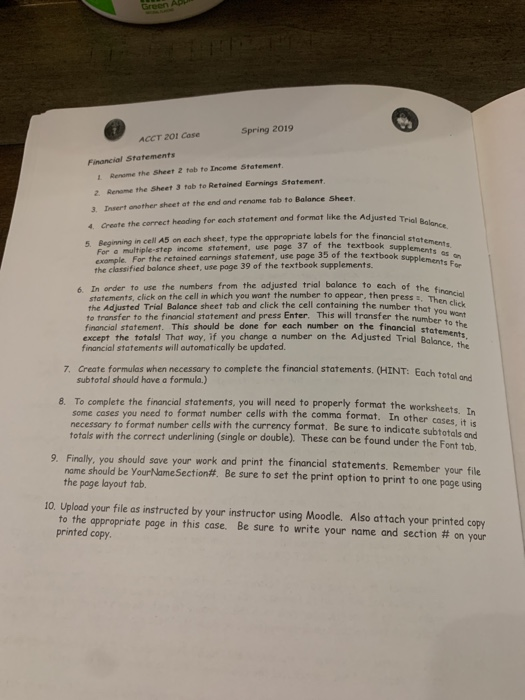
ACCT 201 Case Spring 2019 4. Financial Stetements Based on the adjusted trial balance on the next poge, prepare the Multi-Step Income Statement, the Retained Earnings Statement, and the Classified Balance Sheet for Doggie Dining Company for the fiscal year ending December 31, 2019, using Excel. You must follow all of these instructions including the ones provided for Excel, tion for Doggie Dining, Inc.'s adjusted trial balance is to be entered onto dsheet. Formulas and links to the adjusted trial balance must be cneated in order to generate the three financial statements. Basic instructions are an Excel sprea in this case. If you need additional help. please see your instructor You MUST follow these EXCEL instructions! You should upload a copy of your trial balance and financial statements to your instructor using Moodle. (Please name your uploaded excel file using the following format: yourNameSection#. For example, JaneDoeSection1.) You should also staple a printed copy of the adjusted trial balance and financial statements into this case in the appropriate place. Be sure to write your name and section # on your printed copy. DO NOT E-MAIL YOUR FILE!!! E-mail submissions will NOT be accepted. You must upload your file to Moodle. DO NOT UPLOAD A ZIP FILE!!! Spring 2019 ACCT 2o1 Case Doggie Dining. Inc. Excel D Adjusted Trial Balance December 31, 2019 Adjuste $ 63,200 42,000 Cash s 2.500 19,700 6,000 3,500 260,000 134,000 Allowance for Doubl Accounts Accumulated Depreciation-Equipment Notes Payable, due March 31, 2019 Unearned Revenue Salaries & Wages Payable Notes Payable, due December 31, 2025 24,000 3,000 16,000 59 000 75,000 Retained Earnings 8,000 6,500 39,000 18,500 14,300 11,000 13,000 8,500 5,400 1,200 Salaries & Wages Expense Depreciation Expense 12 Interest Expense Interest Revenue Gain on Sale of Equipment Loss on Sale of Equipment 250 1,800 2,000 ACCT 201 Case Spring 2019 e a set of financial statements using Excel ions: Purpose: Prepar Adjusted Trial Balance Start Excel and open new worksheet sick the Sheet 1 tob and rename the worksheet to Adjysted Trial Balance, and then press Enter a title for the ad justed trial balance and properly format it, click cell Al on the Te srted Trial Balonce worksheet and type boggie Dining. nc., and then press Enter Adjusted cell A2 and type Adjusted Trial Balance, end then press Enter Cick dick cell A3 and type December 31, 2019, and then press Enter the mouse pointer over cells At through Dl. To center the title over the Click and drog mouse til balance, click the Merge & Center tool on the toolbar. This Al, BI, C1, and DI and centers the text in cell A1 over all five. . Perform the same steps to merge and center the statement fitile and period for cell A2 and ell3. (If your date is no longer displayed as December 31, 2019, youll need to change the cell format to Date and this type of format under Type heading) Click and drog the mouse pointer over all five newly merged cells, then click both the Bold and Italics tools on the format menu nning in cell A6, type the account titles of all the accounts that are listed in the adjusted trial balance on the previous page of this comprehensive case. DO NOT ABBREVIATE 9. Beginning 10. Resize column A to fit the account titles 11 In column C (for debits) and column E (for credits), enter the account bolonces in the appropriate column. Place formulas in the appropriate cells to sum the debit and credit columns, CHECK THAT THE TOTALS IN THE DEBIT COLUMN EQUAL THE TOTALS IN THE CREDIT COLUMN 12. To complete the Adjusted Trial Balance, you will need to properly format the worksheet. In some cases you will need to format number cells with the comma format. In other cases, it is necessary to format number cells with the currency format. Be sure to indicate subtotals and totals with the correct under lining (single or double). These can be found under the Font tab. 13. Place a customized footer in the document (found under insert). Place your name and date in the left section of the footer and the file name in the right section of the footer 14. 3. Finally, you should save your work and print the odjusted trial balance. Be sure to set the print option to print to one page. (In page layout tab, set width to 1 poge.)
Step by Step Solution
There are 3 Steps involved in it

Get step-by-step solutions from verified subject matter experts
 Study Help