Question: Need help writing this java code that maintains a song list. I technically have the code written but I just need help rewriting it, also
Need help writing this java code that maintains a song list. I technically have the code written but I just need help rewriting it, also because uses txt files I don't need it to run just help writing it in the correct way.
First here is my code:
import java.util.*;
import java.io.*;
public class Final_Lab
{
public static void main (String[] args) throws IOException {
Scanner sc =new Scanner (System.in) ;
int choice;
System.out.println("========Select action======== "+
"0. Quit " +
"1. Get collection size " +
"2. Search for title " +
"3. Search for artist " +
"4. Add from file " +
"5. Save to file " +
"6. Add one song " +
"7. Remove one song " +
"8. Show");
System.out.print("Enter choice:");
choice = Integer.parseInt(sc.nextLine());
do {
switch (choice) {
case 1:
System.out.println(SongCollection.size());
break;
case 2:
SongCollection.Tittle();
break;
case 3:
SongCollection.Artist();
break;
//System.out.println(SongCollection.size());break;
case 4:
System.out.println("Enter file name");
File file = new File(sc.nextLine());
SongCollection.addFromFile(file);
break;
case 5:
System.out.println("Enter file name: ");
String outputFileName=sc.nextLine();
File outFile=new File(outputFileName);
SongCollection.writeToFile(outFile);
break;
case 6:
SongCollection.AddSong();
break;
case 7:
SongCollection.MoveSong();
break;
case 8:
SongCollection.SHOW();
break;
}
System.out.println("========Select action======== " +
"0. Quit " +
"1. Get collection size " +
"2. Search for title " +
"3. Search for artist " +
"4. Add from file " +
"5. Save to file " +
"6. Add one song " +
"7. Remove one song " +
"8. Show");
System.out.print("Enter choice:");
choice = Integer.parseInt(sc.nextLine());
}while ( choice !=0) ;
}
}
class SongCollection{
private static String[] theSong;
private static String[] NewSong;
private static String[] NewSong1;
private static String[] theSong1;
private static int number;
public static int size() {
return theSong.length/2;
}
public static void addFromFile(File f) throwsFileNotFoundException {
Scanner sc = new Scanner (f);
number = sc.nextInt();
theSong1=new String[number*2+1];
int i =0;
while(sc.hasNext()) {
theSong1[i]=sc.nextLine();
i++;
}
theSong= Arrays.copyOf(theSong1,number*2+1);
}
//Song[] merged = Arrays.copyOf(theSongs, number);
//theSongs = merged;
// /System.out.println(theSongs);
public static void writeToFile( File f ) throwsFileNotFoundException {
BufferedWriter writer;
try {
writer = new BufferedWriter(new FileWriter(f));
writer.write(theSong+" ");
for (int i = 0; i
writer.write(theSong[i]+ " ");
}
writer.flush();
writer.close();
} catch (IOException e) {
e.printStackTrace();
}
}
public static void Tittle() {
Scanner sc = new Scanner(System.in);
System.out.println("Enter name");
String name = sc.nextLine();
for(int i =0;i if(theSong[i].indexOf(name)!=-1) {
System.out.printf("%d: %s,%s ",i/2,theSong[i],theSong[i+1]);
}
//System.out.println(SongCollection.theSong[i]);
}}
public static void Artist() {
Scanner sc = new Scanner(System.in);
System.out.println("Enter name");
String name = sc.nextLine();
for(int i =0;i if(theSong[i].indexOf(name)!=-1) {
System.out.printf("%d: %s,%s ",(i-1)/2,theSong[i-1],theSong[i]);
}}
}
public static void AddSong() {
Scanner sc = new Scanner(System.in);
System.out.println("Enter Title");
String Title = sc.nextLine();
System.out.println("Enter Artist");
String Artist = sc.nextLine();
NewSong= new String[number*2+3] ;
for(int i =0;i NewSong[i] =theSong[i];
}
// NewSong = Arrays.copyOf(theSong,number*2);
NewSong[number*2+1]= Title;
NewSong[number*2+2]= Artist;
for(int z =0;z //System.out.println(NewSong[z]);
}
theSong= Arrays.copyOf(NewSong,number*2+3);
}
public static void MoveSong() {
Scanner sc = new Scanner(System.in);
System.out.println("Enter Position");
int Position =sc.nextInt()*2;
NewSong1 =new String[NewSong.length-2];
for(int i =0; i NewSong1[i] = NewSong[i];
}
for(int i =Position+1; i NewSong1[i] = NewSong[i];
}
theSong=Arrays.copyOf(NewSong1,NewSong1.length);
}
public static void SHOW() {
Scanner sc = new Scanner(System.in);
System.out.println("Enter start Position");
int start =sc.nextInt()*2;
System.out.println("Enter end position");
int end =sc.nextInt()*2;
for(int i =start+1;i System.out.printf("%d: %s,%s ",i/2,theSong[i],theSong[i+1]);
}
}
}
And here are the instructions:
![(String[] args) throws IOException { Scanner sc =new Scanner (System.in) ; int](https://dsd5zvtm8ll6.cloudfront.net/si.experts.images/questions/2024/09/66f522e1acff3_28166f522e133a46.jpg)
Thanks!
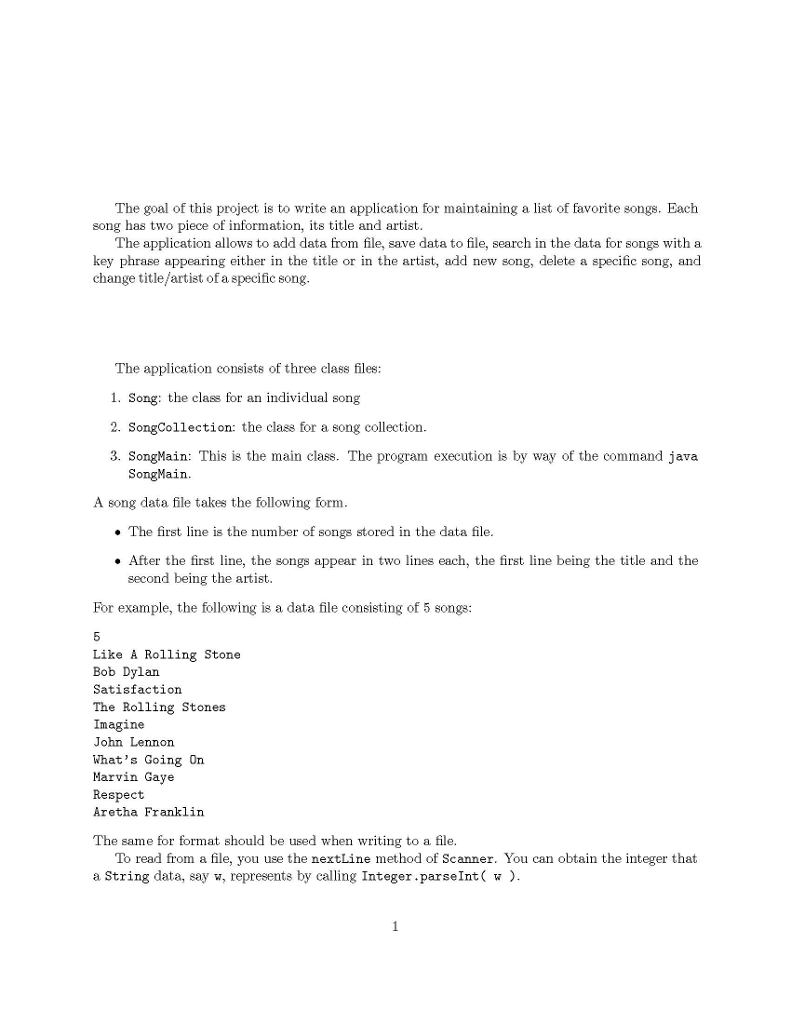
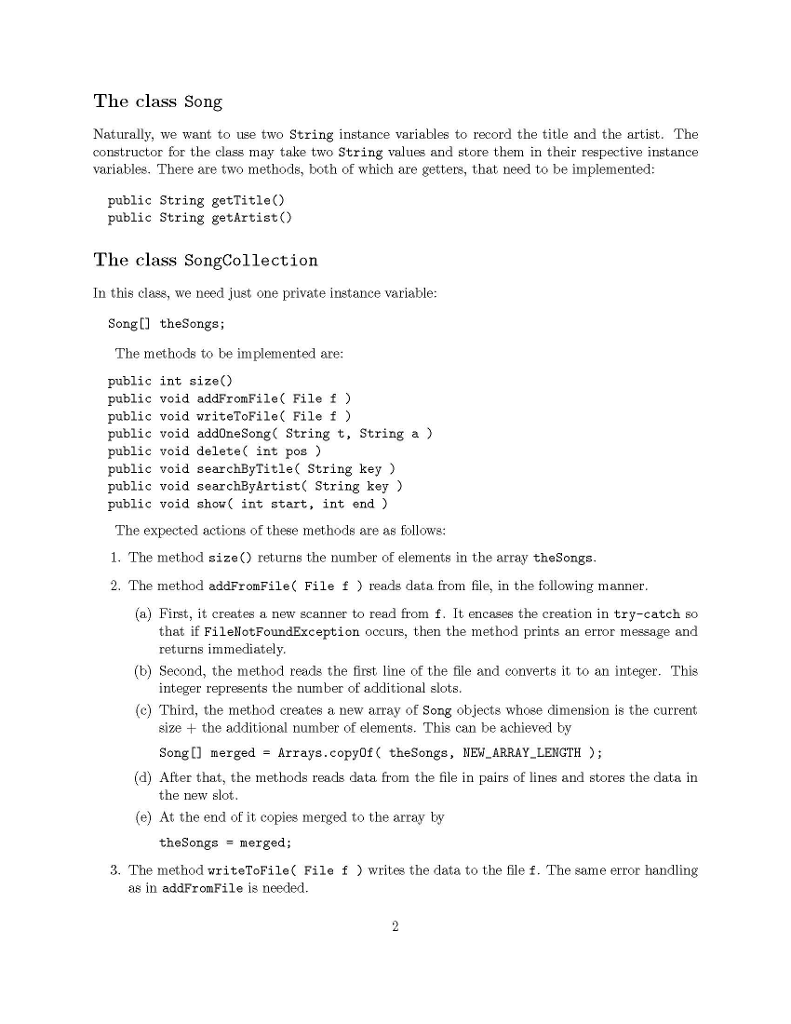
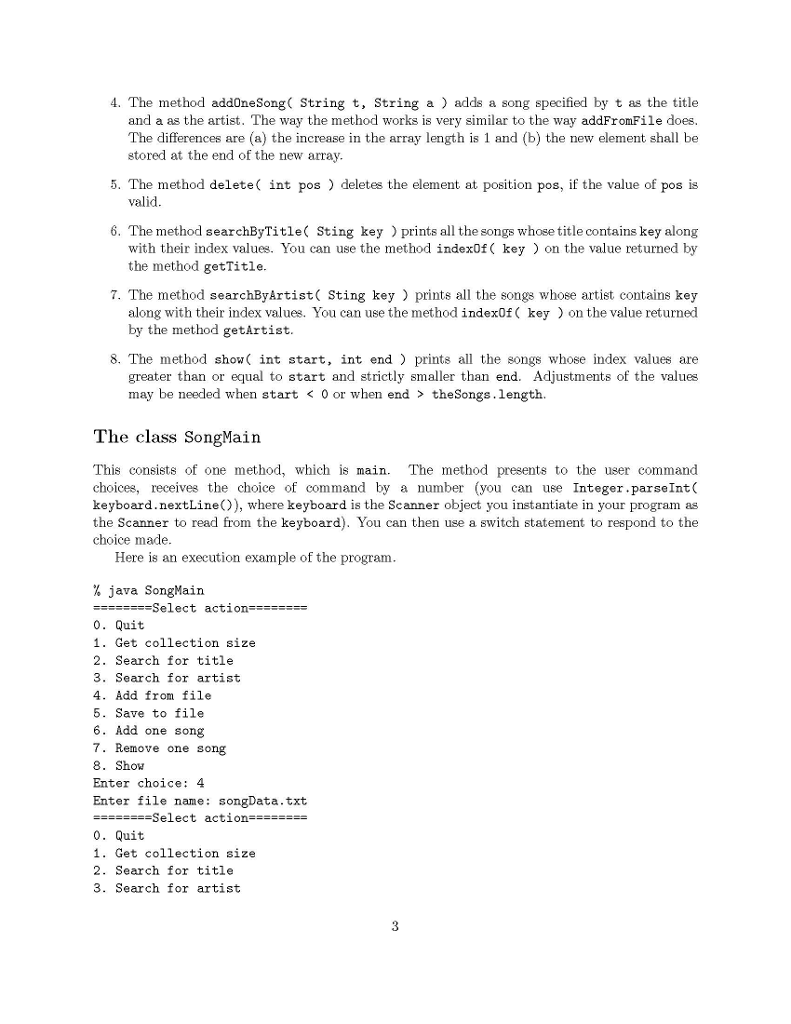
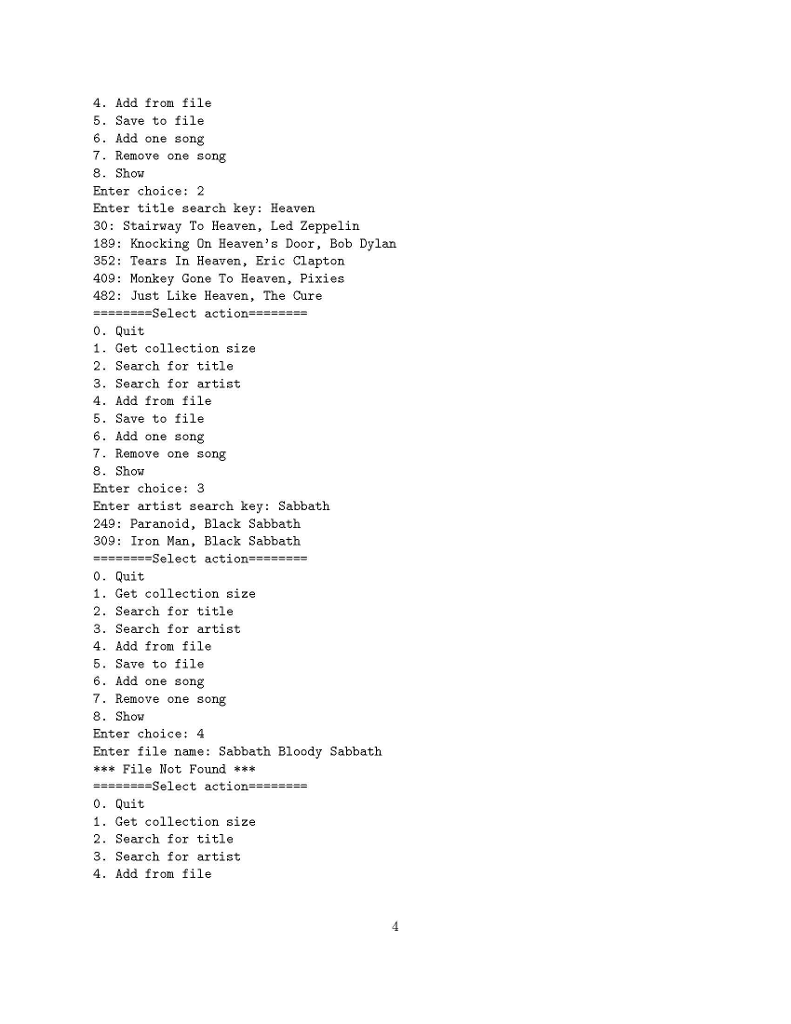
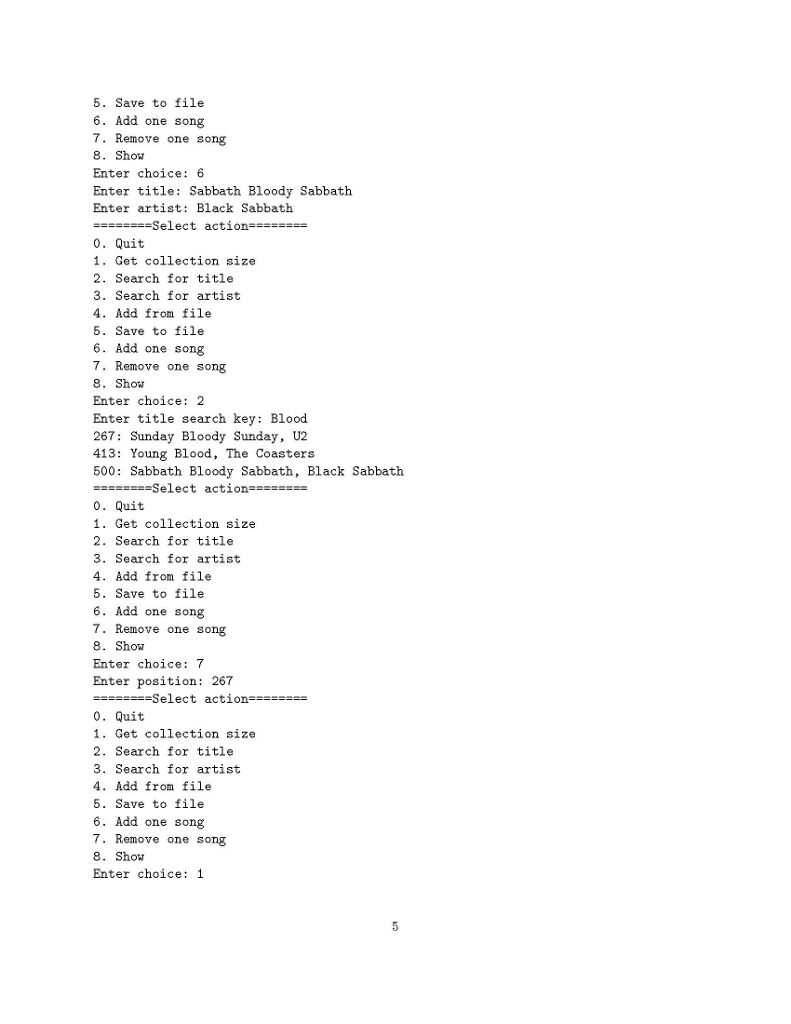
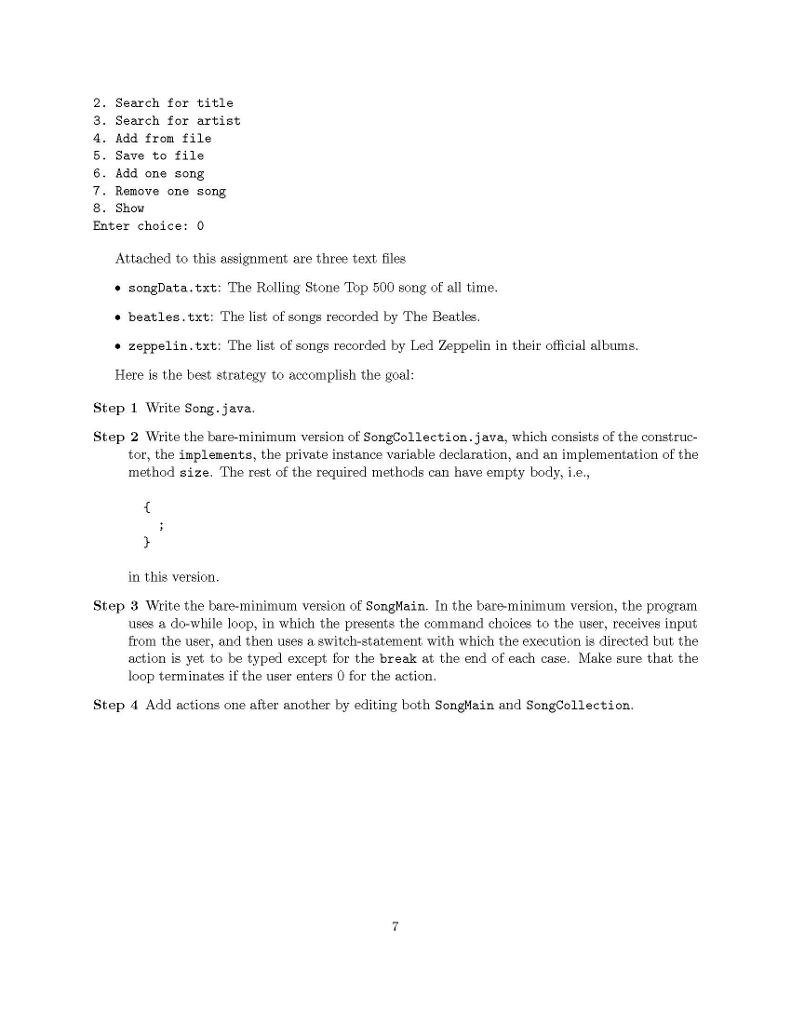
The goal of this project is to write an application for maintaining a list of favorite songs. Each song has two piece of information, its title and artist The application allows to add data from file, ve data to file, search in the data for songs with a key phrase appearing either in the title or in the artist, add new song, delete a specific song, and change title/artist of a specific song The application consists of three class files 1. Song: the class for an individual song 2. SongCollection: the class for a song collection 3. SongMain: This is the main class. The program execution is by way of the command java SongMain. A song data file takes the following form The first line is the number of songs stored in the data file After the first line, the songs appear in two lines each, the first line being the title and the second being the artist. For example, the following is a data file consisting of 5 songs: Like A Rolling Stone Bob Dylarn Satisfaction The Rolling Stones Imagine John Lennon What's Going On Marvin Gave Respect Aretha Franklin The same for format should be used when writing to a file To read from a file, you use the nextLine method of Scanner. You can obtain the integer that a String data, say w, represents by calling Integer.parseInt( ) The class Song Naturally, we want to use two String instance variables to record the title and the artist. The constructor for the class may take two String values and store them in their respective instance variables. There are two methods, both of which are getters, that need to be implemented public String getTitleO public String getArtist) The class SongCollection In this class, we need just one private instance variable Songl] theSongs; The methods to be implemented are: public int sizeC) public void addFromFile( File f) public void writeToFile( File f) public void addOneSong( String t, String a ) public void delete( int pos) public void searchByTitle( String key ) public void searchByArtist( String key ) public void shou int start, int end ) The expected actions of these methods are as follows: 1. The method size ) returns the number of elements in the array theSongs 2. The method addFromFile File f reads data from file, in the following manner (a) First, it creates a new scanner to read from f. It encases the creation in try-catch so that if FilellotFoundException occurs, then the method prints an error message and returns immediately integer represents the number of additional slots size + the additional number of elements. This can be achieved by (b) Second, the method reads the first line of the file and converts it to an integer. This (c) Third, the method creates a new array of Song objects whose dimension is the current Song[ mergedArrays.copyOf ( theSongs, NEW ARRAY_LENGTH ); (d) After that, the methods reads data from the file in pairs of lines and stores the data in the new slot (e) At the end of it copies merged to the array by theSongs- merged; 3. The method writeToFile File f ) writes the data to the file f. The same error handling as in addFromFile is needed 4. The method addOneSong String t, String a) adds a song specified by t as the title and a as the artist. The way the method works is very similar to the way addFromFile does. The differences are (a) the increase in the array length is 1 and (b) the new element shall be stored at the end of the new array 5. The method delete( int pos deletes the element at position pos, if the value of pos is valid 6. The method searchByTitle( Sting key ) prints all the songs whose title contains key along with their index values. You can use the method index0f( key ) on the value returned by the method getTitle. 7. The method searchByArtist( Sting key) prints all the songs whose artist contains key on the value returned along with their index values. You can use the method indexOf ( key by the method getArtist. 8. The method show( int start, int end ) prints all the songs whose index values are greater than or equal to start and strictly smaller than end. Adjustments of the values may be needed when start theSongs. length. The class SongMain This consists of onemethod, which is main. Th choices, receives the choice of command by a number (you can use Integer.parseInt( keyboard.nextLine()), where keyboard is the Scanner object you instantiate in your program as the Scanner to read from the keyboard). You can then use a switch statement to respond to the choice made e method presents to the user command Here is an execution example of the program % java SongMain Select action 0. Quit 1. Get collection size 2. Search for title 3. Search for artist 4. Add from file 5. Save to file 6. Add one song 7. 8. Show Enter choice: 4 Enter file ne: songData.txt Remove one song Select action 0. Quit 1. Get collection size 2. Search for title 3. Search for artist 4. Add from file 5. Save to file 6. Add one song 7. Remove one song 8. Show Enter choice: 2 Enter title search key: Heaven 30: Stairway To Heaven, Led Zeppelin 189: Knocking On Heaven's Door, Bob Dylan 352: Tears In Heaven, Eric Clapton 409: Monkey Gone To Heaven, Pixies 482: Just Like Heaven, The Cure -select action 0. Quit 1. Get collection size 2. Search for title 3. Search for artist 4. Add from file Save to file 6. Add one song 7. Remove one song 8. Show Enter choice:3 Enter artist search key: Sabbath 249: Paranoid, Black Sabbath 309 Iron Man, Black Sabbath 0. Quit 1. Get collection size 2. Search for title 3. Search for artist 4. Add from file 5. Save to file 6. Add one song 7. Remove one song 8. Show Enter choice: 4 Enter file name: Sabbath Bloody Sabbath File Not Found 0. Quit 1. Get collection size 2. Search for title 3. Search for artist 4. Add from file 5. Save to file 6. Add one song 7. Remove one song 8. Sho. Enter choice: 6 Enter title: Sabbath Bloody Sabbath Enter artist: Black Sabbath Select action 0. Quit 1. Get collection size 2. Search for title 3. Search for artist 4. Add from file 5. Save to file 6. Add one song 7. Remove one so 8. Show Enter choice: 2 Enter title search key: Blood 267: Sunday Bloody Sunday, U2 413: Young Blood, The Coasters 500: Sabbath Bloody Sabbath, Black Sabbath n8 -select action 0. Quit 1. Get collection size 2. Search for title 3. Search for artist 4. Add from file Save to file 6. Add one song 7. Remove one song 8. Show Enter choice: 7 Enter position: 267 -Select actin 0. Quit 1. Get collection size 2. Search for title 3. Search for artist 4. Add from file 5. Save to file 6. Add one song 7. Remove one song 8. Sho Enter choice: 1 *Size500 0. Quit 1. Get collection size 2. Search for title 3. Search for artist 4. Add from file Save to file 6. Add one song 7. Remove one song 8. Show Enter choice: 8 Enter start position: 10 Enter end position: 25 10: My Generation, The Who 11: A Change Is Gonna Come, Sam Cooke 12: Yesterday, The Beatles 13: Blowin' In The Wind, Bob Dylan 14: London Calling, The Clash 15: I Want To Hold Your Hand, The Beatles 16: Purple Haze, Jimi Hendrix 17: Maybellene, Chuck Berry 18: Hound Dog, Elvis Presley 19: Let It Be, The Beatles 20: Born To Run, Bruce Springsteen 21: Be My Baby The Ronettes 22: In My Life, The Beatles 23: People Get Ready, The Impressions 24: God Only Knows, The Beach Boys Select action . Quit 1. Get collection size 2. Search for title 3. Search for artist 4. Add from file 5. Save to file 6. Add one song 7. Remove one so 8. Show Enter choice: 5 Enter file name: foo.txt ng Select action 0. Quit 1. Get collection size 2. Search for title 3. Search for artist 4. Add from file Save to file 6. Add one song 7. Remove one so 8. Show Enter choice: 0 n8 Attached to this assignment are three text files songData.txt: The Rolling Stone Top 500 song of all time beatles.txt: The list of songs recorded by The Beatles. * zeppelin.txt: The list of songs recorded by Led Zeppelin in their official albums. Here is the best strategy to accomplish the goal Step 1 Write Song.java. Step 2 Write the bare-minimum version of SongCollection.java, which consists of the construc- tor, the implements, the private instance variable declaration, and an implementation of the method size. The rest of the required methods can have empty body, i.e., in this version Step 3 Write the bare-minimum version of SongMain. In the bare minimum version, the program uses a do-while loop, in which the presents the command choices to the user, receives input from the user, and then uses a switch-statement with which the execution is directed but the action is yet to be typed except for the break at the end of each case. Make sure that the loop terminates if the user enters 0 for the action. Step 4 Add actions one after another by editing both SongMain and SongCollection The goal of this project is to write an application for maintaining a list of favorite songs. Each song has two piece of information, its title and artist The application allows to add data from file, ve data to file, search in the data for songs with a key phrase appearing either in the title or in the artist, add new song, delete a specific song, and change title/artist of a specific song The application consists of three class files 1. Song: the class for an individual song 2. SongCollection: the class for a song collection 3. SongMain: This is the main class. The program execution is by way of the command java SongMain. A song data file takes the following form The first line is the number of songs stored in the data file After the first line, the songs appear in two lines each, the first line being the title and the second being the artist. For example, the following is a data file consisting of 5 songs: Like A Rolling Stone Bob Dylarn Satisfaction The Rolling Stones Imagine John Lennon What's Going On Marvin Gave Respect Aretha Franklin The same for format should be used when writing to a file To read from a file, you use the nextLine method of Scanner. You can obtain the integer that a String data, say w, represents by calling Integer.parseInt( ) The class Song Naturally, we want to use two String instance variables to record the title and the artist. The constructor for the class may take two String values and store them in their respective instance variables. There are two methods, both of which are getters, that need to be implemented public String getTitleO public String getArtist) The class SongCollection In this class, we need just one private instance variable Songl] theSongs; The methods to be implemented are: public int sizeC) public void addFromFile( File f) public void writeToFile( File f) public void addOneSong( String t, String a ) public void delete( int pos) public void searchByTitle( String key ) public void searchByArtist( String key ) public void shou int start, int end ) The expected actions of these methods are as follows: 1. The method size ) returns the number of elements in the array theSongs 2. The method addFromFile File f reads data from file, in the following manner (a) First, it creates a new scanner to read from f. It encases the creation in try-catch so that if FilellotFoundException occurs, then the method prints an error message and returns immediately integer represents the number of additional slots size + the additional number of elements. This can be achieved by (b) Second, the method reads the first line of the file and converts it to an integer. This (c) Third, the method creates a new array of Song objects whose dimension is the current Song[ mergedArrays.copyOf ( theSongs, NEW ARRAY_LENGTH ); (d) After that, the methods reads data from the file in pairs of lines and stores the data in the new slot (e) At the end of it copies merged to the array by theSongs- merged; 3. The method writeToFile File f ) writes the data to the file f. The same error handling as in addFromFile is needed 4. The method addOneSong String t, String a) adds a song specified by t as the title and a as the artist. The way the method works is very similar to the way addFromFile does. The differences are (a) the increase in the array length is 1 and (b) the new element shall be stored at the end of the new array 5. The method delete( int pos deletes the element at position pos, if the value of pos is valid 6. The method searchByTitle( Sting key ) prints all the songs whose title contains key along with their index values. You can use the method index0f( key ) on the value returned by the method getTitle. 7. The method searchByArtist( Sting key) prints all the songs whose artist contains key on the value returned along with their index values. You can use the method indexOf ( key by the method getArtist. 8. The method show( int start, int end ) prints all the songs whose index values are greater than or equal to start and strictly smaller than end. Adjustments of the values may be needed when start theSongs. length. The class SongMain This consists of onemethod, which is main. Th choices, receives the choice of command by a number (you can use Integer.parseInt( keyboard.nextLine()), where keyboard is the Scanner object you instantiate in your program as the Scanner to read from the keyboard). You can then use a switch statement to respond to the choice made e method presents to the user command Here is an execution example of the program % java SongMain Select action 0. Quit 1. Get collection size 2. Search for title 3. Search for artist 4. Add from file 5. Save to file 6. Add one song 7. 8. Show Enter choice: 4 Enter file ne: songData.txt Remove one song Select action 0. Quit 1. Get collection size 2. Search for title 3. Search for artist 4. Add from file 5. Save to file 6. Add one song 7. Remove one song 8. Show Enter choice: 2 Enter title search key: Heaven 30: Stairway To Heaven, Led Zeppelin 189: Knocking On Heaven's Door, Bob Dylan 352: Tears In Heaven, Eric Clapton 409: Monkey Gone To Heaven, Pixies 482: Just Like Heaven, The Cure -select action 0. Quit 1. Get collection size 2. Search for title 3. Search for artist 4. Add from file Save to file 6. Add one song 7. Remove one song 8. Show Enter choice:3 Enter artist search key: Sabbath 249: Paranoid, Black Sabbath 309 Iron Man, Black Sabbath 0. Quit 1. Get collection size 2. Search for title 3. Search for artist 4. Add from file 5. Save to file 6. Add one song 7. Remove one song 8. Show Enter choice: 4 Enter file name: Sabbath Bloody Sabbath File Not Found 0. Quit 1. Get collection size 2. Search for title 3. Search for artist 4. Add from file 5. Save to file 6. Add one song 7. Remove one song 8. Sho. Enter choice: 6 Enter title: Sabbath Bloody Sabbath Enter artist: Black Sabbath Select action 0. Quit 1. Get collection size 2. Search for title 3. Search for artist 4. Add from file 5. Save to file 6. Add one song 7. Remove one so 8. Show Enter choice: 2 Enter title search key: Blood 267: Sunday Bloody Sunday, U2 413: Young Blood, The Coasters 500: Sabbath Bloody Sabbath, Black Sabbath n8 -select action 0. Quit 1. Get collection size 2. Search for title 3. Search for artist 4. Add from file Save to file 6. Add one song 7. Remove one song 8. Show Enter choice: 7 Enter position: 267 -Select actin 0. Quit 1. Get collection size 2. Search for title 3. Search for artist 4. Add from file 5. Save to file 6. Add one song 7. Remove one song 8. Sho Enter choice: 1 *Size500 0. Quit 1. Get collection size 2. Search for title 3. Search for artist 4. Add from file Save to file 6. Add one song 7. Remove one song 8. Show Enter choice: 8 Enter start position: 10 Enter end position: 25 10: My Generation, The Who 11: A Change Is Gonna Come, Sam Cooke 12: Yesterday, The Beatles 13: Blowin' In The Wind, Bob Dylan 14: London Calling, The Clash 15: I Want To Hold Your Hand, The Beatles 16: Purple Haze, Jimi Hendrix 17: Maybellene, Chuck Berry 18: Hound Dog, Elvis Presley 19: Let It Be, The Beatles 20: Born To Run, Bruce Springsteen 21: Be My Baby The Ronettes 22: In My Life, The Beatles 23: People Get Ready, The Impressions 24: God Only Knows, The Beach Boys Select action . Quit 1. Get collection size 2. Search for title 3. Search for artist 4. Add from file 5. Save to file 6. Add one song 7. Remove one so 8. Show Enter choice: 5 Enter file name: foo.txt ng Select action 0. Quit 1. Get collection size 2. Search for title 3. Search for artist 4. Add from file Save to file 6. Add one song 7. Remove one so 8. Show Enter choice: 0 n8 Attached to this assignment are three text files songData.txt: The Rolling Stone Top 500 song of all time beatles.txt: The list of songs recorded by The Beatles. * zeppelin.txt: The list of songs recorded by Led Zeppelin in their official albums. Here is the best strategy to accomplish the goal Step 1 Write Song.java. Step 2 Write the bare-minimum version of SongCollection.java, which consists of the construc- tor, the implements, the private instance variable declaration, and an implementation of the method size. The rest of the required methods can have empty body, i.e., in this version Step 3 Write the bare-minimum version of SongMain. In the bare minimum version, the program uses a do-while loop, in which the presents the command choices to the user, receives input from the user, and then uses a switch-statement with which the execution is directed but the action is yet to be typed except for the break at the end of each case. Make sure that the loop terminates if the user enters 0 for the action. Step 4 Add actions one after another by editing both SongMain and SongCollection









 Study Help