







Question: Need help writing VBA code for the following: 1. The file Shag.xlsm contains hypothetical data on Shaquille O'Neal's success from the free throw line. (In
Need help writing VBA code for the following:

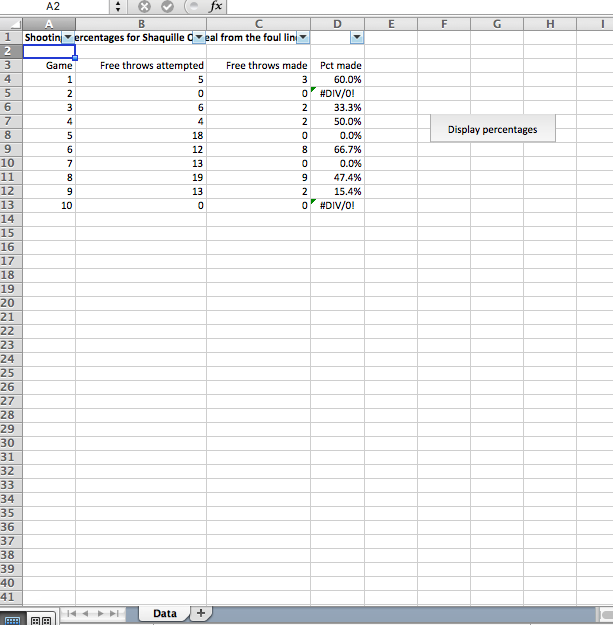
1. The file Shag.xlsm contains hypothetical data on Shaquille O'Neal's success from the free throw line. (In case you are not a basketball fan, Shaq was a notorious poor free throw shooter.) For each of several games, it lists the number of free throws attempted and the number made. It then divides the number made by the number attempted to calculate his free throw percentage for that game. Unfortunately, this results in a #DIV/0! error in games where he didn't take any free throws. The question explored here is how you can recognize and react to this cell error in VBA code. There is already a DisplayPcts sub in this file that goes through each cell in the PctMade column and displays the cell's value in a message box. Run the sub and watch how it bombs. Now rewrite the code so that if this error occurs, a message is displayed to the effect that no percentage can be reported because no free throws were attempted and no nasty error messages are displayed. Do this by checking only the cells in column D; don't check the cells in column B. (Hint: Use VBA's IsError function)
Step by Step Solution
There are 3 Steps involved in it

Get step-by-step solutions from verified subject matter experts
 Study Help