







Question: Need in c++ please explain your code #include #include #include //only from A-Z using namespace std; // get the ciphered text string encryption(string strng, int);
Need in c++ please explain your code
#include
#include
#include
//only from A-Z
using namespace std;
// get the ciphered text
string encryption(string strng, int);
// decrypt the cipher text
string decryption(string strng, int);
int main(int argc, char* argv[])
{
if(argc != 3)
{
cout
return 1;
}
bool encryptFlag = false;
//check whethere we have to encrypt or decrypt
if(strcmp(argv[1], "-e") == 0)
encryptFlag = true;
else
encryptFlag = false;
//get the no. of shift
int n = atoi(argv[2]);
string line;
string converted;
while(getline(cin, line))
{
if(encryptFlag)
converted = encryption(line, n);
else
converted = decryption(line, n);
cout
}
return 0;
}
// get the ciphered text
string encrypt(string strng, int n)
{
int i;
for( i = 0 ; i
{
// to get ascii convert string to int
int ascii = (int)strng[i];
if(ascii >= 'A' && ascii
{
ascii = ascii + n;
if(ascii
ascii = 91 - ( 65 - ascii );
else if(ascii > 90)
ascii = 64 + (ascii - 90);
// update the character with the ciphered text
strng[i] = (char)ascii;
}
}
return strng;
}
// decrypt the cipher text
string decryption(string strng, int n)
{
int i;
for( i = 0 ; i
{
// get the ascii code
int ascii = (int)strng[i];
if(ascii >= 'A' && ascii
{
ascii = ascii - n;
if(ascii
ascii = 91 - ( 65 - ascii );
else if(ascii > 90)
ascii = 64 + (ascii - 90);
// update the character with the ciphered text
strng[i] = (char)ascii;
}
}
return strng;
}
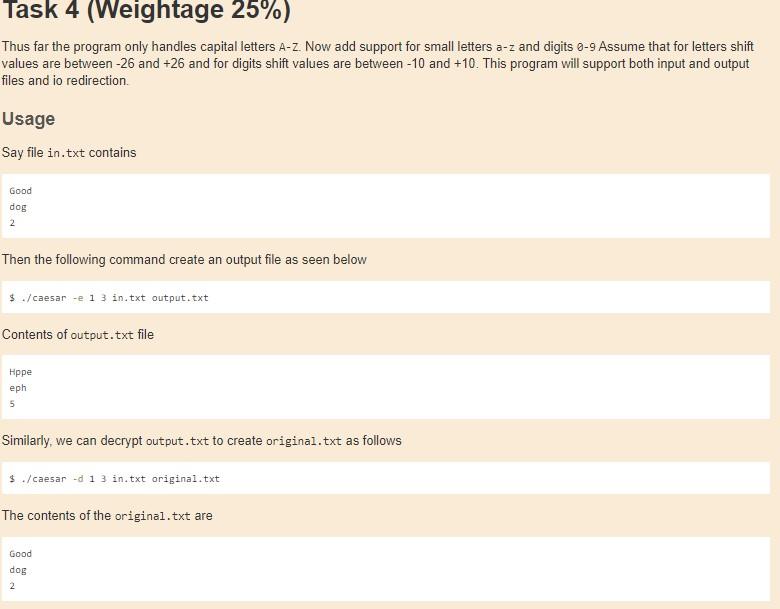
Task 4 (Weightage 25%) Thus far the program only handles capital letters A-Z Now add support for small letters a-z and digits 0-9 Assume that for letters shift values are between-26 and +26 and for digits shift values are between 10 and +10. This program will support both input and output files and io redirection Usage Say file in.txt contains Good dos 2 Then the following command create an output file as seen below $ ./caesar -- 1 3 in.txt output.txt Contents of output.txt file Hppe eph 5 Similarly, we can decrypt output.txt to create original.txt as follows $ ./caesar -d 1 3 in.txt original.txt The contents of the original.txt are Good dog 2
Step by Step Solution
There are 3 Steps involved in it

Get step-by-step solutions from verified subject matter experts
 Study Help