







Question: Need it in (C program). Thats is what it should output. Need it done by today. thanks Sample Output (user input is in bold) jhd0044@cse01:/sandbox$

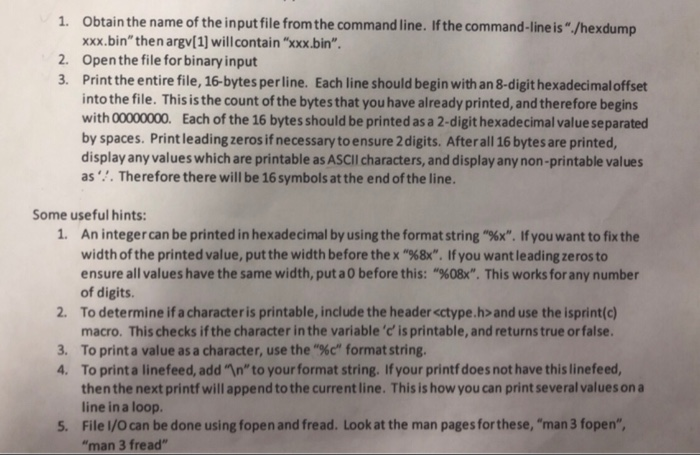
Sample Output (user input is in bold) jhd0044@cse01:"/sandbox$ hexdump-Cyyy.bin 00000000 7 45 46 46 01 01 01 00 00 00 00 00 00 00 00 00 00000010 03 00 03 00 01 00 00 00 17 32 00 00 34 00 00 00 00000020 94 51 02 00 00 00 00 00 T.ELF... .......2..1... 1. Obtain the name of the input file from the command line. If the command-line is"./hexdump xxx.bin" then argv[1] will contain "xxx.bin". 2. Open the file for binary input 3. Print the entire file, 16-bytes perline. Each line should begin with an 8-digit hexadecimaloffset into the file. This is the count of the bytes that you have already printed, and therefore begins with 00000000. Each of the 16 bytes should be printed as a 2-digit hexadecimal value separated by spaces. Print leading zeros if necessary to ensure 2 digits. After all 16 bytes are printed, display any values which are printable as ASCII characters, and display any non-printable values as'. Therefore there will be 16 symbols at the end of the line. Some useful hints: 1. An integer can be printed in hexadecimal by using the format string "%x". If you want to fix the width of the printed value, put the width before the x "%8X". If you want leading zeros to ensure all values have the same width, put a 0 before this: "%08x". This works for any number of digits. 2. To determine if a characteris printable, include the header
Step by Step Solution
There are 3 Steps involved in it

Get step-by-step solutions from verified subject matter experts
 Study Help