







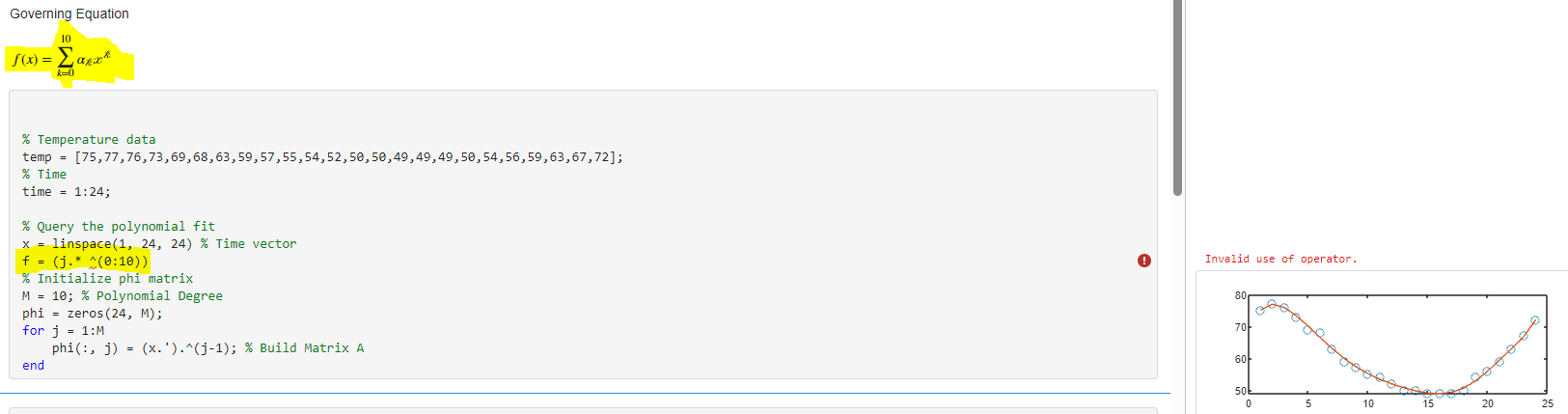
Question: Need MATLAB code for defining f for governing equation to resolve the error message. Governing Equation % Temperature data temp =[75,77,76,73,69,68,63,59,57,55,54,52,50,50,49,49,49,50,54,56,59,63,67,72]; % Time time =1:24;
Need MATLAB code for defining f for governing equation to resolve the error message.
![error message. Governing Equation \% Temperature data temp =[75,77,76,73,69,68,63,59,57,55,54,52,50,50,49,49,49,50,54,56,59,63,67,72]; \% Time time](https://dsd5zvtm8ll6.cloudfront.net/si.experts.images/questions/2024/09/66f12e836520e_11566f12e8302eac.jpg)
Governing Equation \% Temperature data temp =[75,77,76,73,69,68,63,59,57,55,54,52,50,50,49,49,49,50,54,56,59,63,67,72]; \% Time time =1:24; \% Query the polynomial fit x= linspace (1,24,24)% Time vector f=(j^(0:10)) % Initialize phi matrix M=10;% Polynomial Degree phi =zeros(24,M); for j=1:M phi( ,j,j)=(x..)(j1);% Build Matrix A end \% Create a design matrix for the polynomial regression for 1=1:4 an = pinv(phi) * temp. ' ; fna = phi an; % Least squares fit En=norm (ffna)orm(f); Error subplot (2,1,1); plot(time, temp, 'o', time, fna); subplot (4,2,4+1), bar(an, 'FaceColor', [.6.6.6], 'EdgeColor', 'k'); end subplot (2,1,1),plot(x,f,k), hold on \% *Apply different regression Techniques* subplot (2,1,1) lambda=0.1; phi2=phi(:,2:end)
Step by Step Solution
There are 3 Steps involved in it

Get step-by-step solutions from verified subject matter experts
 Study Help