







Question: need some guidance w this lab in java plz ! thx. You have been asked to write a program that produces an image that demonstrates
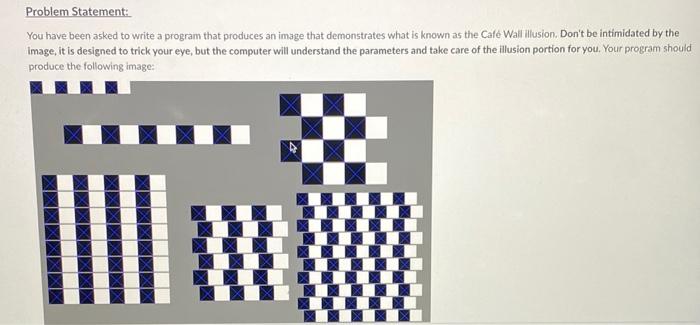
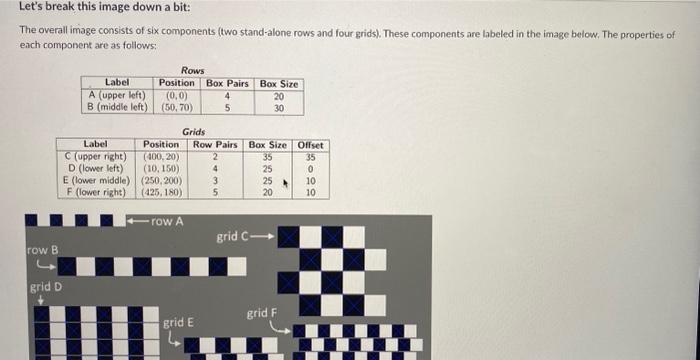
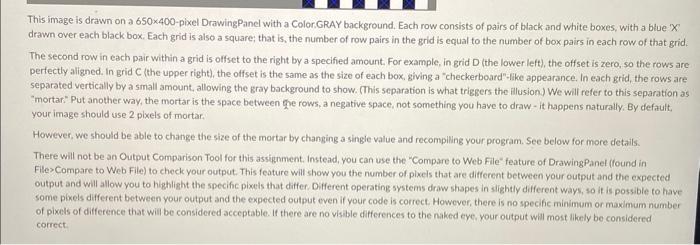
You have been asked to write a program that produces an image that demonstrates what is known as the Cafe Wall illusion. Don't be intimidated by the Image, it is designed to trick your eye, but the computer will understand the parameters and take care of the illusion portion for you. Your program should produce the following image: Let's break this image down a bit: The overall image consists of six components (two stand-alone rows and four grids). These components are labeled in the image below. The properties of eich component are as follows: This image is drawn on a 650400-pixel DrawingPanel with a Color.GRAY background. Each row consists of pairs of black and white boxes, with a blue ' X ' drawn over each black box. Each grid is also a square; that is, the number of row pairs in the grid is equal to the number of box pairs in each row of that grid. The second row in each pair within a gid is offset to the right by a specified amount. For example, in grid D (the lower left), the offset is zero, so the rows are perfectly aligned. In grid C (the upper right), the offset is the same as the size of each box, giving a "checkerboard"-tike appearance. In each grid, the rows are separated vertically by a small amount, allowing the gray background to show. (This separation is what triggers the filusion) We will refer to this separation as "mortar:" Put another way, the mortar is the space between e rows, a negative space, not something you have to draw - it happens naturally. By default, your image should use 2 pixels of mortar. However, we should be able to change the size of the mortar by changing a single value and recompiling your program. See below for more details. There will not be an Cutput Comparison Tool for this assignment. Instead, you can use the "Compare to Web File" feature of DrawingPanel (found in File>Compare to Web File) to check your output. This feature will show you the number of pixels that are different between your output and the expected output and will allow you to highlight the specific pixeis that differ. Different operating systems draw shapes in slightly different ways, so it is possible to have some pixels different between your output and the expected output even if your code is correct. However, there is no specific minimum or maximum number of pixels of difference that will be considered acceptable. If there are no visible differences to the naked eye. your output will most lilkely bo considered correct
Step by Step Solution
There are 3 Steps involved in it

Get step-by-step solutions from verified subject matter experts
 Study Help