







Question: Need some help, when I save and run this and enter a desired salary, I get errors. Please go through and fix everything up for
Need some help, when I save and run this and enter a desired salary, I get errors. Please go through and fix everything up for me, thanks!
def compute_commission(sales_amt):
commission = 0
if(sales_amt >=10000.01):
commission += (sales_amt-10000)*0.12
sales_amt = 10000
if(sales_amt>=5000.01):
commission += (sales_amt-5000)*0.10
sales_amt = 5000
if(sales_amt>=0.01):
commission += (sales_amt)*0.08
return commission
def target_sales(desired_sal):
base_sal = 5000
desired_comm = desired_sal - base_sal
commision =0
if(desired_comm>0):
sales =1
while(True):
commision = compute_commission(sales)
if commision >=desired_comm:
break
else:
sales = sales + 1
return sales
else:
return 0
def print_commission(begin_sales,incr,end_sales):
print("\033[4m")
print("%s %20s" %("Sales Amount","Commission"))
print("\033[0m")
for sales in range(begin_sales,end_sales+1,incr):
print("%10s %20s" %(sales,compute_commission(sales)))
def main():
print_commission(10000,5000,100000)
print("Please enter desired salary.")
desired_sal = input()
print("Target sales to achieve desired salary is "+str(target_sales(desired_sal)))
if __name__ == '__main__':
main()
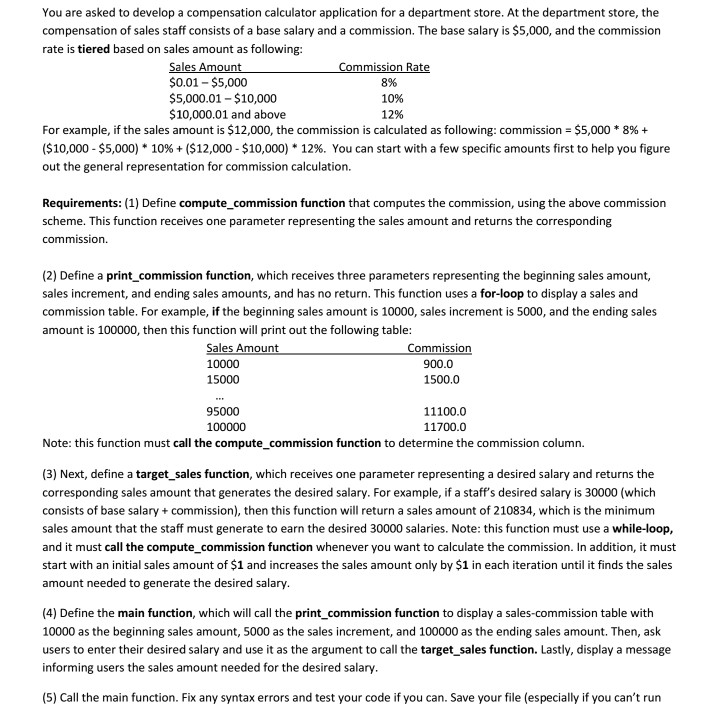
You are asked to develop a compensation calculator application for a department store. At the department store, the compensation of sales staff consists of a base salary and a commission. The base salary is $5,000, and the commission rate is tiered based on sales amount as following: $0.01-$5,000 5,000.01 $10,000 $10,000.01 and above 8% 10% 12% For example, if the sales amount is $12,000, the commission is calculated as following: commission-$5,000 * 8% + ($10,000-$5,000) * 10% + ($12,000-$10,000) * 12%. You can start with a few specific amounts first to help you figure out the general representation for commission calculation. Requirements: (1) Define compute_commission function that computes the commission, using the above commissiorn scheme. This function receives one parameter representing the sales amount and returns the corresponding commission. (2) Define a print commission function, which receives three parameters representing the beginning sales amount, sales increment, and ending sales amounts, and has no return. This function uses a for-loop to display a sales and commission table. For example, if the beginning sales amount is 10000, sales increment is 5000, and the ending sales amount is 100000, then this function will print out the following table les 10000 15000 ommissiOn 900.0 1500.0 95000 100000 11100.0 11700.0 Note: this function must call the compute commission function to determine the commission column. (3) Next, define a target_sales function, which receives one parameter representing a desired salary and returns the corresponding sales amount that generates the desired salary. For example, if a staff's desired salary is 30000 (which consists of base salary+commission), then this function will return a sales amount of 210834, which is the minimum sales amount that the staff must generate to earn the desired 30000 salaries. Note: this function must use a while-loop, and it must call the compute_commission function whenever you want to calculate the commission. In addition, it must start with an initial sales amount of $1 and increases the sales amount only by $1 in each iteration until it finds the sales amount needed to generate the desired salary (4) Define the main function, which will call the print_commission function to display a sales-commission table with 10000 as the beginning sales amount, 5000 as the sales increment, and 100000 as the ending sales amount. Then, ask users to enter their desired salary and use it as the argument to call the target sales function. Lastly, display a message informing users the sales amount needed for the desired salary (5) Call the main function. Fix any syntax errors and test your code if you can. Save your file (especially if you can't run
Step by Step Solution
There are 3 Steps involved in it

Get step-by-step solutions from verified subject matter experts
 Study Help