







Question: Need some help with this which need to be done using MATLAB Type A : Degree-day Caleulations One concept used in meteorology, and HVAC (Heating,
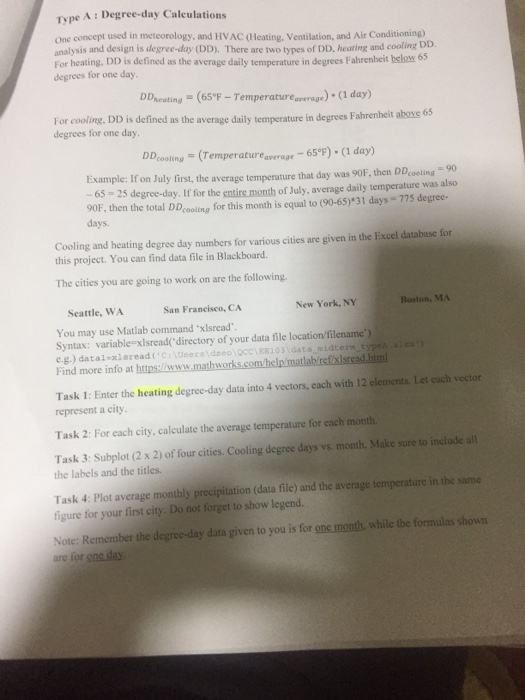
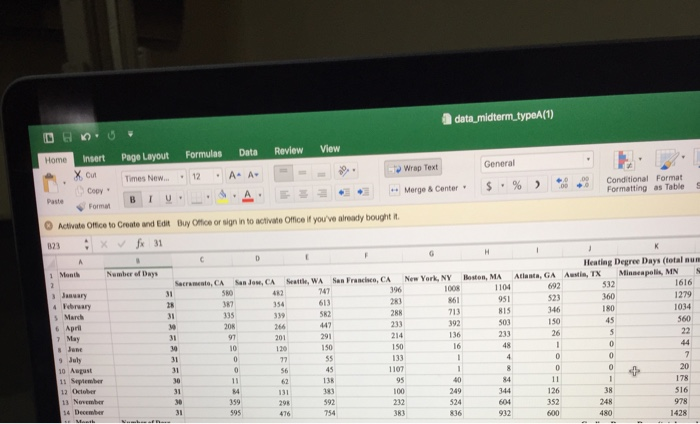
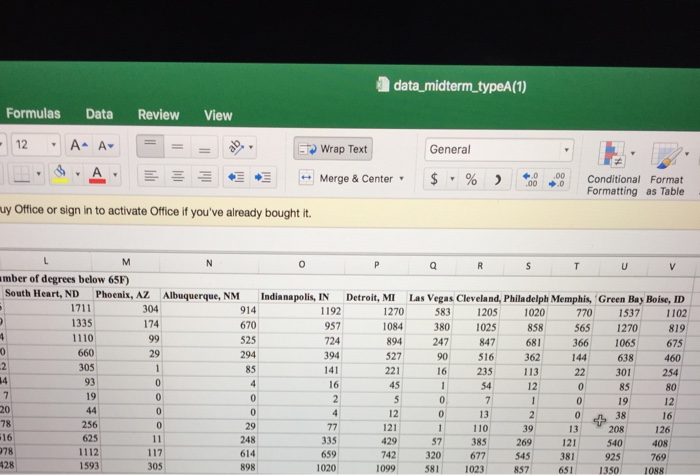
Type A : Degree-day Caleulations One concept used in meteorology, and HVAC (Heating, Ventilation, and Air Conditioning) analysis and design is degree-day (DD). There are two types of DD, heating and cooling Di For heating. DD is defined as the average daily temperature in degrees Fahrenheit below 65 degrees for one day. DDheating (65 F - Temperatureavrage) (1 day) For cooling, DD is defined as the average daily temperature in degrees Fahrenheit aboxe 65 degrees for one day DDcosting (Temperatureaperge 65F) (1 day) Example: If on July first, the average temperature that day was 90F, then DD oling-90 65 25 degree-day. If for the entire month of July, average daily temperature was also 90F, then the total DDcoing for this month is equal to (90-65)*31 days-775 degree- days. Cooling and heating degree day numbers for various cities are given in the Excel database for this project. You can find data file in Blackboard The cities you are going to work on are the following. Seattle, WA San Francisco, CA New York, NY Boston, MA You may use Matlab command xlsread Syntax: variable xlsread( directory of your data file location/filename') Find more info at https://w Task 1: Enter the heating degree-day data into 4 vectors, each with 12 clements. Let each vector represent a city Task 2: For each city, calculate the average temperature for each month Task 3: Subplot (2 x 2) of four cities. Cooling degree days vs. month. Make sure to inclade all the labels and the titles. Task 4: Plot average monthly precipitation (data file) and the average temperature in the same figure for your first city. Do not forget to show legend. Note: Remember the degree-day data given to you is for one month, while the formulas shown Type A : Degree-day Caleulations One concept used in meteorology, and HVAC (Heating, Ventilation, and Air Conditioning) analysis and design is degree-day (DD). There are two types of DD, heating and cooling Di For heating. DD is defined as the average daily temperature in degrees Fahrenheit below 65 degrees for one day. DDheating (65 F - Temperatureavrage) (1 day) For cooling, DD is defined as the average daily temperature in degrees Fahrenheit aboxe 65 degrees for one day DDcosting (Temperatureaperge 65F) (1 day) Example: If on July first, the average temperature that day was 90F, then DD oling-90 65 25 degree-day. If for the entire month of July, average daily temperature was also 90F, then the total DDcoing for this month is equal to (90-65)*31 days-775 degree- days. Cooling and heating degree day numbers for various cities are given in the Excel database for this project. You can find data file in Blackboard The cities you are going to work on are the following. Seattle, WA San Francisco, CA New York, NY Boston, MA You may use Matlab command xlsread Syntax: variable xlsread( directory of your data file location/filename') Find more info at https://w Task 1: Enter the heating degree-day data into 4 vectors, each with 12 clements. Let each vector represent a city Task 2: For each city, calculate the average temperature for each month Task 3: Subplot (2 x 2) of four cities. Cooling degree days vs. month. Make sure to inclade all the labels and the titles. Task 4: Plot average monthly precipitation (data file) and the average temperature in the same figure for your first city. Do not forget to show legend. Note: Remember the degree-day data given to you is for one month, while the formulas shown
Step by Step Solution
There are 3 Steps involved in it

Get step-by-step solutions from verified subject matter experts
 Study Help