







Question: need the mysql code for the queries First Database. 1. Initialize your database with the following script: -- initialize CREATE DATABASE airtraffic; USE airtraffic CREATE
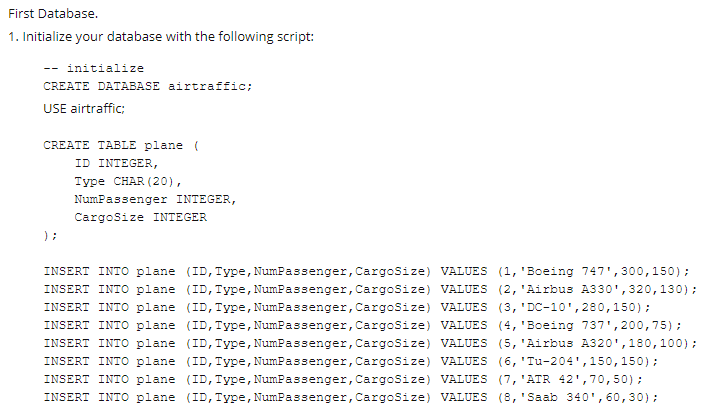
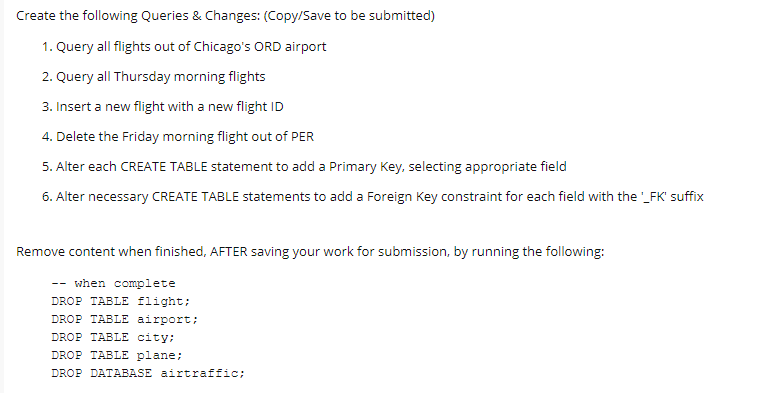
First Database. 1. Initialize your database with the following script: -- initialize CREATE DATABASE airtraffic; USE airtraffic CREATE TABLE plane ID INTEGER, Type CHAR (20), NumPassenger INTEGER, CargoSize INTEGER INSERT INTO plane (ID, Type, NumPassenger, CargoSize) VALUES (1, 'Boeing 747', 300, 150); INSERT INTO plane (ID, Type, NumPassenger, CargoSize) VALUES (2, 'Airbus A330',320,130); INSERT INTO plane (ID, Type, NumPassenger, CargoSize) VALUES (3, 'DC-10', 280,150); INSERT INTO plane (ID, Type, NumPassenger, CargoSize) VALUES (4, 'Boeing 737', 200, 75); INSERT INTO plane (ID, Type, NumPassenger, CargoSize) VALUES (5, 'Airbus A320',180, 100); INSERT INTO plane (ID, Type, NumPassenger, CargoSize) VALUES (6, 'Tu-204', 150, 150); INSERT INTO plane (ID, Type, NumPassenger, CargoSize) VALUES (7, 'ATR 42', 70,50); INSERT INTO plane (ID, Type, NumPassenger, CargoSize) VALUES (8, 'Saab 340, 60, 30); Create the following Queries & Changes: (Copy/Save to be submitted) 1. Query all flights out of Chicago's ORD airport 2. Query all Thursday morning flights 3. Insert a new flight with a new flight ID 4. Delete the Friday morning flight out of PER 5. Alter each CREATE TABLE statement to add a Primary key, selecting appropriate field 6. Alter necessary CREATE TABLE statements to add a Foreign Key constraint for each field with the '_FK suffix Remove content when finished, AFTER saving your work for submission, by running the following: -- when complete DROP TABLE Flight; DROP TABLE airport; DROP TABLE city: DROP TABLE plane; DROP DATABASE airtraffic; First Database. 1. Initialize your database with the following script: -- initialize CREATE DATABASE airtraffic; USE airtraffic CREATE TABLE plane ID INTEGER, Type CHAR (20), NumPassenger INTEGER, CargoSize INTEGER INSERT INTO plane (ID, Type, NumPassenger, CargoSize) VALUES (1, 'Boeing 747', 300, 150); INSERT INTO plane (ID, Type, NumPassenger, CargoSize) VALUES (2, 'Airbus A330',320,130); INSERT INTO plane (ID, Type, NumPassenger, CargoSize) VALUES (3, 'DC-10', 280,150); INSERT INTO plane (ID, Type, NumPassenger, CargoSize) VALUES (4, 'Boeing 737', 200, 75); INSERT INTO plane (ID, Type, NumPassenger, CargoSize) VALUES (5, 'Airbus A320',180, 100); INSERT INTO plane (ID, Type, NumPassenger, CargoSize) VALUES (6, 'Tu-204', 150, 150); INSERT INTO plane (ID, Type, NumPassenger, CargoSize) VALUES (7, 'ATR 42', 70,50); INSERT INTO plane (ID, Type, NumPassenger, CargoSize) VALUES (8, 'Saab 340, 60, 30); Create the following Queries & Changes: (Copy/Save to be submitted) 1. Query all flights out of Chicago's ORD airport 2. Query all Thursday morning flights 3. Insert a new flight with a new flight ID 4. Delete the Friday morning flight out of PER 5. Alter each CREATE TABLE statement to add a Primary key, selecting appropriate field 6. Alter necessary CREATE TABLE statements to add a Foreign Key constraint for each field with the '_FK suffix Remove content when finished, AFTER saving your work for submission, by running the following: -- when complete DROP TABLE Flight; DROP TABLE airport; DROP TABLE city: DROP TABLE plane; DROP DATABASE airtraffic
Step by Step Solution
There are 3 Steps involved in it

Get step-by-step solutions from verified subject matter experts
 Study Help