







Question: Need this in verilog code ASAP. Thank you ! 5) A four-bit modulo counter with enable, asynchronous and synchronous inputs, and a maximum- reached indicator
Need this in verilog code ASAP. Thank you !
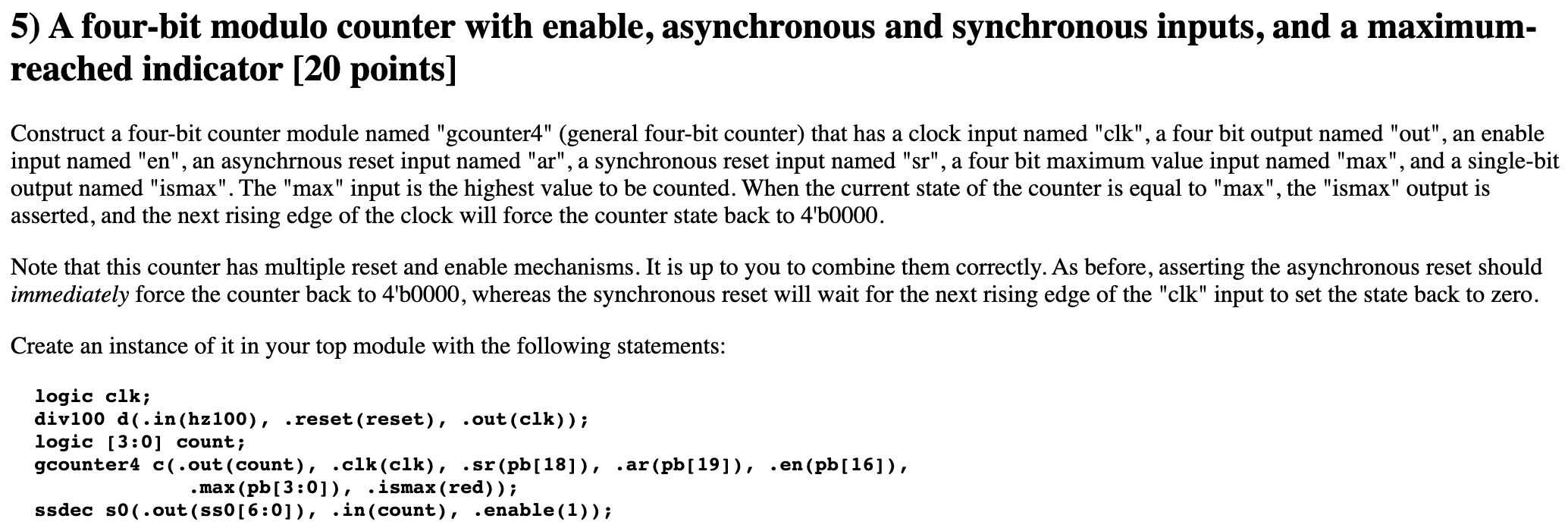
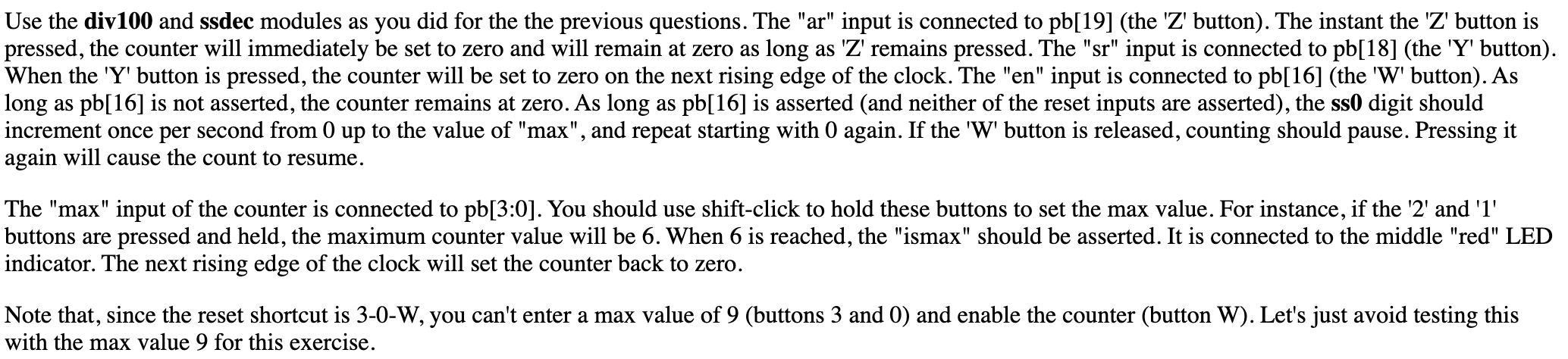
5) A four-bit modulo counter with enable, asynchronous and synchronous inputs, and a maximum- reached indicator [20 points] Construct a four-bit counter module named "gcounter4" (general four-bit counter) that has a clock input named "clk", a four bit output named "out", an enable input named "en", an asynchrnous reset input named "ar", a synchronous reset input named "sr", a four bit maximum value input named "max", and a single-bit output named "ismax". The "max" input is the highest value to be counted. When the current state of the counter is equal to "max", the "ismax" output is asserted, and the next rising edge of the clock will force the counter state back to 4'50000. Note that this counter has multiple reset and enable mechanisms. It is up to you to combine them correctly. As before, asserting the asynchronous reset should immediately force the counter back to 4'50000, whereas the synchronous reset will wait for the next rising edge of the "clk" input to set the state back to zero. Create an instance of it in your top module with the following statements: logic clk; div100 d(.in(hz100), .reset (reset), .out(clk)); logic (3:0] count; gcounter4 c(.out(count), .clk (clk), .sr (pb[18]), .ar (pb[19]), .en (pb[16]), .max (pb[3:0]), .ismax (red)); ssdec so(.out(ss0[6:0]), .in(count), .enable(1)); Use the div100 and ssdec modules as you did for the the previous questions. The "ar" input is connected to pb[19] (the 'Z' button). The instant the 'Z' button is pressed, the counter will immediately be set to zero and will remain at zero as long as 'Z' remains pressed. The "sr" input is connected to pb[18] (the 'Y' button). When the 'Y' button is pressed, the counter will be set to zero on the next rising edge of the clock. The "en" input is connected to pb[16] (the 'W' button). As long as pb[16] is not asserted, the counter remains at zero. As long as pb[16] is asserted (and neither of the reset inputs are asserted), the ss0 digit should increment once per second from 0 up to the value of "max", and repeat starting with 0 again. If the 'W' button is released, counting should pause. Pressing it again will cause the count to resume. The "max" input of the counter is connected to pb[3:0]. You should use shift-click to hold these buttons to set the max value. For instance, if the '2' and 'l' buttons are pressed and held, the maximum counter value will be 6. When 6 is reached, the "ismax" should be asserted. It is connected to the middle "red" LED indicator. The next rising edge of the clock will set the counter back to zero. Note that, since the reset shortcut is 3-0-W, you can't enter a max value of 9 (buttons 3 and 0) and enable the counter (button W). Let's just avoid testing this with the max value 9 for this exercise. 5) A four-bit modulo counter with enable, asynchronous and synchronous inputs, and a maximum- reached indicator [20 points] Construct a four-bit counter module named "gcounter4" (general four-bit counter) that has a clock input named "clk", a four bit output named "out", an enable input named "en", an asynchrnous reset input named "ar", a synchronous reset input named "sr", a four bit maximum value input named "max", and a single-bit output named "ismax". The "max" input is the highest value to be counted. When the current state of the counter is equal to "max", the "ismax" output is asserted, and the next rising edge of the clock will force the counter state back to 4'50000. Note that this counter has multiple reset and enable mechanisms. It is up to you to combine them correctly. As before, asserting the asynchronous reset should immediately force the counter back to 4'50000, whereas the synchronous reset will wait for the next rising edge of the "clk" input to set the state back to zero. Create an instance of it in your top module with the following statements: logic clk; div100 d(.in(hz100), .reset (reset), .out(clk)); logic (3:0] count; gcounter4 c(.out(count), .clk (clk), .sr (pb[18]), .ar (pb[19]), .en (pb[16]), .max (pb[3:0]), .ismax (red)); ssdec so(.out(ss0[6:0]), .in(count), .enable(1)); Use the div100 and ssdec modules as you did for the the previous questions. The "ar" input is connected to pb[19] (the 'Z' button). The instant the 'Z' button is pressed, the counter will immediately be set to zero and will remain at zero as long as 'Z' remains pressed. The "sr" input is connected to pb[18] (the 'Y' button). When the 'Y' button is pressed, the counter will be set to zero on the next rising edge of the clock. The "en" input is connected to pb[16] (the 'W' button). As long as pb[16] is not asserted, the counter remains at zero. As long as pb[16] is asserted (and neither of the reset inputs are asserted), the ss0 digit should increment once per second from 0 up to the value of "max", and repeat starting with 0 again. If the 'W' button is released, counting should pause. Pressing it again will cause the count to resume. The "max" input of the counter is connected to pb[3:0]. You should use shift-click to hold these buttons to set the max value. For instance, if the '2' and 'l' buttons are pressed and held, the maximum counter value will be 6. When 6 is reached, the "ismax" should be asserted. It is connected to the middle "red" LED indicator. The next rising edge of the clock will set the counter back to zero. Note that, since the reset shortcut is 3-0-W, you can't enter a max value of 9 (buttons 3 and 0) and enable the counter (button W). Let's just avoid testing this with the max value 9 for this exercise
Step by Step Solution
There are 3 Steps involved in it

Get step-by-step solutions from verified subject matter experts
 Study Help