







Question: Need this lab done for computer science as soon as possible. I have included Shape.java and CalcAreaAndPerimeter.java at the bottom. Lab 0: Reinforce Abstraction, Inheritance,
Need this lab done for computer science as soon as possible. I have included Shape.java and CalcAreaAndPerimeter.java at the bottom.
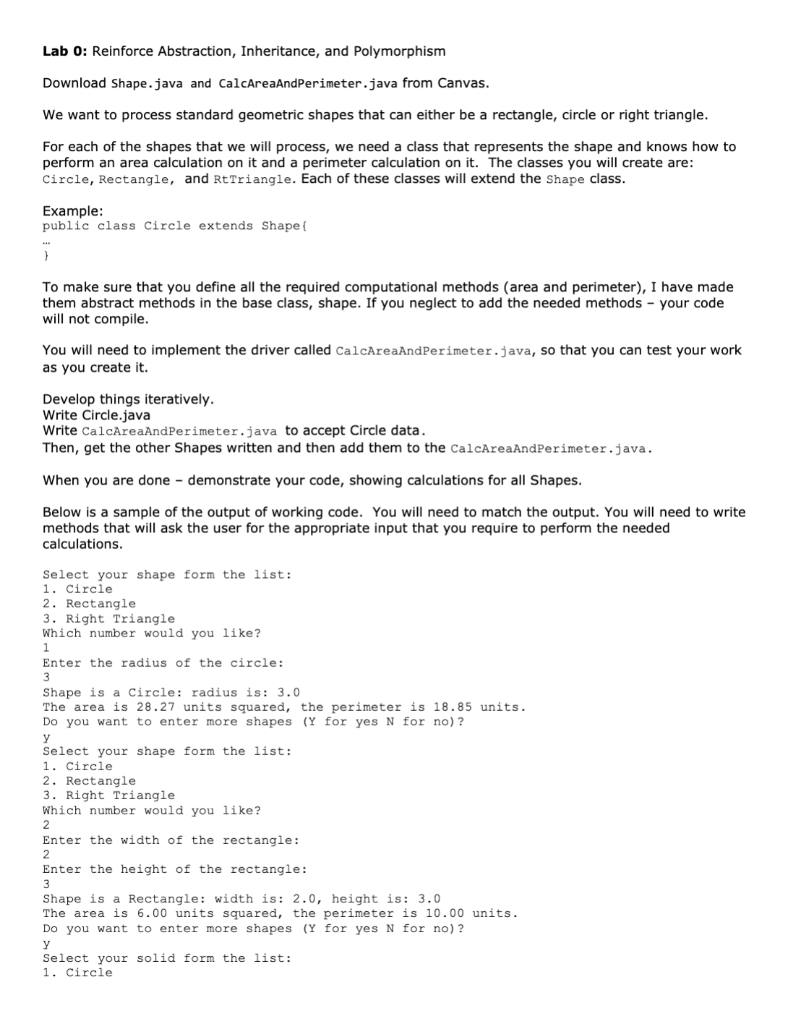
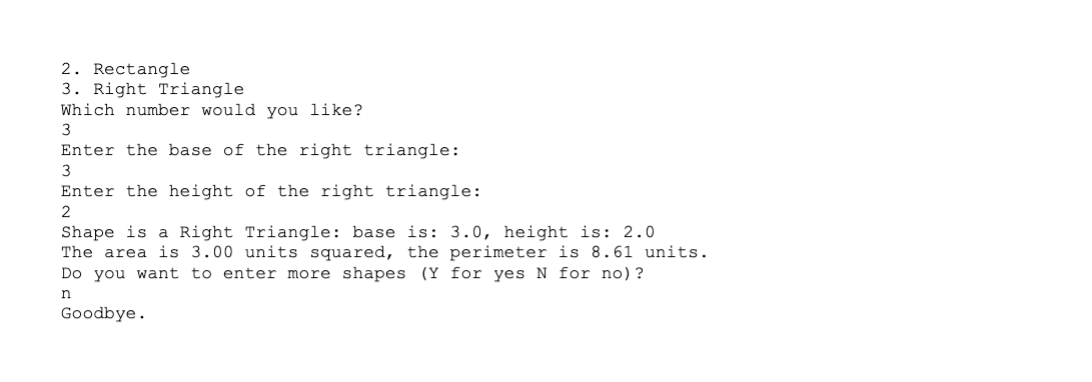

Lab 0: Reinforce Abstraction, Inheritance, and Polymorphism Download Shape.java and CalcAreaAndPerimeter.java from Canvas. We want to process standard geometric shapes that can either be a rectangle, circle or right triangle. For each of the shapes that we will process, we need a class that represents the shape and knows how to perform an area calculation on it and a perimeter calculation on it. The classes you will create are: Circle, Rectangle, and RtTriangle. Each of these classes will extend the Shape class. Example: public class Circle extends Shape{ } To make sure that you define all the required computational methods (area and perimeter), I have made them abstract methods in the base class, shape. If you neglect to add the needed methods your code will not compile. You will need to implement the driver called CalcAreaAndPerimeter.java, so that you can test your work as you create it. Develop things iteratively. Write Circle.java Write CalcAreaAndPerimeter.java to accept Circle data. Then, get the other Shapes written and then add them to the CalcAreaAndPerimeter.java. When you are done demonstrate your code, showing calculations for all Shapes. Below is a sample of the output of working code. You will need to match the output. You will need to write methods that will ask the user for the appropriate input that you require to perform the needed calculations. Select your shape form the list: 1. Circle 2. Rectangle 3. Right Triangle Which number would you like? 1 Enter the radius of the circle: 3 Shape is a Circle: radius is: 3.0 The area is 28.27 units squared, the perimeter is 18.85 units. Do you want to enter more shapes (Y for yes N for no)? y Select your shape form the list: 1. Circle 2. Rectangle 3. Right Triangle Which number would you like? 2 Enter the width of the rectangle: 2 Enter the height of the rectangle: 3 Shape is a Rectangle: width is: 2.0, height is: 3.0 The area is 6.00 units squared, the perimeter is 10.00 units. Do you want to enter more shapes (Y for yes N for no)? y Select your solid form the list: 1. Circle 2. Rectangle 3. Right Triangle Which number would you like? 3 Enter the base of the right triangle: 3 Enter the height of the right triangle: 2 Shape is a Right Triangle: base is: 3.0, height is: 2.0 The area is 3.00 units squared, the perimeter is 8.61 units. Do you want to enter more shapes (Y for yes N for no)? n Goodbye.
Here is the included code for Shape.java:
public abstract class Shape { private String shapeName;/ame of the shape /** Initializes the shapeName * @param shapeName the kind of shape */ public Shape(String shapeName){ this.shapeName = shapeName; } /**Get the kind of shape * @return name of shape */ public String getShapeName(){ return shapeName; } /**Create a string representation of the shape * */ @Override public String toString(){ return "Shape is a "+ shapeName; } //abstract methods public abstract double computeArea();//returns the area of shape public abstract double computePerimeter();//returns the perimeter of shape public abstract void readShapeData();//asks and reads in the info needed to calculate area and perimeter }
Here is CalcAreaAndPerimeter.java:
import java.util.Scanner; /** * File: CalcAreaAndPerimeter.java * author: Heather Amthauer * Lab#1 * Description: Driver for Shapes */ public class CalcAreaAndPerimeter { /**main program performs the following * 1. asks for shape type * 2. asks for specific shape attributes * 3. calculates area * 4. calculates the perimeter * 5. displays results */ public static void main(String args[]){ } /**Ask the user for the type of Shape * * @return an instance of that shape */ public static Shape getShape(Scanner scan){ //print the menu //process the user's choice } /** asks the user if they want to continue analyzing more shapes * * @return true- they are done and false they are not done */ public static boolean askAgain(Scanner in){ } /**Display the results of the calculations * * @param myShape - the shape the user selected * @param area - the calculated area * @param perimeter the calculated perimeter */ public static void displayResult(Shape myShape, double area, double perimeter){ } } Lab 0: Reinforce Abstraction, Inheritance, and Polymorphism Download Shape.java and CalcAreaAndPerimeter.java from Canvas. We want to process standard geometric shapes that can either be a rectangle, circle or right triangle. For each of the shapes that we will process, we need a class that represents the shape and knows how to perform an area calculation on it and a perimeter calculation on it. The classes you will create are: Circle, Rectangle, and Rt Triangle. Each of these classes will extend the Shape class. Example: public class Circle extends Shape 1 To make sure that you define all the required computational methods (area and perimeter), I have made them abstract methods in the base class, shape. If you neglect to add the needed methods - your code will not compile. You will need to implement the driver called CalcAreaAndPerimeter.java, so that you can test your work as you create it. Develop things iteratively. Write Circle.java Write CalcAreaAndPerimeter.java to accept Circle data. Then, get the other Shapes written and then add them to the CalcAreaAndPerimeter.java. When you are done - demonstrate your code, showing calculations for all Shapes. Below is a sample of the output of working code. You will need to match the output. You will need to write methods that will ask the user for the appropriate input that you require to perform the needed calculations. Select your shape form the list: 1. Circle 2. Rectangle 3. Right Triangle Which number would you like? 1 Enter the radius of the circle: Shape is a Circle: radius is: 3.0 The area is 28.27 units squared, the perimeter is 18.85 units. Do you want to enter more shapes (Y for yes N for no)? Select your shape form the list: 1. Circle 2. Rectangle 3. Right Triangle Which number would you like? 2 Enter the width of the rectangle: 2 Enter the height of the rectangle: Shape is a Rectangle: width is: 2.0, height is: 3.0 The area is 6.00 units squared, the perimeter is 10.00 units. Do you want to enter more shapes (Y for yes N for no)? Select your solid form the list: 1. Circle 2. Rectangle 3. Right Triangle Which number would you like? 3 Enter the base of the right triangle: 3 Enter the height of the right triangle: 2 Shape is a Right Triangle: base is: 3.0, height is: 2.0 The area is 3.00 units squared, the perimeter is 8.61 units. Do you want to enter more shapes (Y for yes N for no)? n Goodbye
Step by Step Solution
There are 3 Steps involved in it

Get step-by-step solutions from verified subject matter experts
 Study Help