







Question: Need This To Be Done ASAP , VISUAL BASIC LEARNING OUTCOMES By completing this assignment, students should be able to: Perform arithmetic calculations using VB
Need This To Be Done ASAP , VISUAL BASIC
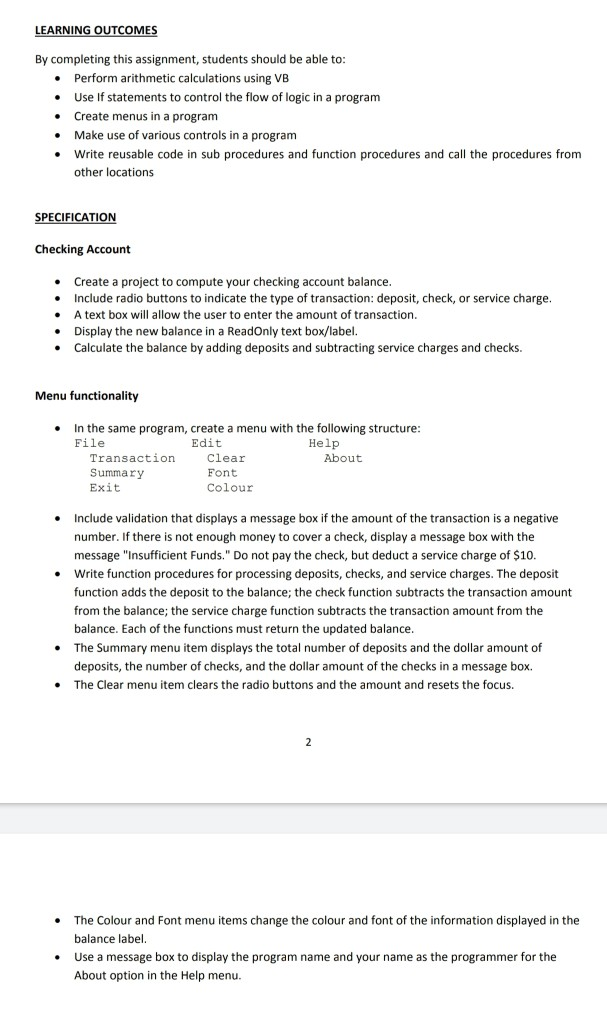
LEARNING OUTCOMES By completing this assignment, students should be able to: Perform arithmetic calculations using VB Use of statements to control the flow of logic in a program Create menus in a program Make use of various controls in a program Write reusable code in sub procedures and function procedures and call the procedures from other locations SPECIFICATION Checking Account Create a project to compute your checking account balance. Include radio buttons to indicate the type of transaction: deposit, check, or service charge. A text box will allow the user to enter the amount of transaction. Display the new balance in a ReadOnly text box/label. Calculate the balance by adding deposits and subtracting service charges and checks. Menu functionality . In the same program, create a menu with the following structure: File Edit Help Transaction Clear About Summary Font Exit Colour Include validation that displays a message box if the amount of the transaction is a negative number. If there is not enough money to cover a check, display a message box with the message "Insufficient Funds." Do not pay the check, but deduct a service charge of $10. Write function procedures for processing deposits, checks, and service charges. The deposit function adds the deposit to the balance; the check function subtracts the transaction amount from the balance; the service charge function subtracts the transaction amount from the balance. Each of the functions must return the updated balance. The Summary menu item displays the total number of deposits and the dollar amount of deposits, the number of checks, and the dollar amount of the checks in a message box. The Clear menu item clears the radio buttons and the amount and resets the focus. The Colour and Font menu items change the colour and font of the information displayed in the balance label. Use a message box to display the program name and your name as the programmer for the About option in the Help menu. LEARNING OUTCOMES By completing this assignment, students should be able to: Perform arithmetic calculations using VB Use of statements to control the flow of logic in a program Create menus in a program Make use of various controls in a program Write reusable code in sub procedures and function procedures and call the procedures from other locations SPECIFICATION Checking Account Create a project to compute your checking account balance. Include radio buttons to indicate the type of transaction: deposit, check, or service charge. A text box will allow the user to enter the amount of transaction. Display the new balance in a ReadOnly text box/label. Calculate the balance by adding deposits and subtracting service charges and checks. Menu functionality . In the same program, create a menu with the following structure: File Edit Help Transaction Clear About Summary Font Exit Colour Include validation that displays a message box if the amount of the transaction is a negative number. If there is not enough money to cover a check, display a message box with the message "Insufficient Funds." Do not pay the check, but deduct a service charge of $10. Write function procedures for processing deposits, checks, and service charges. The deposit function adds the deposit to the balance; the check function subtracts the transaction amount from the balance; the service charge function subtracts the transaction amount from the balance. Each of the functions must return the updated balance. The Summary menu item displays the total number of deposits and the dollar amount of deposits, the number of checks, and the dollar amount of the checks in a message box. The Clear menu item clears the radio buttons and the amount and resets the focus. The Colour and Font menu items change the colour and font of the information displayed in the balance label. Use a message box to display the program name and your name as the programmer for the About option in the Help menu
Step by Step Solution
There are 3 Steps involved in it

Get step-by-step solutions from verified subject matter experts
 Study Help