



Question: Need to complete this study case. Answers are in the system without steps. Need to complete this case study. Answers are in the system without
Need to complete this study case. Answers are in the system without steps.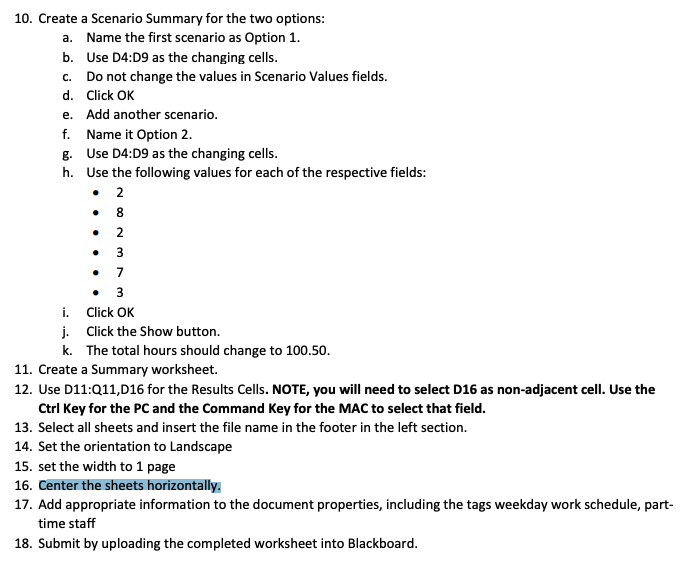
Need to complete this case study. Answers are in the system without steps. Need Asap. Thanks
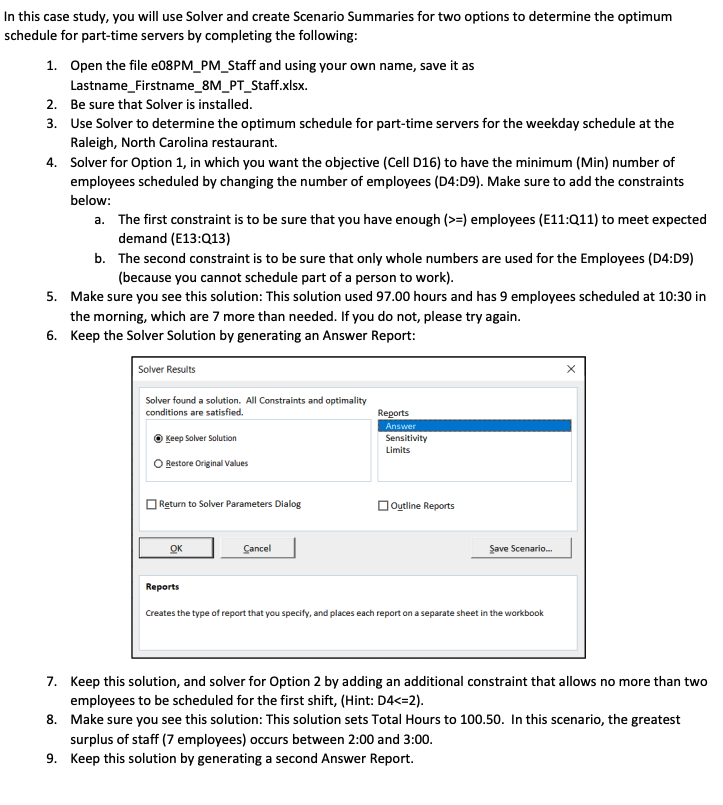
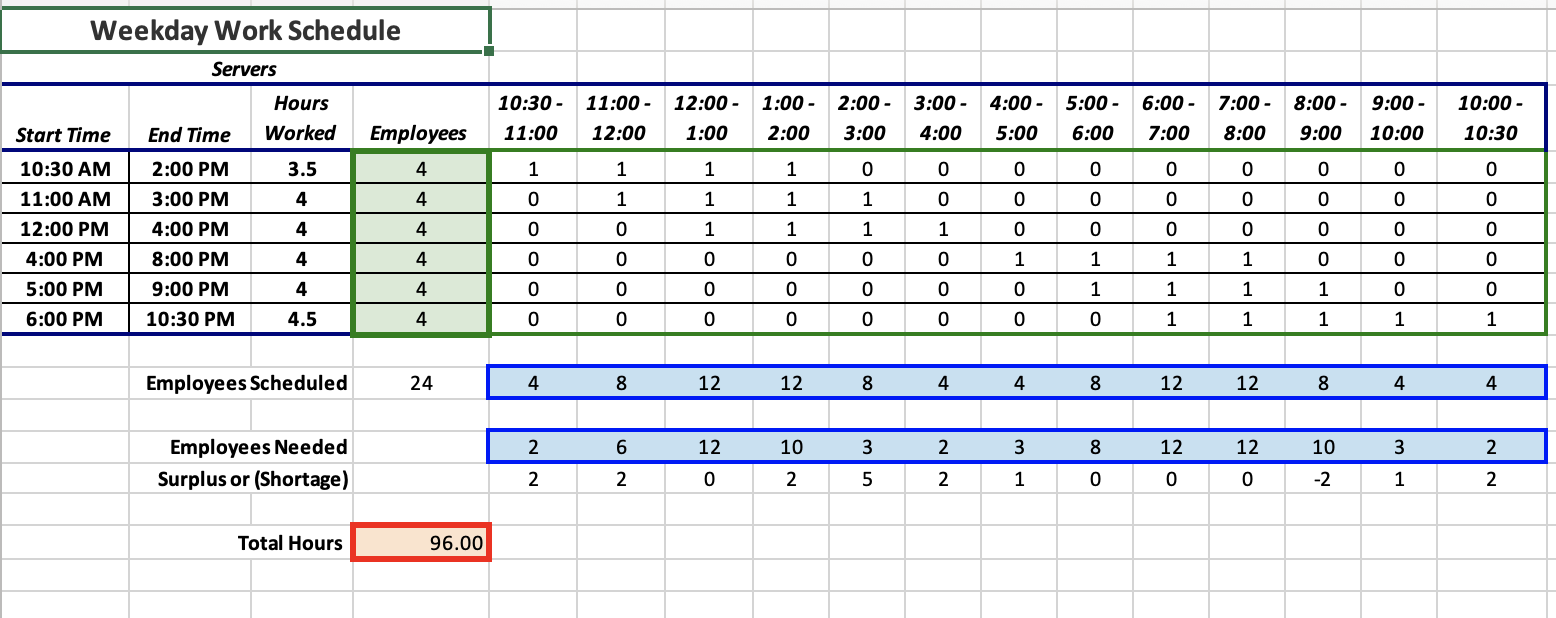
C. . NO . 10. Create a Scenario Summary for the two options: a. Name the first scenario as Option 1. b. Use 04:09 as the changing cells. Do not change the values in Scenario Values fields. d. Click OK e. Add another scenario. f. Name it Option 2. g. Use 04:09 as the changing cells. h. Use the following values for each of the respective fields: 2 8 2 3 7 3 i. Click OK j. Click the Show button. k. The total hours should change to 100.50. 11. Create a Summary worksheet. 12. Use D11:Q11,016 for the Results Cells. NOTE, you will need to select D16 as non-adjacent cell. Use the Ctrl Key for the PC and the Command Key for the MAC to select that field. 13. Select all sheets and insert the file name in the footer in the left section. 14. Set the orientation to Landscape 15. set the width to 1 page 16. Center the sheets horizontally. 17. Add appropriate information to the document properties, including the tags weekday work schedule, part- time staff 18. Submit by uploading the completed worksheet into Blackboard. In this case study, you will use Solver and create Scenario Summaries for two options to determine the optimum schedule for part-time servers by completing the following: 1. Open the file e08PM_PM_Staff and using your own name, save it as Lastname_Firstname_8M_PT_Staff.xlsx. 2. Be sure that Solver is installed. 3. Use Solver to determine the optimum schedule for part-time servers for the weekday schedule at the Raleigh, North Carolina restaurant. 4. Solver for Option 1, in which you want the objective (Cell D16) to have the minimum (Min) number of employees scheduled by changing the number of employees (D4:09). Make sure to add the constraints below: a. The first constraint is to be sure that you have enough (>=) employees (E11:Q11) to meet expected demand (E13:Q13) b. The second constraint is to be sure that only whole numbers are used for the Employees (D4:09) (because you cannot schedule part of a person to work). 5. Make sure you see this solution: This solution used 97.00 hours and has 9 employees scheduled at 10:30 in the morning, which are 7 more than needed. If you do not, please try again. 6. Keep the Solver Solution by generating an Answer Report: Solver Results Solver found a solution. All Constraints and optimality conditions are satisfied. Reports Answer Sensitivity Limits Keep Solver Solution Restore Original Values Return to Solver Parameters Dialog Outline Reports OK Cancel Save Scenario... Reports Creates the type of report that you specify, and places each report on a separate sheet in the workbook 7. Keep this solution, and solver for Option 2 by adding an additional constraint that allows no more than two employees to be scheduled for the first shift, (Hint: D4=) employees (E11:Q11) to meet expected demand (E13:Q13) b. The second constraint is to be sure that only whole numbers are used for the Employees (D4:09) (because you cannot schedule part of a person to work). 5. Make sure you see this solution: This solution used 97.00 hours and has 9 employees scheduled at 10:30 in the morning, which are 7 more than needed. If you do not, please try again. 6. Keep the Solver Solution by generating an Answer Report: Solver Results Solver found a solution. All Constraints and optimality conditions are satisfied. Reports Answer Sensitivity Limits Keep Solver Solution Restore Original Values Return to Solver Parameters Dialog Outline Reports OK Cancel Save Scenario... Reports Creates the type of report that you specify, and places each report on a separate sheet in the workbook 7. Keep this solution, and solver for Option 2 by adding an additional constraint that allows no more than two employees to be scheduled for the first shift, (Hint: D4Step by Step Solution
There are 3 Steps involved in it
1 Expert Approved Answer
Step: 1 Unlock

Question Has Been Solved by an Expert!
Get step-by-step solutions from verified subject matter experts
Step: 2 Unlock
Step: 3 Unlock