







Question: Need to implement this into the code I have and need help with it thanks Maze.py import random class Maze: def __init__(self,filename): ''' Scans the
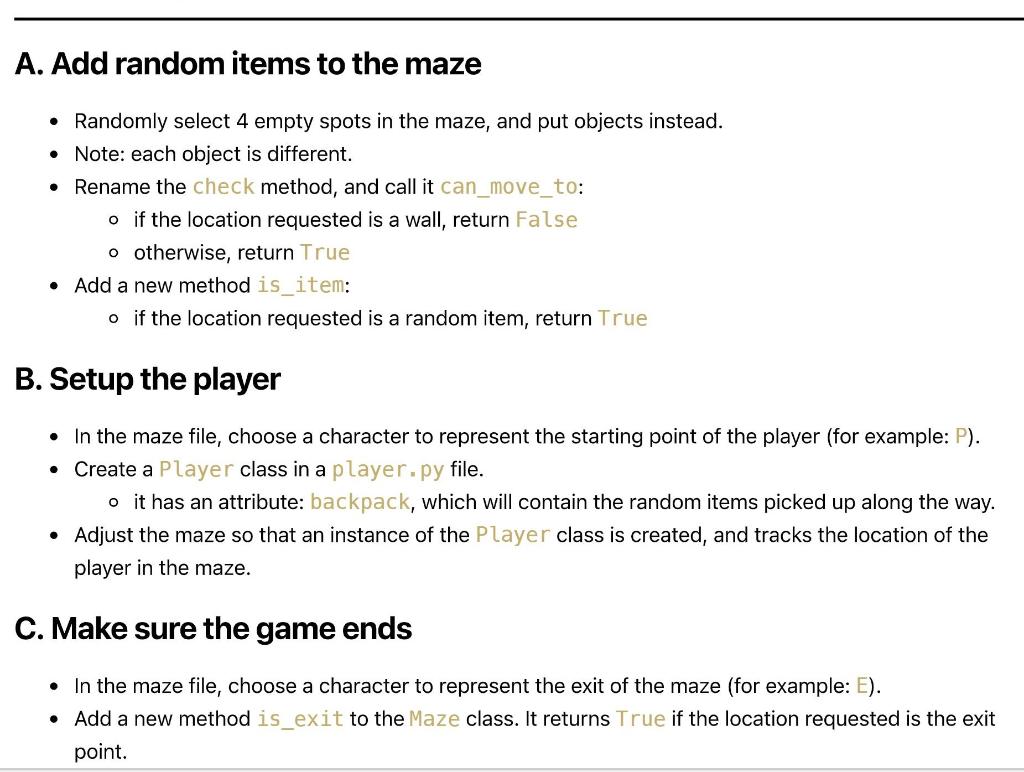
Need to implement this into the code I have and need help with it thanks
Maze.py
import random
class Maze: def __init__(self,filename): ''' Scans the maze file and puts it into list, while also saving the maze dimensions into lines and cols ''' _content = [] self._cols = 0 with open(filename) as f: lines = f.readlines() for line in lines: _content.append(line.strip(' ')) self._cols = len(line) - 1 self._lines = len(_content) - 1 self._maze = _content self.item1 = self.find_random_spot() self.item2 = self.find_random_spot() self.item3 = self.find_random_spot() self.item4 = self.find_random_spot()
def is_item(self): ''' Supposed to check if current location is an item ''' pass
def can_move_to(self,line_number,column_number): ''' Checks if coordinate inputed is a wall ,if not the it will return True ''' if self._maze[line_number][column_number] == 'X': return False else: return True @property def display(self): for line in self._maze: print(line)
def find_random_spot(self): """ Looks for a random spot in the maze, and will return the coordinates """ empty_space = False while empty_space != True: line_num = random.randint(0,self._lines) col_num = random.randint(0,self._cols) if (self.can_move_to(line_num,col_num) == True): empty_space = True return line_num , col_num
test.py
from maze import Maze
new_maze = Maze('x.txt')
new_maze.display
print(new_maze.can_move_to(1,19))
print(new_maze.find_random_spot())
# y range0 - 11 # x range0 - 19
x.txt
X XXXXXXXXXXXXXXXXXX X XXXXX XX X XXXXXXX XXXX XX XX X X XX XX XX XX X XX XXXX XX XX XX XXXXXX XXXX XX XX XX X XXXX XX XX XX XXXX X XX XX XXXX XXXXX XXXXXXXXX XXXX XXXXX X XX XXXX XXXXX XX XXXXXXXXXXXXXXXXX XX
A. Add random items to the maze Randomly select 4 empty spots in the maze, and put objects instead. Note: each object is different. Rename the check method, and call it can_move_to: o if the location requested is a wall, return false o otherwise, return True Add a new method is_item: o if the location requested is a random item, return True B. Setup the player In the maze file, choose a character to represent the starting point of the player (for example:P). Create a Player class in a player.py file. o it has an attribute: backpack, which will contain the random items picked up along the way. Adjust the maze so that an instance of the Player class is created, and tracks the location of the player in the maze. . C. Make sure the game ends In the maze file, choose a character to represent the exit of the maze (for example: E). Add a new method is_exit to the Maze class. It returns True if the location requested is the exit point. A. Add random items to the maze Randomly select 4 empty spots in the maze, and put objects instead. Note: each object is different. Rename the check method, and call it can_move_to: o if the location requested is a wall, return false o otherwise, return True Add a new method is_item: o if the location requested is a random item, return True B. Setup the player In the maze file, choose a character to represent the starting point of the player (for example:P). Create a Player class in a player.py file. o it has an attribute: backpack, which will contain the random items picked up along the way. Adjust the maze so that an instance of the Player class is created, and tracks the location of the player in the maze. . C. Make sure the game ends In the maze file, choose a character to represent the exit of the maze (for example: E). Add a new method is_exit to the Maze class. It returns True if the location requested is the exit point
Step by Step Solution
There are 3 Steps involved in it

Get step-by-step solutions from verified subject matter experts
 Study Help