







Question: Needed in Python Code GUI interface with tkinter. In your Final project, you are going to develop a tool, called timetable. Details regarding the requirements
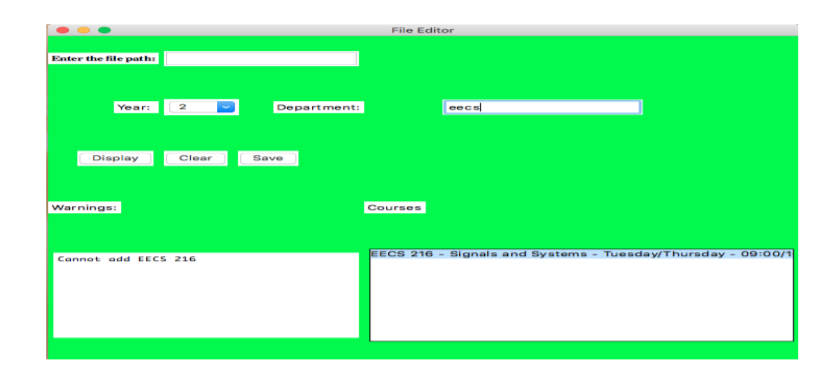
Needed in Python Code GUI interface with tkinter. In your Final project, you are going to develop a tool, called timetable. Details regarding the requirements are as follows: 1. Your program will have a graphical user interface (GUI) which will look like as shown in figure 1. You may use any coloring-scheme you like. The below one is for illustration purposes only. Details about how it should work are provided below. 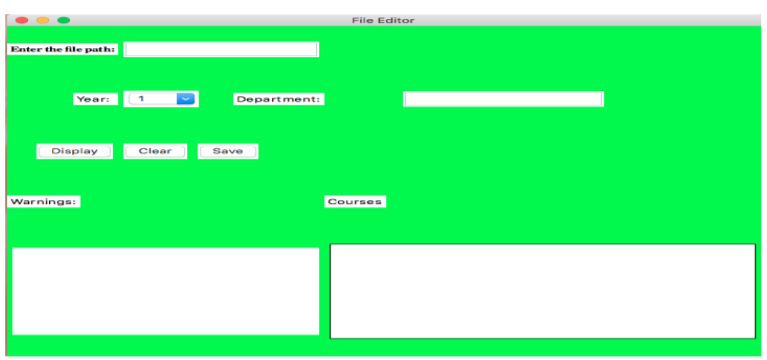 Your software will accept the semester program for any semester (fall, spring) in University in the form of a csv file as input. The user will give path of the csv file as an input to the Entry box and it will read content of the csv file in that path. Next, the user will select year (1, 2 and etc.) or codes (CS, EE, UNI and etc.) or both. Finally, the user will click on the button, Display, which will display the all courses in semester program with their corresponding time and code information as shown in figure 2 (Your program should display courses only according chosen year or code or both. As an example, if you choose code as a CS, it should display only CS courses). (Your program should display a warning if you dont choose any file in warning text box). 2. After displaying a semester program, the user should be able to select a desired course by clicking on the name of the course. Here, you can use listbox to shows the courses. 3. Furthermore, you program should allow at most 6 courses to select. 4. Also, if you choose two courses in same time (As an example, if you choose courses in figure 3 and if you want to add course in figure 3, it should give warning), your program should warn the user like in figure 3 and not add the last item to the timetable 5. Your timetable should not refresh when you change year or code while searching courses. As an example, you take 3 courses from CS department and if you want to take some common courses, when you go search common courses, your program should keep 3 CS courses not remove from the timetable. You should put a clear button in order to create new timetable. Finally, when you create your timetable, click on save button and get all courses from your timetable and write them to the timetable.csv file. 6. Write your code in a single Python file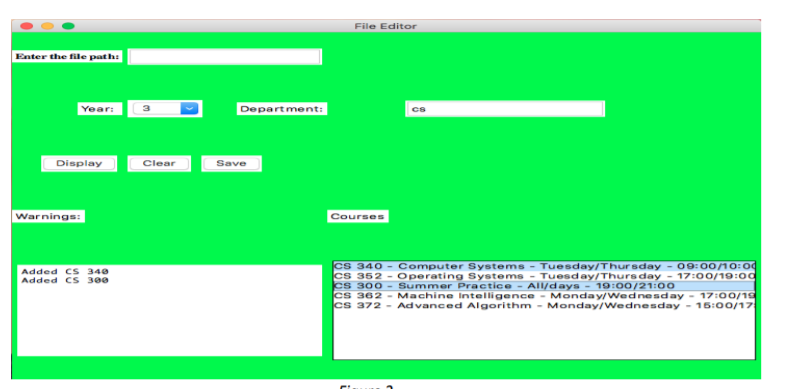
 CSV SAMPLE DATA: [code] CHI 101,Chinese I,Wednesday,10:00-13:00 CS 200,Summer Practice,, CS 240,Exploratory Data Analysis,Wednesday Friday,09:00-11:00 11:00-12:00 CS 300,Summer Practice,, CS 340,Computer Systems,Tuesday Thursday,09:00-10:00 09:00-11:00 CS 352,Operating Systems,Tuesday Thursday,17:00-18:00 17:00-19:00 CS 362,Machine Intelligence,Monday Wednesday,15:00-16:00 15:00-17:00 CS 372,Advanced Algorithms,Tuesday Thursday,14:00-16:00 15:00-16:00 ECE 504,Advanced Communication Circuits,Tuesday Thursday,17:00-19:00 18:00-19:00 ECE 510,Statistical Signal Processing II: Detection Theory,Tuesday Thursday,14:00-15:00 14:00-16:00 ECE 518,Digital Communications II,Monday Wednesday,16:00-17:00 16:00-18:00 ECE 520,Software Based Startups,Tuesday Thursday,16:00-17:00 16:00-18:00 ECE 529,Multimedia Systems,Tuesday Thursday,11:00-13:00 11:00-12:00 ECE 541,Nano and Micro Electro Mechanical Systems,Tuesday Thursday,15:00-17:00 16:00-17:00 ECE 578,Data Visualization,Wednesday Friday,10:00-12:00 11:00-12:00 ECE 580,Networks,Tuesday Thursday,13:00-15:00 14:00-15:00 ECE 586,Computational Genomics,Wednesday,17:00-20:00 ECE 588,Agile Methods,Thursday,17:00-20:00 ECE 589,Natural Language Processing,Wednesday,14:00-17:00 ECE 591 A,Graduate Seminar I,Wednesday,12:00-13:00 ECON 202,Microeconomics,Tuesday Thursday,12:00-13:00 12:00-14:00 EE 200,Summer Practice,, EE 300,Summer Practice,, EE 302,Microelectronic Circuit Design,Monday Wednesday Friday,11:00-12:00 10:00-12:00 15:00-17:00 EE 321,Electromagnetics,Tuesday Thursday,12:00-13:00 12:00-14:00 EE 324,Control Systems,Tuesday,09:00-12:00 [/code]
File Editor Enter the file pathi Year: Department: Display Clear Save Warnings: Courses File Editor Enter the file pathi Year: Department: cs Display Clear Save Warnings: Courses Added CS 340 Added CS 300 CS 340 - Computer Systems - Tuesday/Thursday - 09:00 10:04 CS 352 - Operating Systems - Tuesday/Thursday - 17:00/19:00 CS 300 - Summer Practice - All/days - 19:00/21:00 CS 362 - Machine Intelligence - Monday/ Wednesday - 17:00/19 CS 372 - Advanced Algorithm - Monday/Wednesday - 15:00/17 File Editor Enter the file path Year: Department: cecs Display Clear Save Warnings: Courses Cannot add EECS 216 FECS 216 - Signals and Systems - Tuesday Thursday - 09:00/1
Step by Step Solution
There are 3 Steps involved in it

Get step-by-step solutions from verified subject matter experts
 Study Help