



Question: needing a small abstract from the Arduino lab below 1 Program Syntax When you write a program in C, before it can be executed by
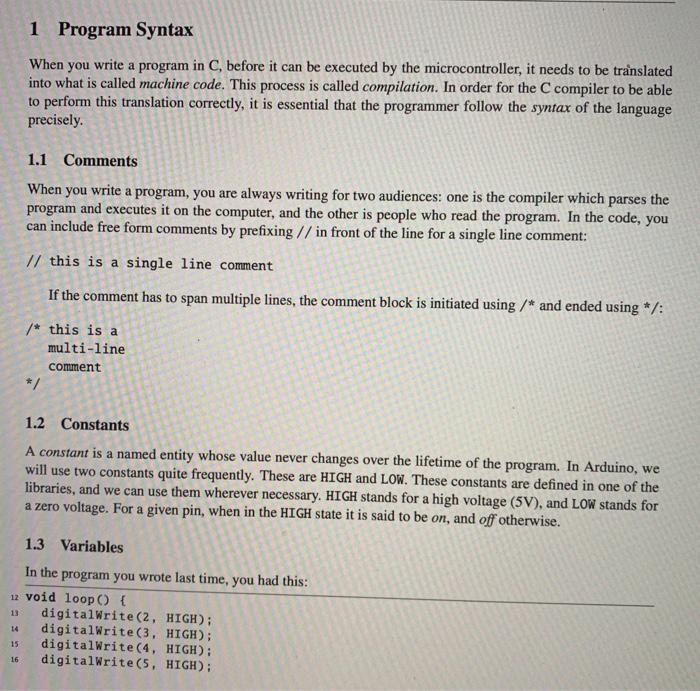
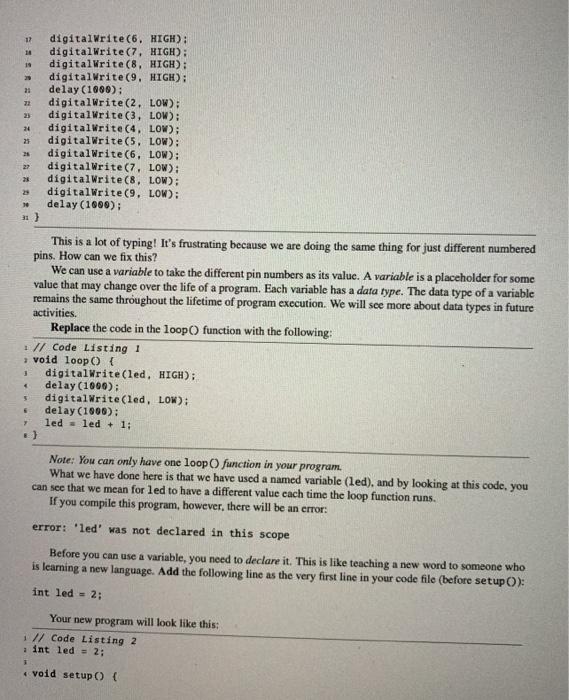
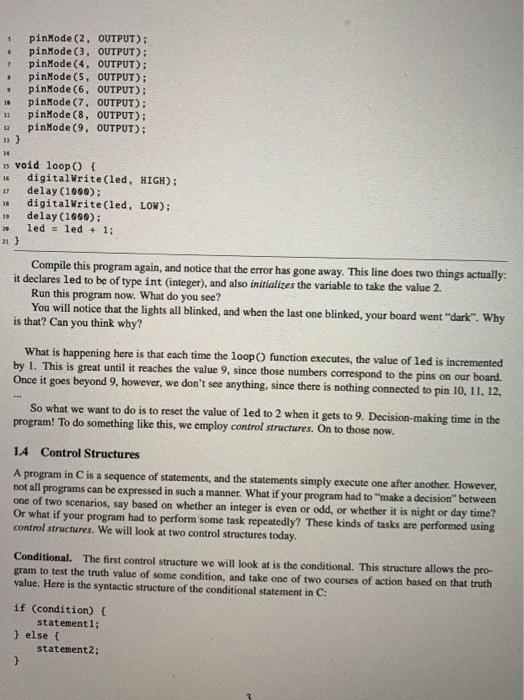
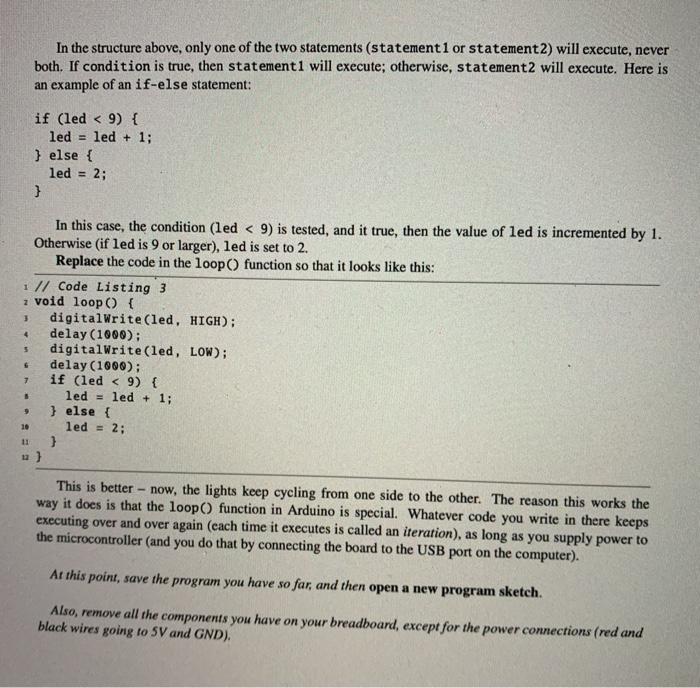
1 Program Syntax When you write a program in C, before it can be executed by the microcontroller, it needs to be translated into what is called machine code. This process is called compilation. In order for the C compiler to be able to perform this translation correctly, it is essential that the programmer follow the syntax of the language precisely. 1.1 Comments When you write a program, you are always writing for two audiences: one is the compiler which parses the program and executes it on the computer, and the other is people who read the program. In the code, you can include free form comments by prefixing // in front of the line for a single line comment: // this is a single line comment If the comment has to span multiple lines, the comment block is initiated using /* and ended using */: /* this is a multi-line comment */ 1.2 Constants A constant is a named entity whose value never changes over the lifetime of the program. In Arduino, we will use two constants quite frequently. These are HIGH and Low. These constants are defined in one of the libraries, and we can use them wherever necessary. HIGH stands for a high voltage (5V), and LOW stands for a zero voltage. For a given pin, when in the HIGH state it is said to be on, and off otherwise. 1.3 Variables In the program you wrote last time, you had this: 12 void loop() { digitalWrite(2, HIGH); digitalWrite(3, HIGH); digitalWrite(4, HIGH): digitalWrite(5, HIGH); 15 16 12 10 19 21 22 25 24 25 25 27 10 digitalWrite(6. HIGH): digitalWrite(7. HIGH): digitalWrite(8. HIGH): digitalWrite(9, HIGH): delay (1800): digitalWrite(2. LOW): digitalWrite(3, LOW): digitalWrite(4, LOW); digitalWrite(5, LOW): digitalWrite(6. LOW): digitalWrite(7. LOW): digitalWrite(8, LOW): digitalWrite(9. LOW): delay (1980); 31) This is a lot of typing! It's frustrating because we are doing the same thing for just different numbered pins. How can we fix this? We can use a variable to take the different pin numbers as its value. A variable is a placeholder for some value that may change over the life of a program. Each variable has a data type. The data type of a variable remains the same throughout the lifetime of program execution. We will see more about data types in future activities. Replace the code in the loop function with the following: // Code Listing 1 ; void loop() { digitalWrite(led, HIGH); delay(1000); digitalWrite(led, LOW): delay (1900): led led + 1: 5 6 Note: You can only have one loop function in your program. What we have done here is that we have used a named variable (led), and by looking at this code, you can see that we mean for led to have a different value cach time the loop function runs. If you compile this program, however, there will be an error: error: 'led' was not declared in this scope Before you can use a variable, you need to declare it. This is like teaching a new word to someone who is learning a new language. Add the following line as the very first line in your code file (before setup O): int led = 2; Your new program will look like this: 1 // Code Listing 2 int led = 2; * void setup() { $ > . pinMode(2, OUTPUT); pinMode(3, OUTPUT): pinMode(4, OUTPUT): pinMode(5, OUTPUT); pinMode(6. OUTPUT); pinMode(7. OUTPUT); pinMode(8, OUTPUT); pinMode(9, OUTPUT): 3 10 11 12 11) 14 16 17 18 13 void loop() { digitalWrite(led, HIGH); delay (1996): digitalWrite(led. LOW): delay (1996): 29 led = led + 1; Compile this program again, and notice that the error has gone away. This line does two things actually: it declares led to be of type int (integer), and also initializes the variable to take the value 2. Run this program now. What do you see? You will notice that the lights all blinked, and when the last one blinked, your board went "dark". Why is that? Can you think why? What is happening here is that each time the loop() function executes, the value of led is incremented by 1. This is great until it reaches the value 9, since those numbers correspond to the pins on our board. Once it goes beyond 9, however, we don't see anything, since there is nothing connected to pin 10, 11, 12, So what we want to do is to reset the value of led to 2 when it gets to 9. Decision-making time in the program! To do something like this, we employ control structures. On to those now. 1.4 Control Structures A program in C is a sequence of statements, and the statements simply execute one after another. However, not all programs can be expressed in such a manner. What if your program had to make a decision" between one of two scenarios, say based on whether an integer is even or odd, or whether it is night or day time? Or what if your program had to perform some task repeatedly? These kinds of tasks are performed using control structures. We will look at two control structures today, Conditional. The first control structure we will look at is the conditional. This structure allows the pro- gram to test the truth value of some condition, and take one of two courses of action based on that truth value. Here is the syntactic structure of the conditional statement in C: if (condition) { statement 1: } else { statement 2: } In the structure above, only one of the two statements (statement1 or statement2) will execute, never both. If condition is true, then statement 1 will execute; otherwise, statement2 will execute. Here is an example of an if-else statement: if (led
Step by Step Solution
There are 3 Steps involved in it

Get step-by-step solutions from verified subject matter experts