







Question: needs python language Part 2 (10 points) Write a GUI named FileCountExplorer that creates an interface that allows the user to pick a folder using
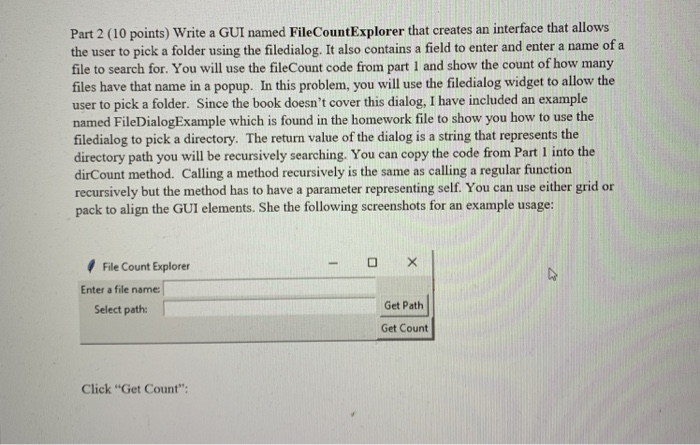
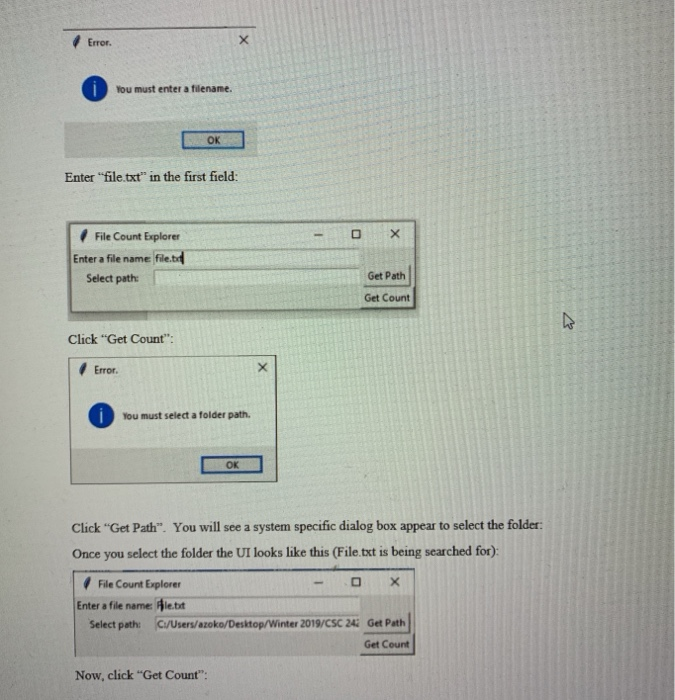
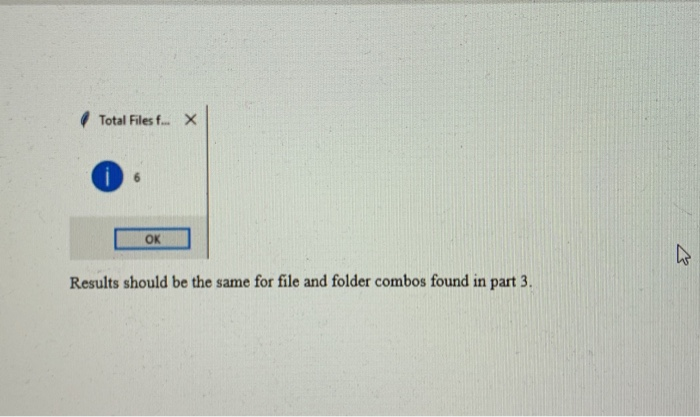
Part 2 (10 points) Write a GUI named FileCountExplorer that creates an interface that allows the user to pick a folder using the filedialog. It also contains a field to enter and enter a name of a file to search for. You will use the fileCount code from part I and show the count of how many files have that name in a popup. In this problem, you will use the filedialog widget to allow the user to pick a folder. Since the book doesn't cover this dialog, I have included an example named FileDialogExample which is found in the homework file to show you how to use the filedialog to pick a directory. The return value of the dialog is a string that represents the directory path you will be recursively searching. You can copy the code from Part 1 into the dirCount method. Calling a method recursively is the same as calling a regular function recursively but the method has to have a parameter representing self. You can use either grid or pack to align the GUI elements. She the following screenshots for an example usage: File Count Explore Enter a file name: Get Path Select path Get Count Click "Get Count" Error. 1 You must enter a filename. OK Enter "file.txt" in the first field: File Count xplorer Enter a file name f Get Path Select path: Get Count Click "Get Count: Error. You must select a folder path. OK Click "Get Path". You will see a system specific dialog box appear to select the folder Once you select the folder the UI looks like this (File.txt is being searched for): File Count Explorer Enter a file name Ale.bt Select path: C/Uses/azoko/Destop/Winter 2019/CSC 24i Get Path Get Count Now, click "Get Count
Step by Step Solution
There are 3 Steps involved in it

Get step-by-step solutions from verified subject matter experts
 Study Help