







Question: Needs to be a macro that populates the average delay and Efficiency columns after the add values button is pressed Part C Using VB Excel,
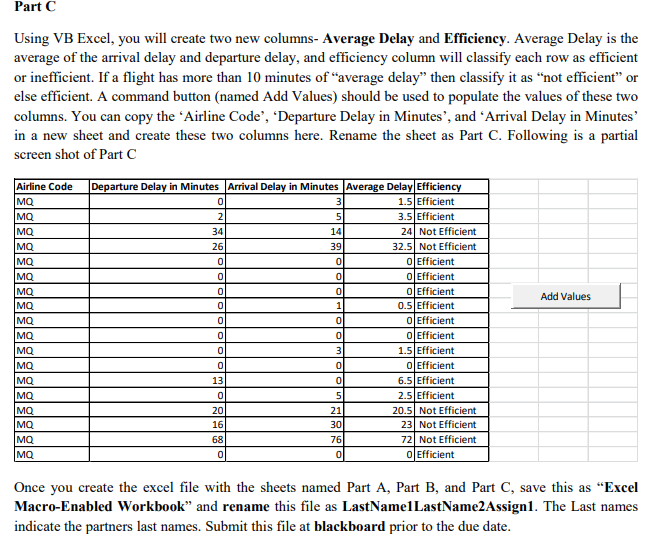 Needs to be a macro that populates the "average delay" and "Efficiency" columns after the "add values" button is pressed
Part C Using VB Excel, you will create two new columns- Average Delay and Efficiency. Average Delay is the average of the arrival delay and departure delay, and efficiency column will classify each row as efficient or inefficient. If a flight has more than 10 minutes of "average delay" then classify it as "not efficient" or else efficient. A command button (named Add Values) should be used to populate the values of these two columns. You can copy the 'Airline Code', 'Departure Delay in Minutes', and 'Arrival Delay in Minutes in a new sheet and create these two columns here. Rename the sheet as Part C. Following is a partial screen shot of Part C Airline Code Departure Delay in Minutes Arrival Delay in Minutes Average Delay Efficie 1.5 Efficient 3.5 Efficient 24 Not Efficient 2.5 Not Efficient 34 14 26 39 O Efficient 0 Efficient O Efficient 0.5 Efficient 01 Efficient OEfficient 1.5 Efficient 0 Efficient 6.5Efficient 2.5 Efficient Ma Add Values MQ MQ Ma 13 20 16 20.5 Not Efficient 23 Not Efficient 72 Not Efficient 21 76 O Efficient Once you create the excel file with the sheets named Part A, Part B, and Part C, save this as "Excel Macro-Enabled Workbook" and rename this file as LastNamelLastName2Assign1. The Last names indicate the partners last names. Submit this file at blackboard prior to the due date
Step by Step Solution
There are 3 Steps involved in it

Get step-by-step solutions from verified subject matter experts
 Study Help