







Question: NEEDS TO BE IN PYTHON!: Program Behavior The program will repeatedly read numbers entered by the user and respond accordingly. Below is a sample run
NEEDS TO BE IN PYTHON!:
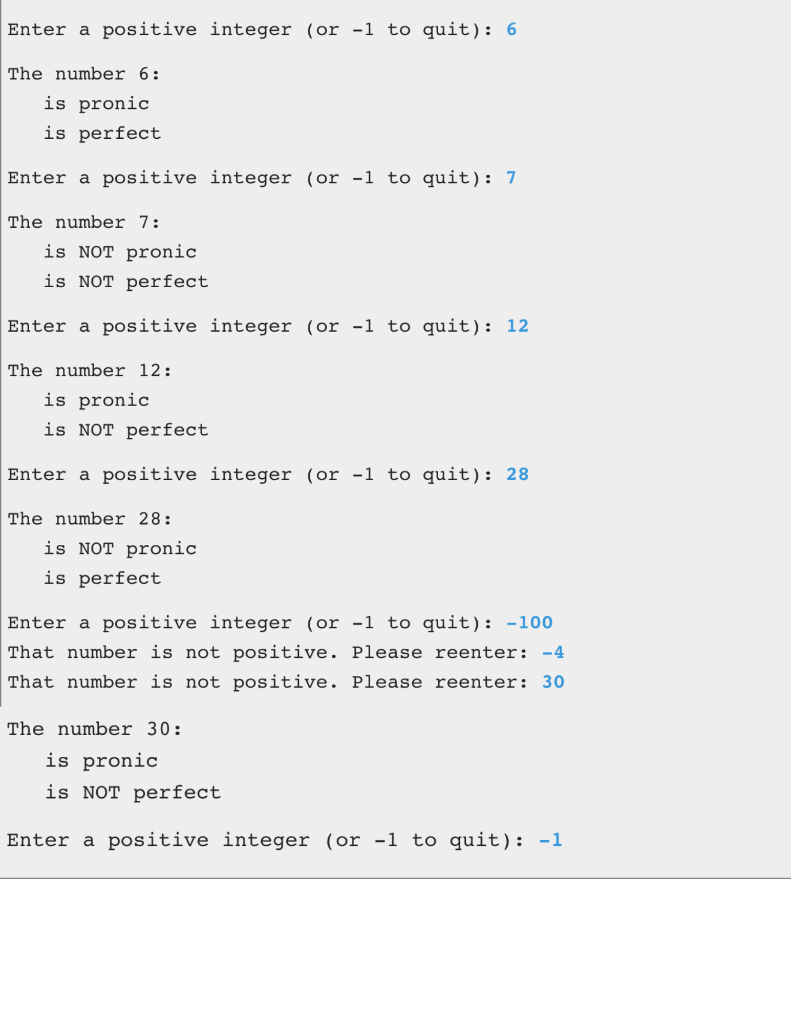
Program Behavior The program will repeatedly read numbers entered by the user and respond accordingly. Below is a sample run of the program. User input is shown in blue. A value of -1 is used as a sentinel value as the indication the user wants to end the program.
Your program should include the following functions:
get_number - This function reads an integer from the user, validates it, and returns it. The function should reprompt the user as many times as necessary until the user enters a positive integer or the sentinel value. This function accepts no arguments.
is_pronic - This predicate function accepts an integer argument and returns True if the argument is a pronic number and False otherwise. The function should check to see if the product of any two consecutive integers between 1 and a max value equals the argument. The max value checked should be the ceiling of the square root of the argument (any consecutive pair past that max value will be greater than the argument and therefore need not be checked). Use the max.ceil and max.sqrt functions.
is_perfect - This predicate function accepts an integer argument and returns True if the argument is a perfect number and False otherwise. The function should check to see if the sum of add up all integer divisors of the argument, except itself, equals the argument.
main - This function represents the main program. It contains the loop that processes multiple values, calling the other functions as needed. Call the get_number function initially to get the first input value, then loop to process the value and get the next one,
Other than the definitions of the functions described above, the only code in the module should be the following, at the end of the file:
# Call main like this to keep Web-CAT happy: if __name__ == '__main__': main()
Your program should conform to the prompts and behavior displayed above. Include blank lines in the output as shown. Indent the output for the categorization by three spaces as shown.
When submitted, your program will be tested using data other than the examples shown. This was just a sample run. Make sure your program follows all other requirements in this specification.
Note that the program should NOT process the sentinel value. That is, don't try to determine if the sentinel value is pronic or perfect.
Enter a positive integer (or 1 to quit) : 6 The number 6: is pronic is perfect Enter a positive integer (or 1 to quit) : 7 The number 7: is NOT pronic is NOT perfect Enter a positive integer (or 1 to quit) : 12 The number 12 : is pronic is NOT perfect Enter a positive integer (or 1 to quit) : 28 The number 28 : is NOT pronic is perfect Enter a positive integer (or 1 to quit) : 100 That number is not positive. Please reenter: 4 That number is not positive. Please reenter: 30 The number 30 : is pronic is NOT perfect Enter a positive integer (or 1 to quit) : 1
Step by Step Solution
There are 3 Steps involved in it

Get step-by-step solutions from verified subject matter experts
 Study Help