







Question: NEEDS TO BE IN PYTHON TEXT FILE: SKELETON CODE: class ContactInfo (object): # constructor def __init__ (self, street, city, state, zip_code, country, phone, email): #
NEEDS TO BE IN PYTHON

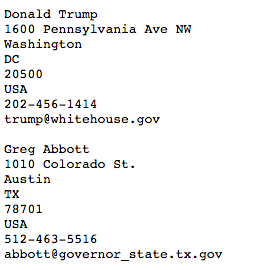
TEXT FILE:
SKELETON CODE:
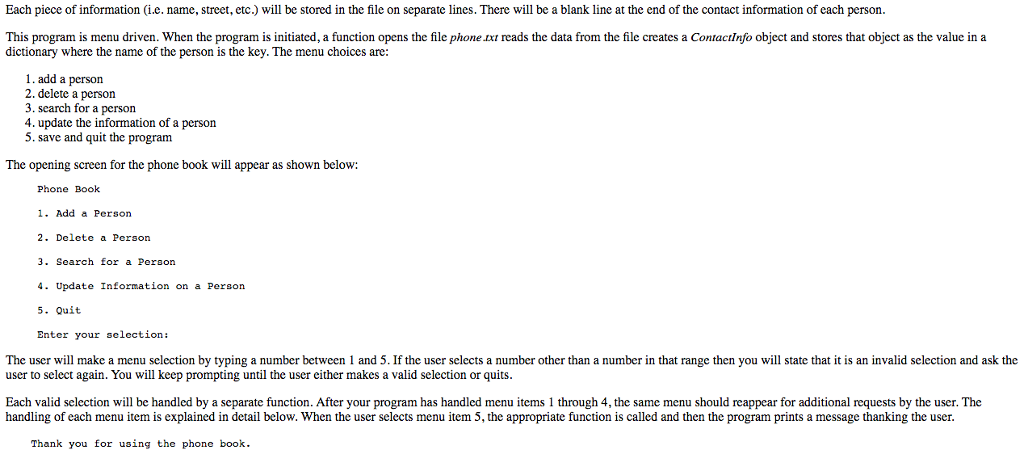
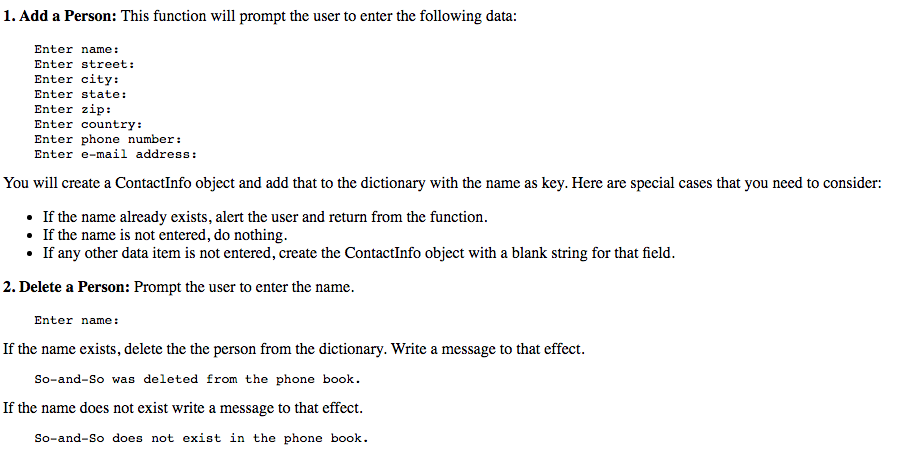
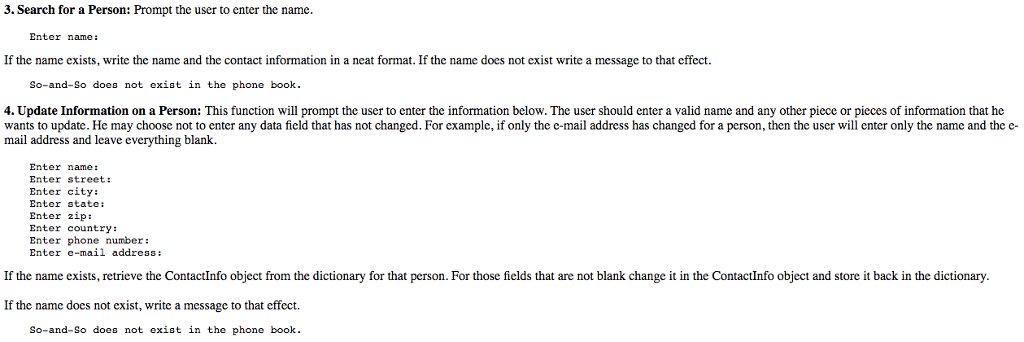
class ContactInfo (object): # constructor def __init__ (self, street, city, state, zip_code, country, phone, email): # string representation of Contact Info def __str__ (self): # Define global dictionary to hold all the contact information phone_book = {} # This function adds the contact information of a new person in the # dictionary def add_person(): # Prompt the user to enter the name of the new person # Check if name exists in phone book. If it does print a message # to that effect and return # Prompt the user to enter the required contact information # Create the ContactInfo object contactObj = ContactInfo (street, city, state, zip_code, country, phone, email) # Add the name and the contact information to the phone dictionary # Print message that the information was added successfully # This function deletes an existing person from the phone dictionary def delete_person(): # Prompt the user to enter the name of the person # If the name exists in phone book delete it. # Print message as to the action. # This function updates the information of an existing person def update_person(): # Prompt the user to enter the name of the person # Check if name exists in phone book. If it does prompt # the user to enter the required information. # Write a message as to the action # This function prints the contact information of an existing person def search_person(): # Prompt the user to enter the name of the person # Check if name exists in phone book. If it does print the # information in a neat format. # If the name does not exist print a message to that effect. # This function open the file for writing and writes out the contents # of the dictionary. def save_quit(): # Open file for writing # Iterate through the dictionary and write out the items in the file # Close file # Print message # This function prints the menu, prompts the user for his/her selection # and returns it. def menu(): # This function opens the file for reading, reads the contact information # for each person and adds it to the dictionary. def create_phone_book(): # Open file for reading in_file = open ("./phone.txt", "r") # Read first line (name) line = in_file.readline() line = line.strip() # Loop through the entries for each person while (line != ""): name = line # Read street # Read city # Read state # Read zip-code # Read country # Read phone number # Read e-mail address # Read blank line # Read first line of the next block of data line = in_file.readline() line = line.strip() # Create ContactInfo object # Add to phone dictionary # Close file def main(): # Read file and create phone book dictionary create_phone_book() # Print logo print("Phone Book") # Print menu and get selection selection = menu() # Process request, print menu and prompt again and again # until the user types 5 to quit. # Save, print goodbye message, quit Each piece of information (i.e. name, street, etc.) will be stored in the file on separate lines. There will be a blank line at the end of the contact information of each person. This program is menu driven. When the program is initiated, a function opens the file phone xt reads the data from the file creates a Contactlnfo object and stores that object as the value in a dictionary where the name of the person is the key. The menu choices are: 1. add a person 2. delete a person 3. search for a person 4. update the information of a person 5. save and quit the program The opening screen for the phone book will appear as shown below: Phone Book 1. Add a Perso 2 Delete a Person 3. Search for a Peraon 4.Update Information on a Person Quit Enter your selection: The user wll make a menu selection by typing a number between 1 and 5. If the user selects a number other than a number in that range then you will state that it is an invalid selection and ask the user to select again. You will keep prompting until the user either makes a valid selection or quits. Each valid selection will be handled by a separate function. After your program has handled menu items 1 through 4, the same menu should reappear for additional requests by the user. The handling of each menu item is explained in detail below. When the user selects menu item 5, the appropriate function is called and then the program prints a message thanking the user. Thank you for using the phone book
Step by Step Solution
There are 3 Steps involved in it

Get step-by-step solutions from verified subject matter experts
 Study Help