







Question: NETW251 - Network Design and Implementation Week 3 - Command Line Interface (CLT) Assessment Deadline Due by the end of Week 3 at 11:59 pm.
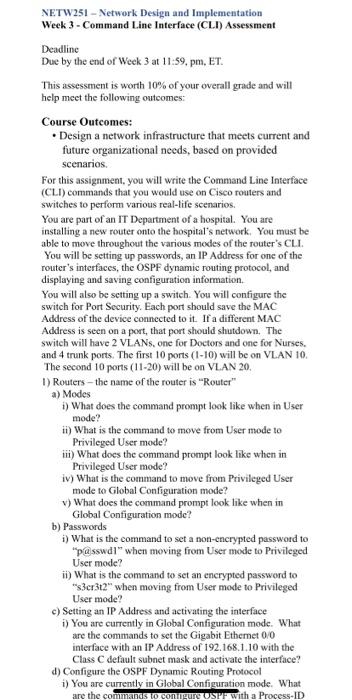
NETW251 - Network Design and Implementation Week 3 - Command Line Interface (CLT) Assessment Deadline Due by the end of Week 3 at 11:59 pm. ET. This assessment is worth 10% of your overall grade and will help meet the following outcomes: Course Outcomes: Design a network infrastructure that meets current and future organizational needs, based on provided scenarios. For this assignment, you will write the Command Line Interface (CLI) commands that you would use on Cisco routers and switches to perform various real-life scenarios. You are part of an IT Department of a hospital. You are installing a new router onto the hospital's network. You must be able to move throughout the various modes of the router's CLI. You will be setting up passwords, an IP Address for one of the router's interfaces, the OSPF dynamic routing protocol, and displaying and saving configuration information. You will also be setting up a switch. You will configure the switch for Port Security. Each port should save the MAC Address of the device connected to it. If a different MAC Address is seen on a port that port should shutdown. The switch will have 2 VLANs, one for Doctors and one for Nurses. and 4 trunk ports. The first 10 ports (1-10) will be on VLAN 10. The second 10 ports (11-20) will be on VLAN 20. 1) Routers - the name of the router is "Router" a) Modes 1) What does the command prompt look like when in User mode? in) What is the command to move from User mode to Privileged User mode? II) What does the command prompt look like when in Privileged User mode? iv) What is the command to move from Privileged User mode to Global Configuration mode? v) What does the command prompt look like when in Global Configuration mode? b) Passwords 1) What is the command to set a non-encrypted password to "passwdi" when moving from User mode to Privileged User mode? ii) What is the command to set an encrypted password to **s3cr3t2" when moving from User mode to Privileged User mode? c) Setting an IP Address and activating the interface i) You are currently in Global Configuration mode. What are the commands to set the Gigabit Ethemet 0/0 interface with an IP Address of 192.168.1.10 with the Class C default subnet mask and activate the interface? d) Configure the OSPF Dynamic Routing Protocol i) You are currently in Global Configuration made. What are the commands to contigure USPF with a Process-ID
Step by Step Solution
There are 3 Steps involved in it

Get step-by-step solutions from verified subject matter experts
 Study Help