







Question: NO MODULES ARE MISSING ALL INFORMATION IS GIVEN BELOW THE PROGRAM NEEDS TO BE IN MVC AS LISTED BELOW BUT IT DOESNT NOT HAVE TO
NO MODULES ARE MISSING ALL INFORMATION IS GIVEN BELOW
THE PROGRAM NEEDS TO BE IN MVC AS LISTED BELOW BUT IT DOESNT NOT HAVE TO BE HARRY POTTER ORIENTED AS THE ONE IS BELOW. HOWEVER IT NEEDS TO BE IN THE SAME FORMAT/STRUCTURE THANK OY IN ADVANCE!!!!
Objectives:
JavaFX
File I/O
Collections - Map
Task: Hogwarts software 2.0
You did such a great job on your program for Hogwarts 1.0 that the school for witchcraft & wizardry has decided to hire you again - congratulations! This time, Headmaster Dumbledore is interested in an app to help with enrollment of students in their houses.
Getting Started
To begin this lab, create a new JavaFX project named abc123-lab6, and create the following packages, classes, and FXML files: (Note that you can and should reuse your code wherever possible from Hogwarts 1.0)
application.Main
application.controller.MainController
application.controller.HouseController
application.controller.EnrollmentController
application.model.House
application.model.Student
Main.fxml
Enroll.fxml
House.fxml
App Design
Your program will show a view similar to the one shown below when the app is run: 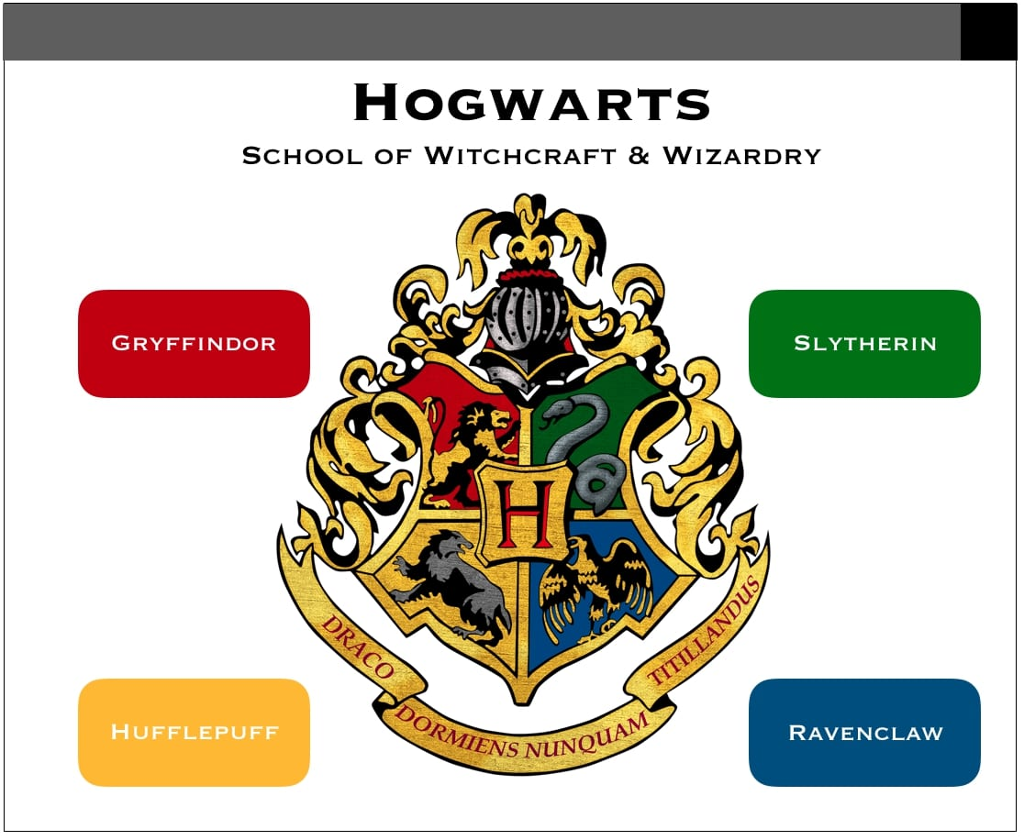 This view will be the Main.fxml. If the user clicks on any of the house buttons (i.e. Gryffindor), the app will display information about that house, including its students:
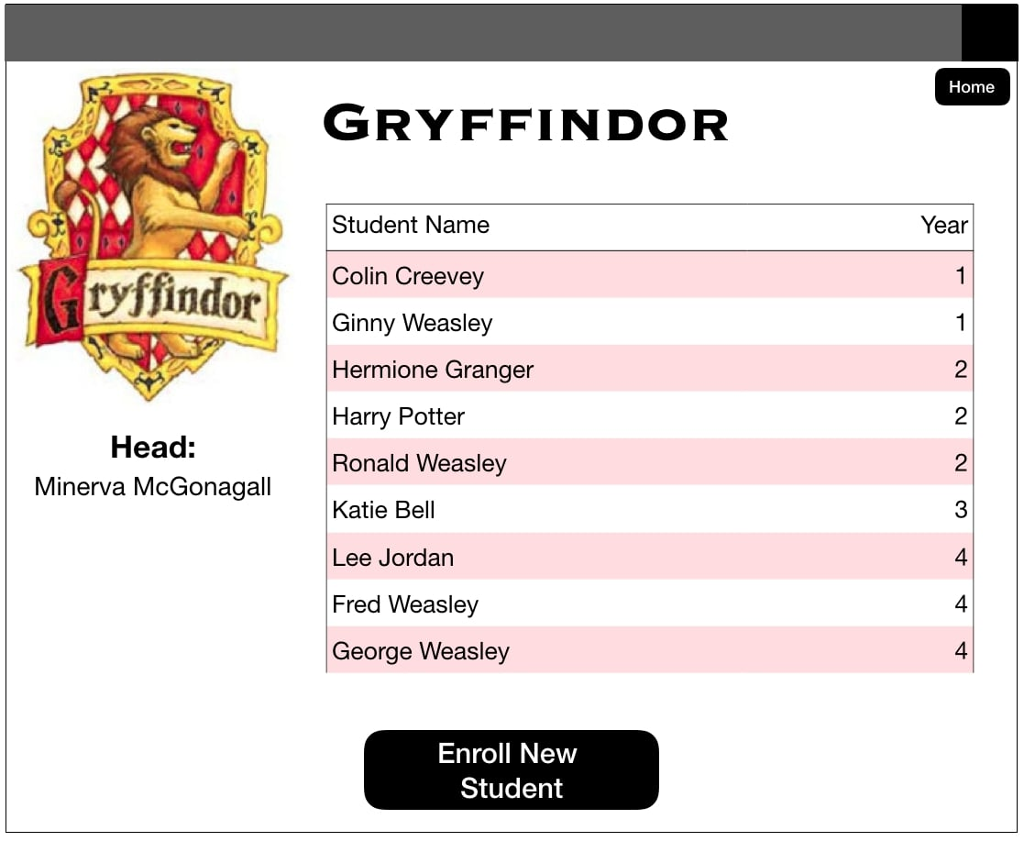
This view will be the House.fxml. From the house view, if the user clicks the Enroll New Student button, the app will display a page for enrolling new students into that house:
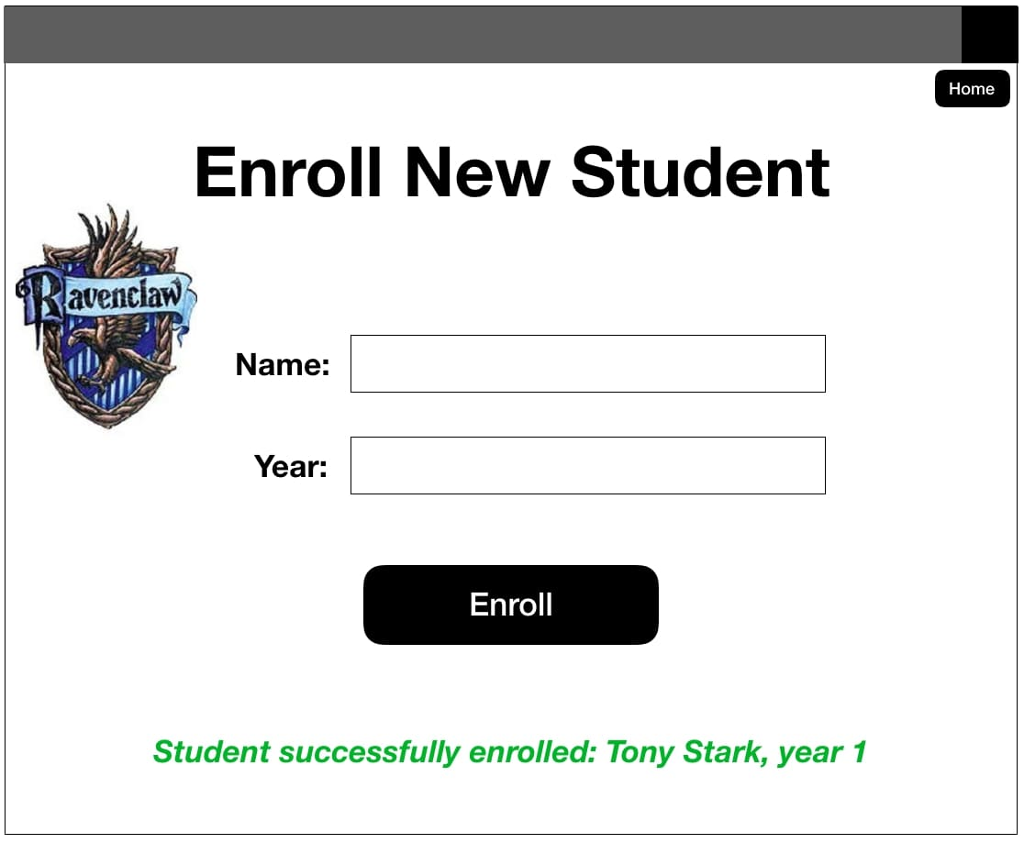
This view will be the Enroll.fxml.
It's officially time to get creative! You may choose the images, fonts, colors, app size, and any other style features. Use this opportunity to learn about background colors, good user design, or any aspects that might be useful to your team project. The above views are minimal examples of the requirements for the lab - your submission must reflect all GUI components shown. For your convenience, all images in this example app are available here. (Remember to include all files in your exported Eclipse project!) You may assume the number of houses (4) will not change, nor will their names or colors. Your app should accommodate any number of students in any of these houses (within reason).
Making it Work
Main.java will launch the application and show Main.fxml. MainController.java will be the EventHandler for this fxml, and should be connected to all buttons in this view. If the user chooses one of the house buttons, MainController will replace the current scene on the stage with House.fxml. The controller should call on the model of the application to populate House.fxml with the appropriate house information, based upon which button was pressed. Hint:One solution to displaying lists of students is to use the javafx.scene.ListView class.
The Model
The model of this application will be School.java, which will utilize House.java and Student.java. If you plan to use your code from Lab 1, copy these classes from that Eclipse project and paste them into this one. If Eclipse asks about "copying the files" versus "linking to the files", choose to copy them (this ensures they will be located in the correct project and exported properly). Be sure to update these classes as needed, adding any variables or methods needed for this new version of the software. This app will have a single School object, which will contain four House objects. Following the MVC design pattern, none of the model classes may directly update the view - this should always be handled by a constructor. You will need to decide what other methods are needed in these classes. As a general rule, always include getters and setters for all class variables.
School objects must each have a name and four House objects.
House objects must each have a name, a color, the name of a professor who is the Head of the house, and a collection of Student objects. Houses also have a crest/logo associated with them, examples have been provided with this lab. For convenience, the heads of each house are currently assigned (but should be able to change in the future - read and save these from a file!):
Gryffindor: Minerva McGonagall
Ravenclaw: Filius Flitwick
Hufflepuff: Pomona Sprout
Slytherin: Severus Snape
Houses should sort their students by year first, then by last name, then first name. That is, if Ginny Weasley (year 1), Fred Weasley (year 4), and Hermione Granger (year 2) are in Gryffindor, then they should be listed in order with Ginny first, then Hermione, then Fred. Houses should be populated using the data from the text files given in Lab 1. Copy these into your project to ensure they are submitted in your zip file.
Student objects must each have a name (first & last) and a year. For example, the following could be used to instantiate a new Student:
Student student1 = new Student("Harry Potter", 2);
Valid years for students are 1-7.
Enrollment
The enrollment view will be displayed by Enroll.fxml, and EnrollController.java will be the EventHandler for this. The purpose of this view is to enable the user to enroll a student into the house they were previously viewing. The user will input text into the given fields for name and year. They should receive feedback (i.e. red text near to the field name) if they enter incorrect information. An example of incorrect information would be a year outside of the valid range for a student. Upon succesful completion/enrollment of a student, the user should see confirmation that the enrollment has occurred, including the student's name and year. (See view above for an example - the confirmation is the green text, which does not show until an enrollment is succesful.) This allows the user to continue and enroll another student in the same house. Data When a student is enrolled, their information should be saved to the appropriate file. Therefore, when the house view is opened again, they should appear in the list of students in that house.
Step by Step Solution
There are 3 Steps involved in it

Get step-by-step solutions from verified subject matter experts
 Study Help