







Question: Normal No Spaci... Heading 1 Heading 2 Title Paragraph Styles Intermediate Spreadsheet Concepts Exercise 7 ou have been asked to prepare a spreadsheet to show
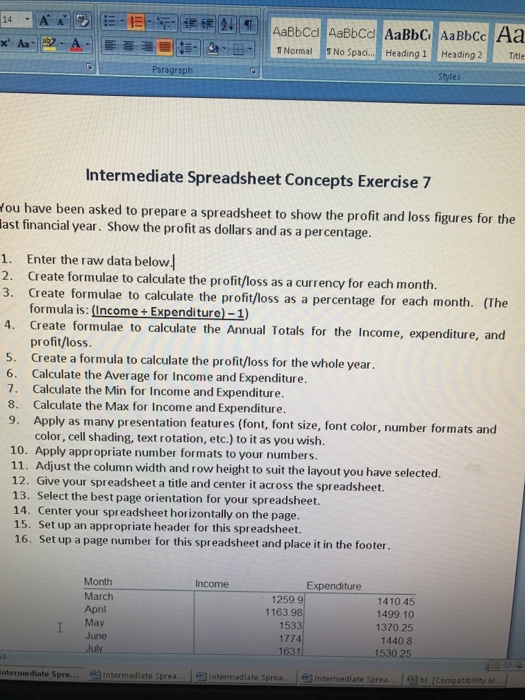
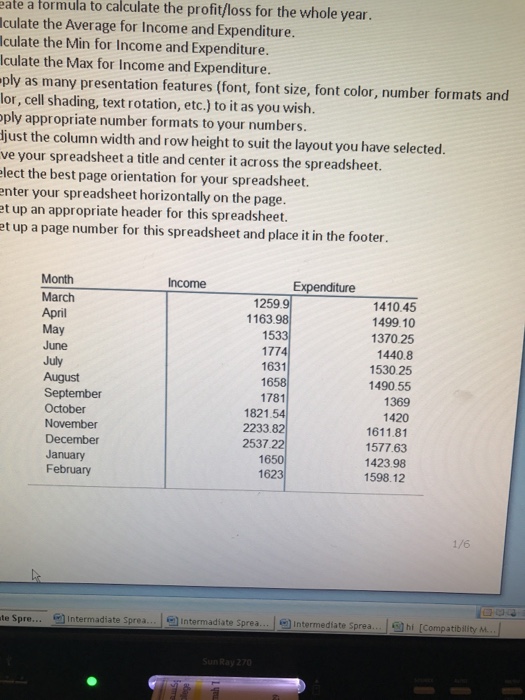
Normal No Spaci... Heading 1 Heading 2 Title Paragraph Styles Intermediate Spreadsheet Concepts Exercise 7 ou have been asked to prepare a spreadsheet to show the profit and loss figures for the last financial year. Show the profit as dollars and as a percentage. 1. Enter the raw data below 2. Create formulae to calculate the profit/loss as a currency for each month 3. Create formulae to calculate the profit/loss as a percentage for each month. (The formula is: (Income+ Expenditure)-1) 4. Create formulae to calculate the Annual Totals for the Income, expenditure, and profit/loss 5. Create a formula to calculate the profit/loss for the whole year Calculate the Average for Income and Expenditure. 7. 6. Calculate the Min for Income and Expenditure. 8. Calculate the Max for Income and Expenditure. 9. Apply as many presentation features (font, font size, font color, number formats and color, cell shading, text rotation, etc.) to it as you wish. 10. Apply appropriate number formats to your numbers. 11. Adjust the column width and row height to suit the layout you have selected. 12. Give your spreadsheet a title and center it across the spreadsheet. 13. Select the best page orientation for your spreadsheet. 14. Center your spreadsheet horizontally on the page. 15. Set up an appropriate header for this spreadsheet. 16. Set up a page number for this spreadsheet and place it in the footer Month March April May June July Income Expenditure 1259.9 1163.98 1533 1774 1410.45 1499.10 1370 25 1440 8 1530.25 ntermediate Spre intermadiate preaIntermadiate Sprea 1 Intermediate Sprea Compatibility M
Step by Step Solution
There are 3 Steps involved in it

Get step-by-step solutions from verified subject matter experts
 Study Help