



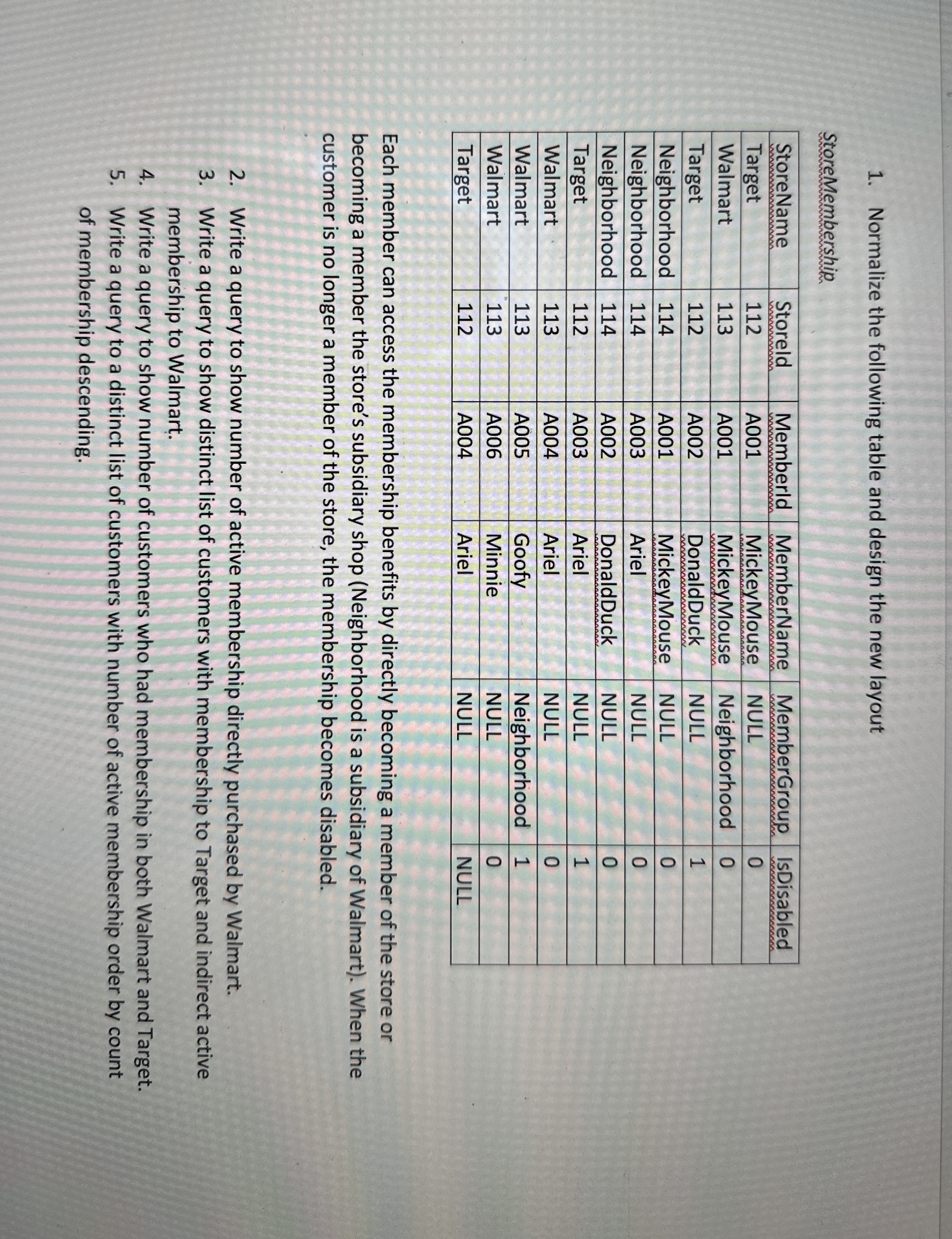
Question: Normalize the following table and design the new layout StoreMembership table [ [ StoreName , Storeld,Memberld,MemberName,MemberGroup,IsDisabled ] , [ Target , 1 1 2
Normalize the following table and design the new layout
StoreMembership
tableStoreNameStoreld,Memberld,MemberName,MemberGroup,IsDisabledTargetAMickeyMouse,NULL,WalmartAMickeyMouse,Neighborhood,TargetADonaldDuck,NULL,NeighborhoodAMickeyMouse,NULL,NeighborhoodAAriel,NULL,NeighborhoodADonaldDuck,NULL,TargetAAriel,NULL,WalmartAAriel,NULL,WalmartAGoofy,Neighborhood,WalmartAMinnie,NULL,TargetAAriel,NULL,NULL
Each member can access the membership benefits by directly becoming a member of the store or becoming a member the store's subsidiary shop Neighborhood is a subsidiary of Walmart When the customer is no longer a member of the store, the membership becomes disabled.
Write a query to show number of active membership directly purchased by Walmart.
Write a query to show distinct list of customers with membership to Target and indirect active membership to Walmart.
Write a query to show number of customers who had membership in both Walmart and Target.
Write a query to a distinct list of customers with number of active membership order by count of membership descending.
Step by Step Solution
There are 3 Steps involved in it
1 Expert Approved Answer
Step: 1 Unlock

Question Has Been Solved by an Expert!
Get step-by-step solutions from verified subject matter experts
Step: 2 Unlock
Step: 3 Unlock