







Question: NOTE: 1. USE PYCHARM 2020 OR PYTHON 3 2. Program must allow user to input values. For instance: ?u www.google.com 8.8.8.8 3. Please show screenshot
NOTE:
1. USE PYCHARM 2020 OR PYTHON 3
2. Program must allow user to input values. For instance: ?u www.google.com 8.8.8.8
3. Please show screenshot of your program output and program codes.
Problem 2:
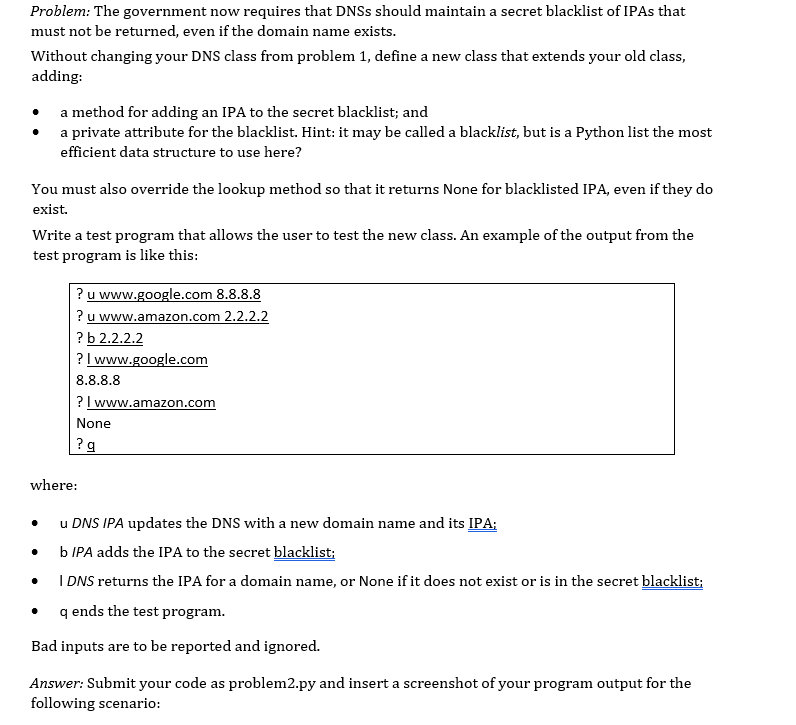

Problem: The government now requires that DNSs should maintain a secret blacklist of IPAs that must not be returned, even if the domain name exists. Without changing your DNS class from problem 1, define a new class that extends your old class, adding: a method for adding an IPA to the secret blacklist; and a private attribute for the blacklist. Hint: it may be called a blacklist, but is a Python list the most efficient data structure to use here? You must also override the lookup method so that it returns None for blacklisted IPA, even if they do exist. Write a test program that allows the user to test the new class. An example of the output from the test program is like this: ? u www.google.com 8.8.8.8 ? u www.amazon.com 2.2.2.2 ? b 2.2.2.2 ? I www.google.com 8.8.8.8 ? I www.amazon.com None ?g where: . u DNS IPA updates the DNS with a new domain name and its IPA; b IPA adds the IPA to the secret blacklist: I DNS returns the IPA for a domain name, or None if it does not exist or is in the secret blacklist; qends the test program. Bad inputs are to be reported and ignored. . a Answer: Submit your code as problem2.py and insert a screenshot of your program output for the following scenario: u www.apple.com 10.10.10.10 ? u www.tesla.com 11.11.11.11 ? O 10.10.10.10 ? 1 www.apple.com ? 1 www.tesla.com
Step by Step Solution
There are 3 Steps involved in it

Get step-by-step solutions from verified subject matter experts
 Study Help