







Question: Note: it does not provide the monthly payment amount . Thanks This is a problem that I must calculate in Excel, I am struggling with
Note: it does not provide the monthly payment amount. Thanks
This is a problem that I must calculate in Excel, I am struggling with it after an hour but not successful, please assist using excel with formulas and show them in each cell. The interest rate increases within the problem itself. The interest rate increases from 9% and back to 8%. The last lump sum ends at period 73. There are a total of 360 periods in total. The only 9% are from period 13 to period 60. The rest of the periods are 8%. Thanks
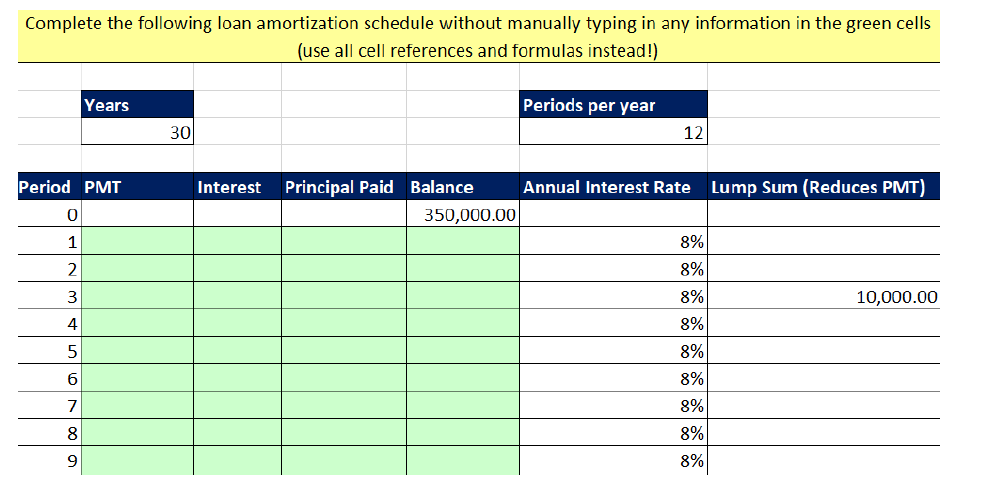
Complete the following loan amortization schedule without manually typing in any information in the green cells (use all cell references and formulas instead!) Years Periods per year 30 12 Period PMT 0 1 Interest Principal Paid Balance Annual Interest Rate Lump Sum (Reduces PMT) 350,000.00 8% 8% 3 4 5 10,000.00 8% 8% 8% 8% 8% 7 9 Complete the following loan amortization schedule without manually typing in any information in the green cells (use all cell references and formulas instead!) Years Periods per year 30 12 Period PMT 0 1 Interest Principal Paid Balance Annual Interest Rate Lump Sum (Reduces PMT) 350,000.00 8% 8% 3 4 5 10,000.00 8% 8% 8% 8% 8% 7 9
Step by Step Solution
There are 3 Steps involved in it

Get step-by-step solutions from verified subject matter experts
 Study Help