







Question: Note:- It must be in C# language Create a Windows Forms application. Use the following names for the project and solution, respectively: Hales Project and
Note:- It must be in C# language
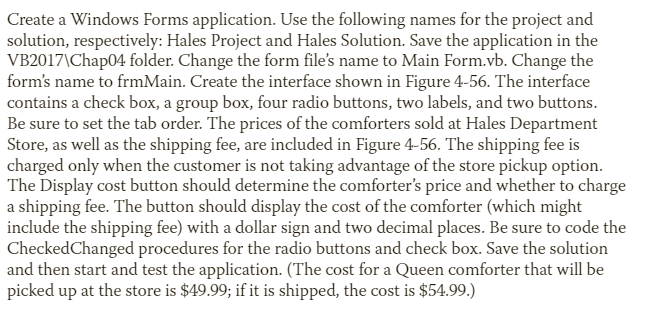
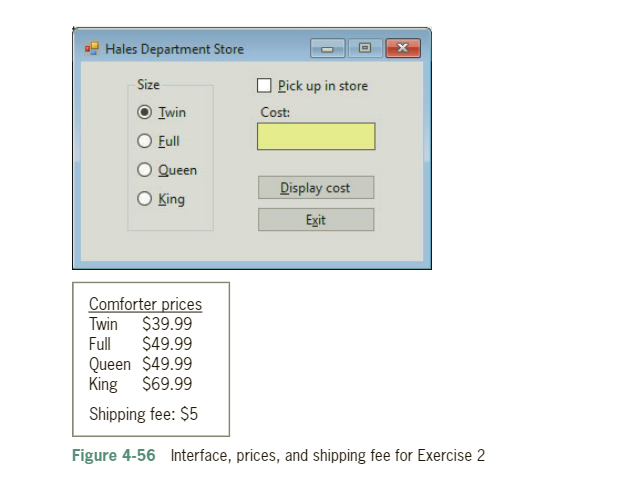
Create a Windows Forms application. Use the following names for the project and solution, respectively: Hales Project and Hales Solution. Save the application in the VB2017\Chap04 folder. Change the form file's name to Main Form.vb. Change the form's name to frmMain. Create the interface shown in Figure 4-56. The interface contains a check box, a group box, four radio buttons, two labels, and two buttons. Be sure to set the tab order. The prices of the comforters sold at Hales Department Store, as well as the shipping fee, are included in Figure 4-56. The shipping fee is charged only when the customer is not taking advantage of the store pickup option. The Display cost button should determine the comforter's price and whether to charge a shipping fee. The button should display the cost of the comforter (which might include the shipping fee) with a dollar sign and two decimal places. Be sure to code the CheckedChanged procedures for the radio buttons and check box. Save the solution and then start and test the application. (The cost for a Queen comforter that will be picked up at the store is $49.99; if it is shipped, the cost is $54.99. Figure 4-56 Interface, prices, and shipping fee for Exercise 2
Step by Step Solution
There are 3 Steps involved in it

Get step-by-step solutions from verified subject matter experts
 Study Help