







Question: NOTE: JUST GOT STARTED ON JAVA FX IN JAVA 2 COURSE Part III Graphics in JavaFX Ball Movement FX: In Eclipse, create a new project
NOTE: JUST GOT STARTED ON "JAVA FX" IN JAVA 2 COURSE
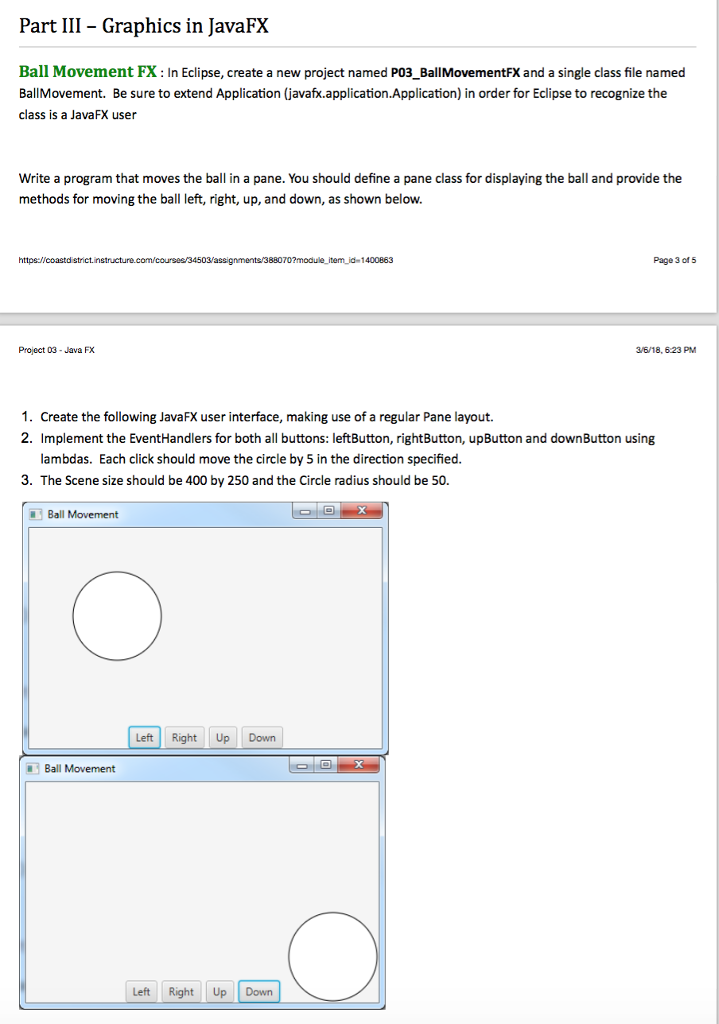
Part III Graphics in JavaFX Ball Movement FX: In Eclipse, create a new project named PO3_BallMovementFX and a single class file named BallMovement. Be sure to extend Application (javafx.application.Application) in order for Eclipse to recognize the class is a JavaFX user Write a program that moves the ball in a pane. You should define a pane class for displaying the ball and provide the methods for moving the ball left, right, up, and down, as shown below. 70?module item id-1400863 Page 3 of 5 Project 03 Java FX 3/6/18, 623 PM 1. Create the following JavaFX user interface, making use of a regular Pane layout. 2. Implement the EventHandlers for both all buttons: leftButton, rightButton, upButton and downButton using lambdas. Each click should move the circle by 5 in the direction specified. 3. The Scene size should be 400 by 250 and the Circle radius should be 50. Ball Movement Left Right Up Down Left Right Up Down
Step by Step Solution
There are 3 Steps involved in it

Get step-by-step solutions from verified subject matter experts
 Study Help