







Question: NOTE : - Question Has to be in a g++ Compiler without any errors ! And do what they ask in question ! in c++
NOTE : - Question Has to be in a g++ Compiler without any errors ! And do what they ask in question ! in c++ language !
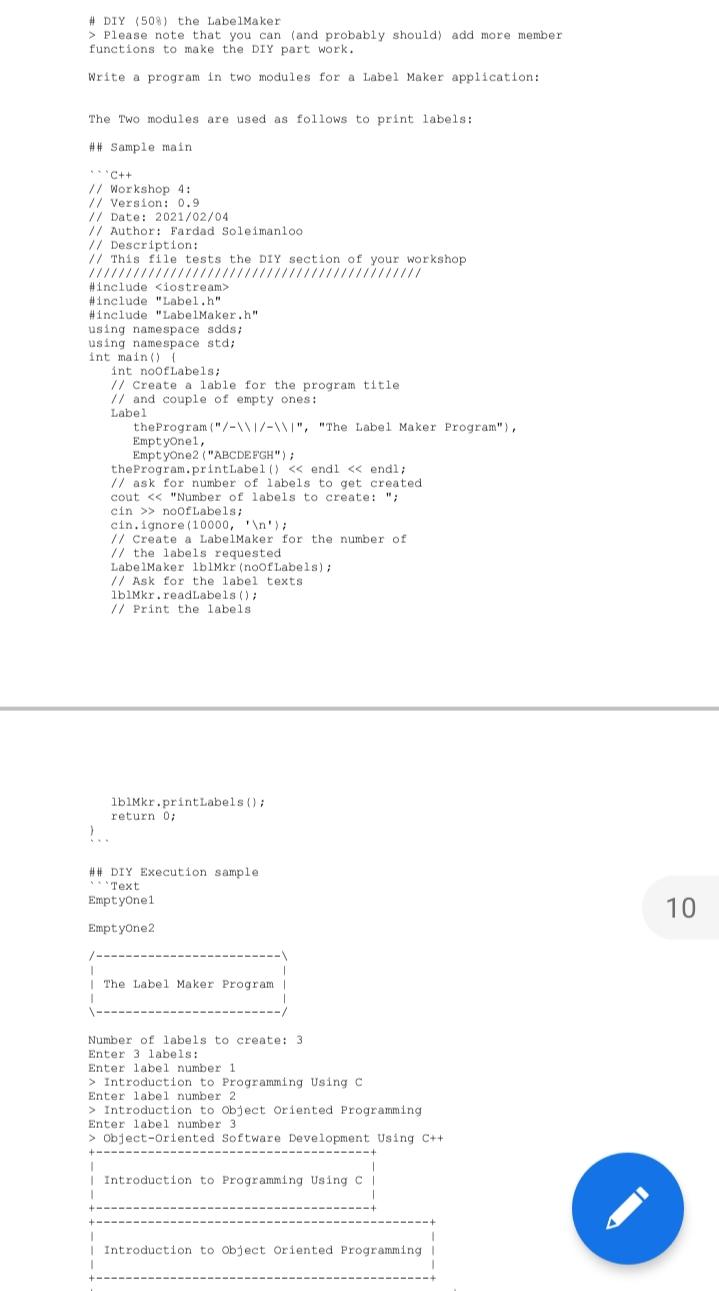
# DIY (508) the Label Maker > Please note that you can (and probably should) add more member functions to make the DIY part work. Write a program in two modules for a Label Maker application: The Two modules are used as follows to print labels: ## Sample main C++ // Workshop 4: // Version: 0.9 // Date: 2021/02/04 // Author: Fardad Soleimanloo // Description: // This file tests the DIY section of your workshop #include
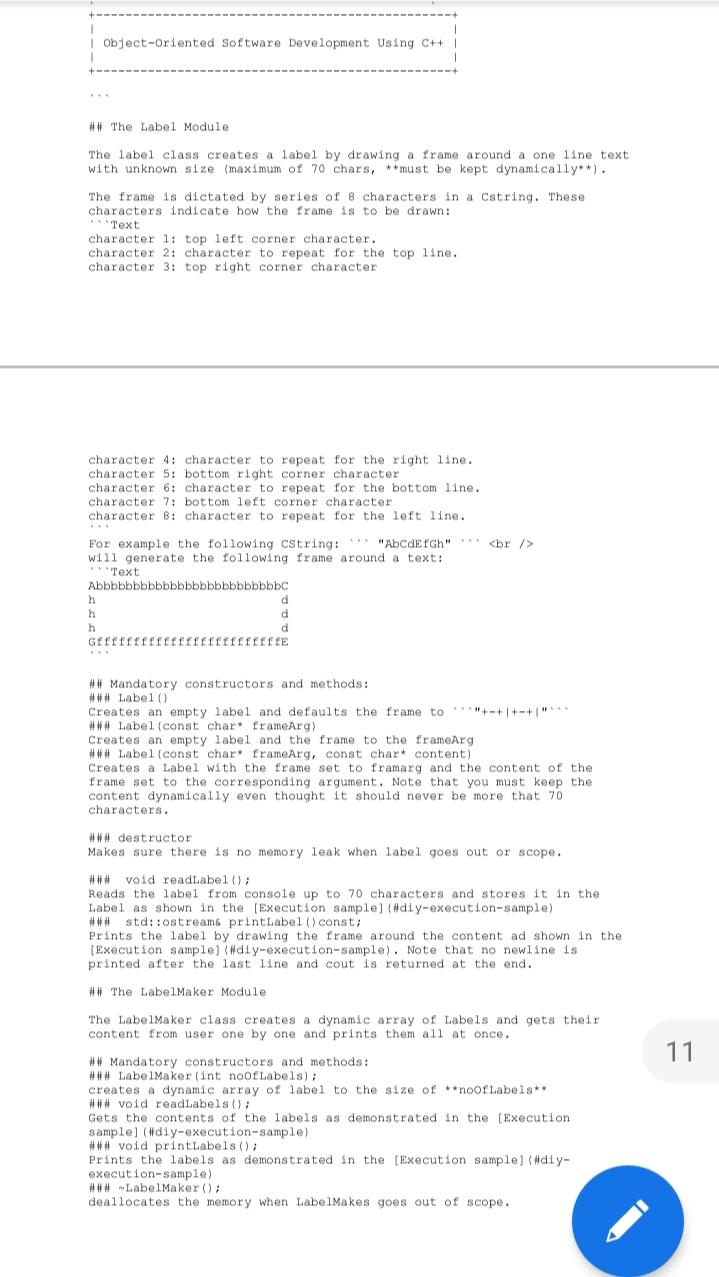
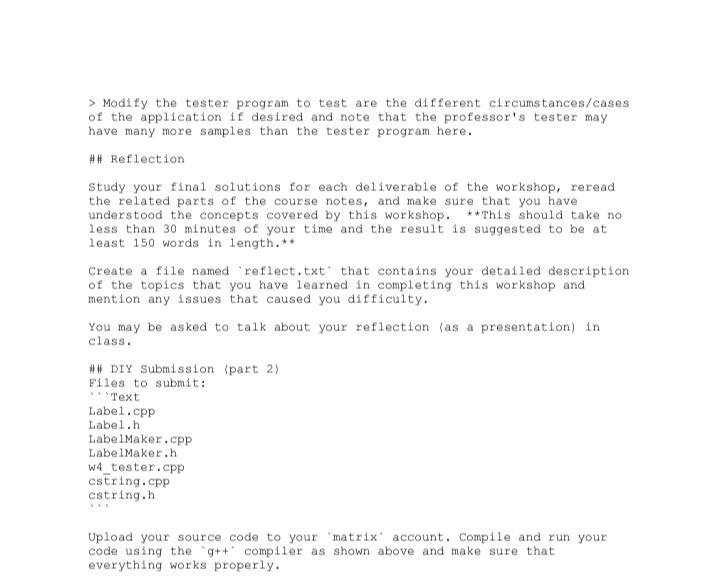
will generate the following frame around a text: Text Abbbbbbbbbbbbbbbbbbbbbbbbbc h d h d h d Gfffffffffffffffffffffffffe ## Mandatory constructors and methods: ### Label Creates an empty label and defaults the frame to **+-+1+-+" ### Label (const char. frameArg) Creates an empty label and the frame to the frameArg ### Label (const char* frameArg, const chart content) Creates a Label with the frame set to framarg and the content of the frame set to the corresponding argument. Note that you must keep the content dynamically even thought it should never be more that 70 characters. ### destructor Makes sure there is no memory leak when label goes out or scope. ### void readLabel(); Reads the label from console up to 70 characters and stores it in the Label as shown in the Execution sample) (#diy-execution-sample) std::ostream& printLabel (const; Prints the label by drawing the frame around the content ad shown in the [Execution sample) (#diy-execution-sample). Note that no newline is printed after the last line and cout is returned at the end. ## The Label Maker Module The LabelMaker class creates a dynamic array of Labels and gets their content from user one by one and prints them all at once. 11 ## Mandatory constructors and methods: ### LabelMaker (int noofLabels); creates a dynamic array of label to the size of **noor Labels ### void readLabels(); Gets the contents of the labels as demonstrated in the [Execution sample) (#diy-execution-sample) ### void printLabels(); Prints the labels as demonstrated in the [Execution sample] (#diy- execution-sample) ### Label Maker(); deallocates the memory when Label.Makes goes out of scope. > Modify the tester program to test are the different circumstances/cases of the application if desired and note that the professor's tester may have many more samples than the tester program here. ## Reflection Study your final solutions for each deliverable of the workshop, reread the related parts of the course notes, and make sure that you have understood the concepts covered by this workshop. **This should take no less than 30 minutes of your time and the result is suggested to be at least 150 words in length. ** Create a file named 'reflect.txt' that contains your detailed description of the topics that you have learned in completing this workshop and mention any issues that caused you difficulty. You may be asked to talk about your reflection as a presentation) in class. ## DIY Submission (part 2) Files to submit: "Text Label.cpp Label.h LabelMaker.cpp LabelMaker.h W4_tester.cpp cstring.cpp cstring.h Upload your source code to your 'matrix account. Compile and run your code using the 'g++ compiler as shown above and make sure that everything works properly. # DIY (508) the Label Maker > Please note that you can (and probably should) add more member functions to make the DIY part work. Write a program in two modules for a Label Maker application: The Two modules are used as follows to print labels: ## Sample main C++ // Workshop 4: // Version: 0.9 // Date: 2021/02/04 // Author: Fardad Soleimanloo // Description: // This file tests the DIY section of your workshop #include
will generate the following frame around a text: Text Abbbbbbbbbbbbbbbbbbbbbbbbbc h d h d h d Gfffffffffffffffffffffffffe ## Mandatory constructors and methods: ### Label Creates an empty label and defaults the frame to **+-+1+-+" ### Label (const char. frameArg) Creates an empty label and the frame to the frameArg ### Label (const char* frameArg, const chart content) Creates a Label with the frame set to framarg and the content of the frame set to the corresponding argument. Note that you must keep the content dynamically even thought it should never be more that 70 characters. ### destructor Makes sure there is no memory leak when label goes out or scope. ### void readLabel(); Reads the label from console up to 70 characters and stores it in the Label as shown in the Execution sample) (#diy-execution-sample) std::ostream& printLabel (const; Prints the label by drawing the frame around the content ad shown in the [Execution sample) (#diy-execution-sample). Note that no newline is printed after the last line and cout is returned at the end. ## The Label Maker Module The LabelMaker class creates a dynamic array of Labels and gets their content from user one by one and prints them all at once. 11 ## Mandatory constructors and methods: ### LabelMaker (int noofLabels); creates a dynamic array of label to the size of **noor Labels ### void readLabels(); Gets the contents of the labels as demonstrated in the [Execution sample) (#diy-execution-sample) ### void printLabels(); Prints the labels as demonstrated in the [Execution sample] (#diy- execution-sample) ### Label Maker(); deallocates the memory when Label.Makes goes out of scope. > Modify the tester program to test are the different circumstances/cases of the application if desired and note that the professor's tester may have many more samples than the tester program here. ## Reflection Study your final solutions for each deliverable of the workshop, reread the related parts of the course notes, and make sure that you have understood the concepts covered by this workshop. **This should take no less than 30 minutes of your time and the result is suggested to be at least 150 words in length. ** Create a file named 'reflect.txt' that contains your detailed description of the topics that you have learned in completing this workshop and mention any issues that caused you difficulty. You may be asked to talk about your reflection as a presentation) in class. ## DIY Submission (part 2) Files to submit: "Text Label.cpp Label.h LabelMaker.cpp LabelMaker.h W4_tester.cpp cstring.cpp cstring.h Upload your source code to your 'matrix account. Compile and run your code using the 'g++ compiler as shown above and make sure that everything works properly
Step by Step Solution
There are 3 Steps involved in it

Get step-by-step solutions from verified subject matter experts
 Study Help