







Question: note* Replace 2000 to 8000 table 3 is outline 1. To switch on the microprocessor training system M85-01 and prepare for work (activate the display
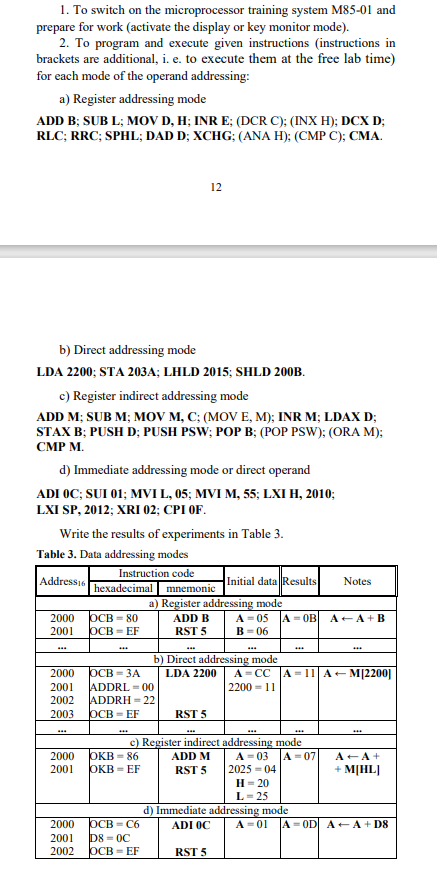 note* Replace 2000 to 8000
table 3 is outline
1. To switch on the microprocessor training system M85-01 and prepare for work (activate the display or key monitor mode). 2. To program and execute given instructions (instructions in brackets are additional, i. e. to execute them at the free lab time) for each mode of the operand addressing: a) Register addressing mode ADD B; SUB L; MOV D, H; INR E; (DCR C); (INX H); DCX D; RLC; RRC; SPHL; DAD D; XCHG; (ANA H); (CMP C); CMA. 12 b) Direct addressing mode LDA 2200; STA 203A; LHLD 2015; SHLD 200B. c) Register indirect addressing mode ADD M; SUB M; MOV M, C; (MOV E, M); INR M; LDAX D; STAX B; PUSH D; PUSH PSW; POP B; (POP PSW); (ORA M); CMP M. d) Immediate addressing mode or direct operand ADI 0C; SUI 01; MVI L, 05; MVI M, 55; LXI H, 2010; LXI SP, 2012; XRI 02; CPI 0F. Write the results of experiments in Table 3. Table 3 . Data addressing modes 1. To switch on the microprocessor training system M85-01 and prepare for work (activate the display or key monitor mode). 2. To program and execute given instructions (instructions in brackets are additional, i. e. to execute them at the free lab time) for each mode of the operand addressing: a) Register addressing mode ADD B; SUB L; MOV D, H; INR E; (DCR C); (INX H); DCX D; RLC; RRC; SPHL; DAD D; XCHG; (ANA H); (CMP C); CMA. 12 b) Direct addressing mode LDA 2200; STA 203A; LHLD 2015; SHLD 200B. c) Register indirect addressing mode ADD M; SUB M; MOV M, C; (MOV E, M); INR M; LDAX D; STAX B; PUSH D; PUSH PSW; POP B; (POP PSW); (ORA M); CMP M. d) Immediate addressing mode or direct operand ADI 0C; SUI 01; MVI L, 05; MVI M, 55; LXI H, 2010; LXI SP, 2012; XRI 02; CPI 0F. Write the results of experiments in Table 3. Table 3 . Data addressing modes
Step by Step Solution
There are 3 Steps involved in it

Get step-by-step solutions from verified subject matter experts
 Study Help