







Question: (Note: The base code is already written, I just need help modifying it in order to add a combo box that shows and allows the
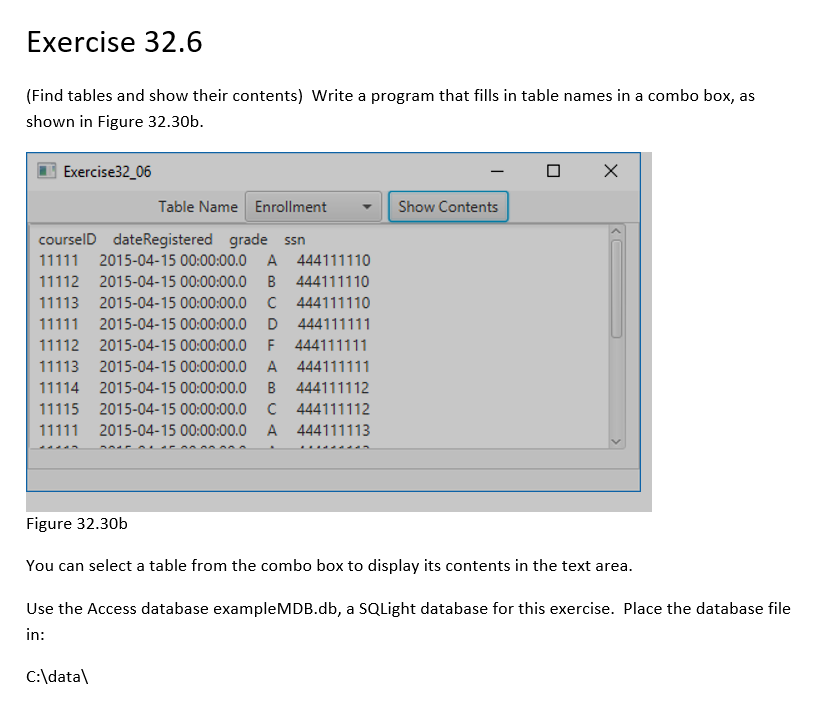
(Note: The base code is already written, I just need help modifying it in order to add a combo box that shows and allows the user to select a table from the query.)
(here is the code)
/* * To change this license header, choose License Headers in Project Properties. * To change this template file, choose Tools | Templates * and open the template in the editor. */ package com.example.exercise32_06; import java.sql.Connection; import java.sql.DriverManager; import java.sql.ResultSet; import java.sql.ResultSetMetaData; import java.sql.SQLException; import java.sql.Statement; import javafx.application.Application; import javafx.geometry.Pos; import javafx.scene.Scene; import javafx.scene.control.Button; import javafx.scene.control.Label; import javafx.scene.control.TextField; import javafx.stage.Stage; import javafx.scene.control.ScrollPane; import javafx.scene.control.TextArea; import javafx.scene.layout.BorderPane; import javafx.scene.layout.HBox; public class Exercise32_06 extends Application { private TextField tfTableName = new TextField(); private TextArea taResult = new TextArea(); private Button btShowContents = new Button("Show Contents"); private Label lblStatus = new Label(); // Statement for executing queries private Statement stmt; @Override // Override the start method in the Application class public void start(Stage primaryStage) { HBox hBox = new HBox(5); hBox.getChildren().addAll(new Label("Table Name"), tfTableName, btShowContents); hBox.setAlignment(Pos.CENTER); BorderPane pane = new BorderPane(); pane.setCenter(new ScrollPane(taResult)); pane.setTop(hBox); pane.setBottom(lblStatus); // Create a scene and place it in the stage Scene scene = new Scene(pane, 500, 200); primaryStage.setTitle("Exercise32_06"); // Set the stage title primaryStage.setScene(scene); // Place the scene in the stage primaryStage.show(); // Display the stage initializeDB(); btShowContents.setOnAction(e -> showContents()); } private void initializeDB() { try { // Load the JDBC driver Class.forName("net.ucanaccess.jdbc.UcanaccessDriver"); System.out.println("Driver loaded"); // Establish a connection Connection connection = DriverManager.getConnection("jdbc:ucanaccess://C:/Data/exampleMDB.accdb"); // ("jdbc:oracle:thin:@liang.armstrong.edu:1521:ora9i", // "scott", "tiger"); System.out.println("Database connected"); // Create a statement stmt = connection.createStatement(); } catch (Exception ex) { ex.printStackTrace(); } } private void showContents() { String tableName = tfTableName.getText(); try { String queryString = "select * from " + tableName; ResultSet resultSet = stmt.executeQuery(queryString); ResultSetMetaData rsMetaData = resultSet.getMetaData(); for (int i = 1; i (Find tables and show their contents) Write a program that fills in table names in a combo box, as shown in Figure 32.30b. Figure 32.30b You can select a table from the combo box to display its contents in the text area. Use the Access database exampleMDB.db, a SQLight database for this exercise. Place the database file in: C:\ data \ Step by Step Solution
There are 3 Steps involved in it
1 Expert Approved Answer
Step: 1 Unlock

Question Has Been Solved by an Expert!
Get step-by-step solutions from verified subject matter experts
Step: 2 Unlock
Step: 3 Unlock
 Study Help