







Question: NOTE: The first 2 problems are for reference, the last one is what i was hoping to get answered, thanks! Write a script areaMenu that
 NOTE: The first 2 problems are for reference, the last one is what i was hoping to get answered, thanks!
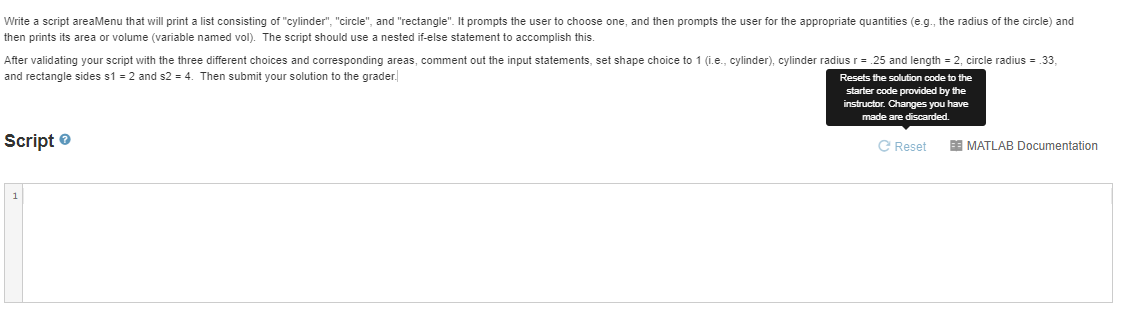
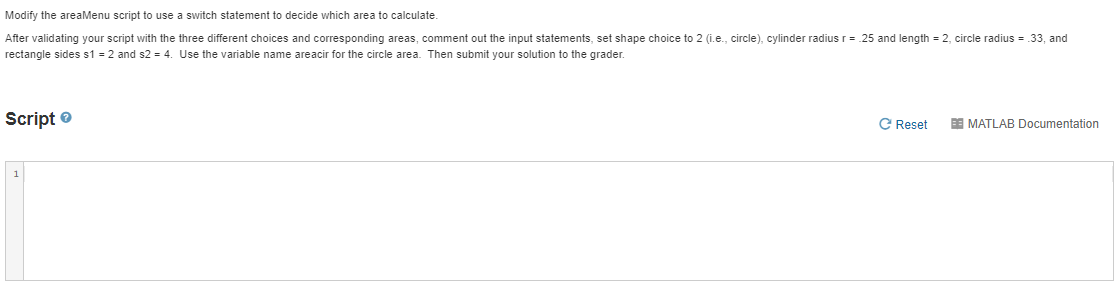
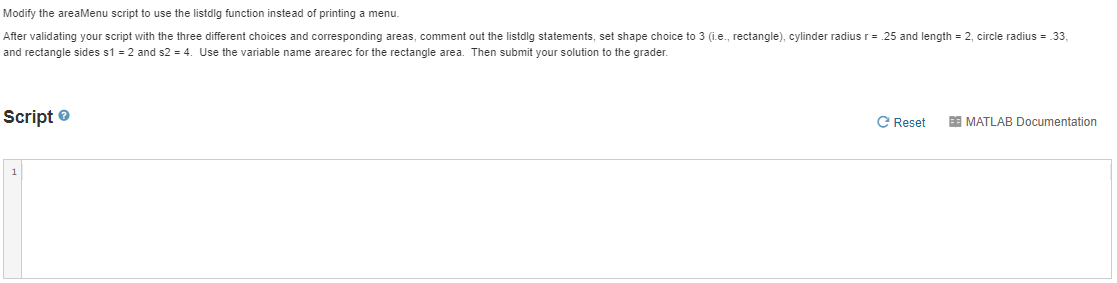
Write a script areaMenu that will print a list consisting of "cylinder", "circle" and "rectangle". It prompts the user to choose one, and then prompts the user for the appropriate quantities (e.g., the radius of the circle) and then prints its area or volume (variable named vol). The script should use a nested if-else statement to accomplish this. After validating your script with the three different choices and corresponding areas, comment out the input statements, set shape choice to 1 (i.e., cylinder), cylinder radius r = 25 and length = 2, circle radius = 33, and rectangle sides s1 = 2 and s2 = 4. Then submit your solution to the grader. Resets the solution code to the starter code provided by the instructor. Changes you have made are discarded. Script C Reset DE MATLAB Documentation Modify the areaMenu script to use a switch statement to decide which area to calculate. After validating your script with the three different choices and corresponding areas, comment out the input statements, set shape choice to 2 (i.e., circle), cylinder radius r = 25 and length = 2, circle radius = 33, and rectangle sides s1 = 2 and s2 = 4. Use the variable name areacir for the circle area. Then submit your solution to the grader. Script e Reset ES MATLAB Documentation Modify the areaMenu script to use the listdig function instead of printing a menu. After validating your script with the three different choices and corresponding areas, comment out the listdig statements, set shape choice to 3 (i.e., rectangle), cylinder radius r = 25 and length = 2, circle radius = 33, and rectangle sides s1 = 2 and s2 = 4. Use the variable name arearec for the rectangle area. Then submit your solution to the grader. Script C Reset ES MATLAB Documentation Write a script areaMenu that will print a list consisting of "cylinder", "circle" and "rectangle". It prompts the user to choose one, and then prompts the user for the appropriate quantities (e.g., the radius of the circle) and then prints its area or volume (variable named vol). The script should use a nested if-else statement to accomplish this. After validating your script with the three different choices and corresponding areas, comment out the input statements, set shape choice to 1 (i.e., cylinder), cylinder radius r = 25 and length = 2, circle radius = 33, and rectangle sides s1 = 2 and s2 = 4. Then submit your solution to the grader. Resets the solution code to the starter code provided by the instructor. Changes you have made are discarded. Script C Reset DE MATLAB Documentation Modify the areaMenu script to use a switch statement to decide which area to calculate. After validating your script with the three different choices and corresponding areas, comment out the input statements, set shape choice to 2 (i.e., circle), cylinder radius r = 25 and length = 2, circle radius = 33, and rectangle sides s1 = 2 and s2 = 4. Use the variable name areacir for the circle area. Then submit your solution to the grader. Script e Reset ES MATLAB Documentation Modify the areaMenu script to use the listdig function instead of printing a menu. After validating your script with the three different choices and corresponding areas, comment out the listdig statements, set shape choice to 3 (i.e., rectangle), cylinder radius r = 25 and length = 2, circle radius = 33, and rectangle sides s1 = 2 and s2 = 4. Use the variable name arearec for the rectangle area. Then submit your solution to the grader. Script C Reset ES MATLAB Documentation
Step by Step Solution
There are 3 Steps involved in it

Get step-by-step solutions from verified subject matter experts
 Study Help