



Question: NPV in Excel Requirements: Using Microsoft Excel to calculate and analyze the Net Present Value (NPV), Internal Rate of Return (IRR). Accounting Rate of Return
NPV in Excel
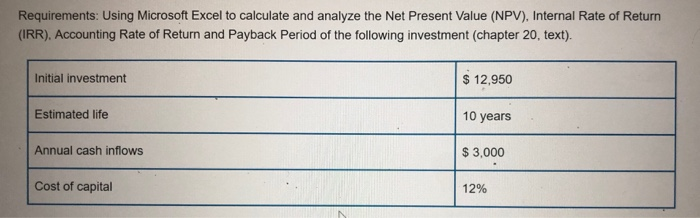
Requirements: Using Microsoft Excel to calculate and analyze the Net Present Value (NPV), Internal Rate of Return (IRR). Accounting Rate of Return and Payback period of the following investment (chapter 20, text). Initial investment $ 12,950 Estimated life 10 years Annual cash inflows $3,000 Cost of capital 12%
Step by Step Solution
There are 3 Steps involved in it
1 Expert Approved Answer
Step: 1 Unlock

Question Has Been Solved by an Expert!
Get step-by-step solutions from verified subject matter experts
Step: 2 Unlock
Step: 3 Unlock