



Question: NUMBER 1. USE TINKERCARD NUMBER 2. USE MULTIMEDIA LOGIC 1- Introduction to Implement control of LED lights by writing a program using Arduino software in
NUMBER 1. USE TINKERCARD NUMBER 2. USE MULTIMEDIA LOGIC 1- Introduction to Implement control of LED lights by writing a program using Arduino software in Tinkercad simulation environment that executes the flow chart provided in Figure 1. Your program should control at least 4 LEDs where each LED could be set to a different Wait time such it flashes at a different rate as compared to remaining three LEDs. Also, design and implement the related circuit in Tinkercad and test your design. Figure 1 Flow chart for Flashing LEDs. 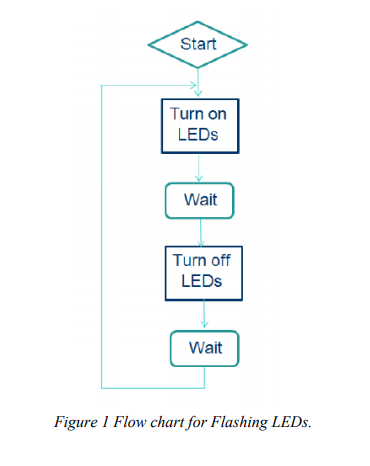 Bonus: - Change the blink rate: How fast can the LED blink (before you can no longer perceive the blinking?) -How would you make the LED dimmer? (...without changing the resistor?)
2- Introduction to MultiMedia Logic Follow the instructions provided and familiarize yourself with MultiMedia Logic simulator and then try to test the operations of the following circuits: (Hint: you can demonstrate the validity of the operation by using the gate truth table and comparing it with the results obtained from the simulation) a) 2-input AND b) 3-input OR c) 2-input NAND (* with in-class implementation on breadboard) d) 3-input XOR e) A majority circuit is a combinational circuit whose output is equal to 1 if the input variables have more 1s than 0s. The output is 0 otherwise. Draw the truth table and design a 3-input majority circuit. Simulate your design in MultiMedia Logic.
Start Turn on LEDs Wait Turn off LEDs Wait Figure 1 Flow chart for Flashing LEDs. Start Turn on LEDs Wait Turn off LEDs Wait Figure 1 Flow chart for Flashing LEDs
Step by Step Solution
There are 3 Steps involved in it

Get step-by-step solutions from verified subject matter experts