







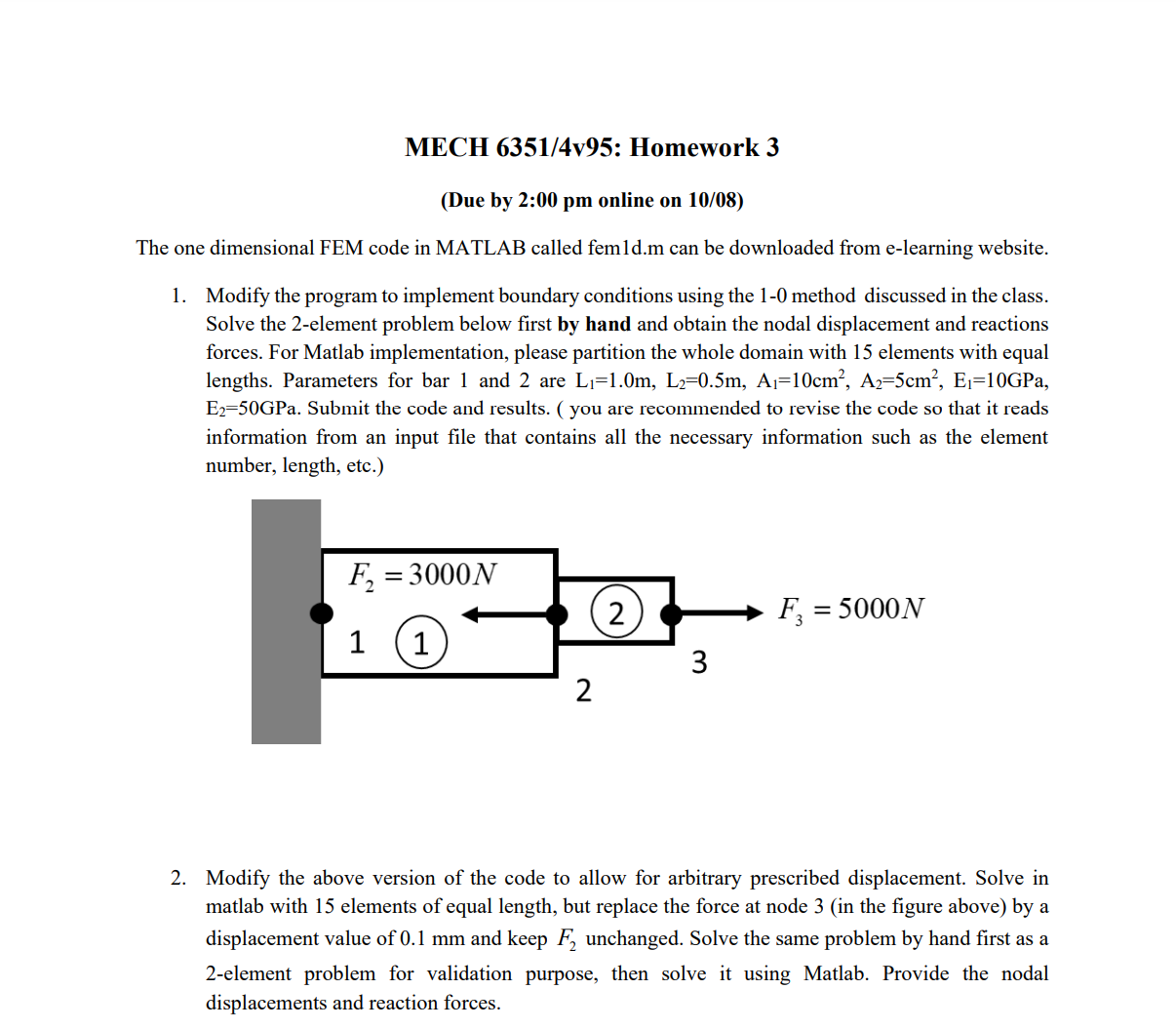
Question: number, length, etc. ) 2 . Modify the above version of the code to allow for arbitrary prescribed displacement. Solve in matlab with 1 5
number, length, etc.
Modify the above version of the code to allow for arbitrary prescribed displacement. Solve in matlab with elements of equal length, but replace the force at node in the figure above by a displacement value of mm and keep F unchanged. Solve the same problem by hand first as a element problem for validation purpose, then solve it using Matlab. Provide the nodal displacements and reaction forces.
This data will automatically describe a line of node elements
clear;
numele; numnodnumele;
xcoordinates of nodes
x:numele:;
node stores the nodes of all the elements, ie element connectivity
node:numele;:numele;
area onesnumele;
young Eones numele;
support conditions, ifix i if node i is fixed, else
ifixzeros numele;
ifixnumnod;
externally applied loads
forceethetanumeleones numnod;
Initialize system matrix
bigk zerosnumnod numnod;
Loop over elements
for e:numele
compute element length
length xnodee xnodee;
c youngeareaelength;
compute element stiffness matrix
bigknodee nodeebigknodee nodeeke;
bigknodee nodeebigknodee nodeeke;
bigknodee nodeebigknodee nodeeke;
bigknodee nodeebigknodee nodeeke;
end
for n:numnod
ififixn
bigknnE;
forcen;
end
end
solve stiffness equations
dispforcebigk;
Plot displacements
subplot; plotxdisp;
title FEM results Elem number:;
xlabelx;ylabelDisplacement;
Plot stresses
for e:numele
length xnodee xnodee;
elong dispnodee dispnodee;
epselonglength;
sigeyoungeeps;
sige sige;
xxe xnodee;
xxmp@subsupexoperatornamenodee;
yyexnodeexnodee
end
subplot; plotxxsig;
xlabelx;ylabelstress;
Step by Step Solution
There are 3 Steps involved in it
1 Expert Approved Answer
Step: 1 Unlock

Question Has Been Solved by an Expert!
Get step-by-step solutions from verified subject matter experts
Step: 2 Unlock
Step: 3 Unlock
 Study Help