







Question: NumPy - Pandas How can I create the last data frame? the one is assigned to Q12 - Create the following two separate series: -
NumPy - Pandas
How can I create the last data frame? the one is assigned to Q12
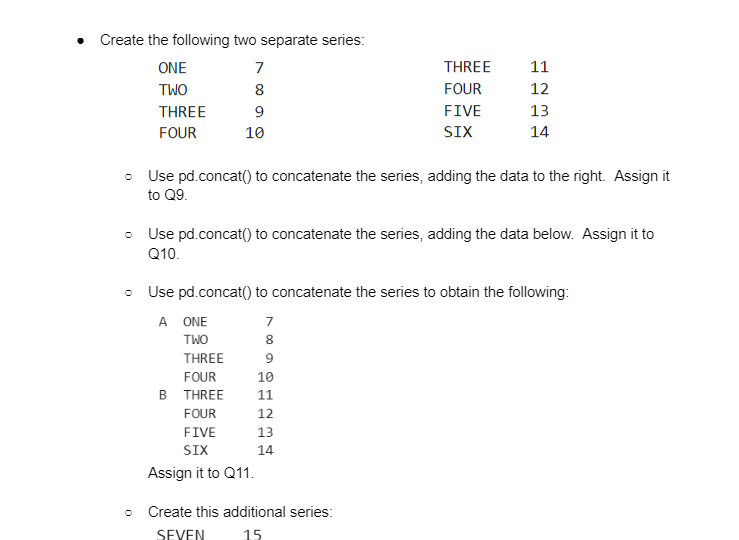
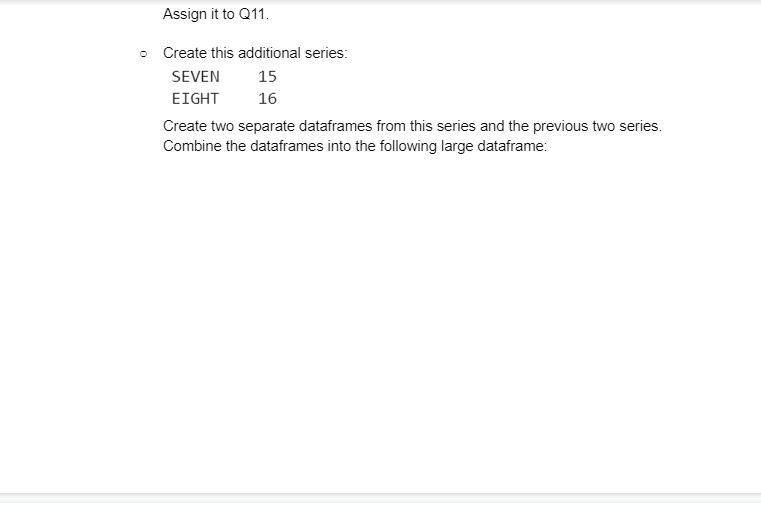
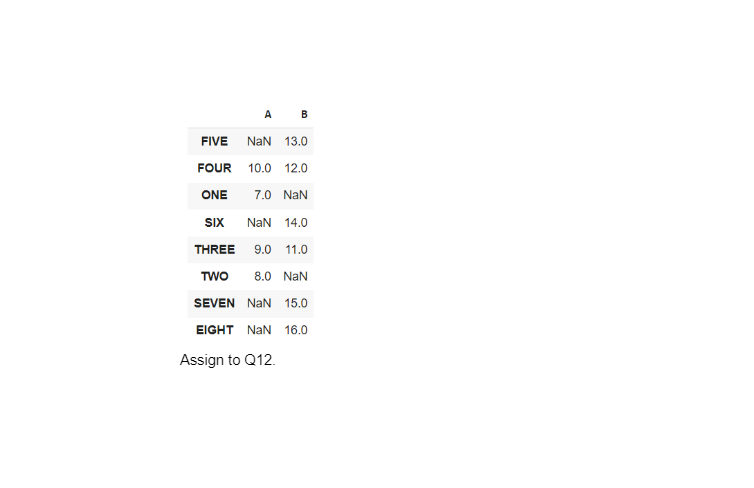
- Create the following two separate series: - Use pd.concat() to concatenate the series, adding the data to the right. Assign it to Q9. - Use pd.concat() to concatenate the series, adding the data below. Assign it to Q10. - Use pd.concat() to concatenate the series to obtain the following: Assign it to Q11. - Create this additional series: Create this additional series: Create two separate dataframes from this series and the previous two series. Combine the dataframes into the following large dataframe: FIVEFOURONESIXTHREETWOSEVENEIGHTAsSigntoANaN10.07.0NaN9.08.0NaNNaNQ12.B13.012.0NaN14.011.0NaN15.016.0
Step by Step Solution
There are 3 Steps involved in it

Get step-by-step solutions from verified subject matter experts
 Study Help