







Question: OBJECTIVE - C I am building an RSS Feed app for my computer science class How do I add a thumbnail image (from an article)
OBJECTIVE - C
I am building an RSS Feed app for my computer science class
How do I add a thumbnail image (from an article) above the title in this table view (code below)
JUST ADD TO THIS CODE :
#import "APPMasterViewController.h"
#import "APPDetailViewController.h"
@interface APPMasterViewController () {
NSXMLParser *parser;
NSMutableArray *feeds;
NSMutableDictionary *item;
NSMutableString *title;
NSMutableString *link;
NSString *element;
}
@end
@implementation APPMasterViewController
- (void)awakeFromNib
{
[super awakeFromNib];
}
- (void)viewDidLoad {
[super viewDidLoad];
feeds = [[NSMutableArray alloc] init];
NSURL *url = [NSURL URLWithString:@"http://images.apple.com/main/rss/hotnews/hotnews.rss"];
parser = [[NSXMLParser alloc] initWithContentsOfURL:url];
[parser setDelegate:self];
[parser setShouldResolveExternalEntities:NO];
[parser parse];
}
- (void)didReceiveMemoryWarning
{
[super didReceiveMemoryWarning];
// Dispose of any resources that can be recreated.
}
#pragma mark - Table View
- (NSInteger)numberOfSectionsInTableView:(UITableView *)tableView {
return 1;
}
- (NSInteger)tableView:(UITableView *)tableView numberOfRowsInSection:(NSInteger)section {
return feeds.count;
}
- (UITableViewCell *)tableView:(UITableView *)tableView cellForRowAtIndexPath:(NSIndexPath *)indexPath {
UITableViewCell *cell = [tableView dequeueReusableCellWithIdentifier:@"Cell" forIndexPath:indexPath];
cell.textLabel.text = [[feeds objectAtIndex:indexPath.row] objectForKey: @"title"];
return cell;
}
- (void)parser:(NSXMLParser *)parser didStartElement:(NSString *)elementName namespaceURI:(NSString *)namespaceURI qualifiedName:(NSString *)qName attributes:(NSDictionary *)attributeDict {
element = elementName;
if ([element isEqualToString:@"item"]) {
item = [[NSMutableDictionary alloc] init];
title = [[NSMutableString alloc] init];
link = [[NSMutableString alloc] init];
}
}
- (void)parser:(NSXMLParser *)parser didEndElement:(NSString *)elementName namespaceURI:(NSString *)namespaceURI qualifiedName:(NSString *)qName {
if ([elementName isEqualToString:@"item"]) {
[item setObject:title forKey:@"title"];
[item setObject:link forKey:@"link"];
[feeds addObject:[item copy]];
}
}
- (void)parser:(NSXMLParser *)parser foundCharacters:(NSString *)string {
if ([element isEqualToString:@"title"]) {
[title appendString:string];
} else if ([element isEqualToString:@"link"]) {
[link appendString:string];
}
}
- (void)parserDidEndDocument:(NSXMLParser *)parser {
[self.tableView reloadData];
}
- (void)prepareForSegue:(UIStoryboardSegue *)segue sender:(id)sender {
if ([[segue identifier] isEqualToString:@"showDetail"]) {
NSIndexPath *indexPath = [self.tableView indexPathForSelectedRow];
NSString *string = [feeds[indexPath.row] objectForKey: @"link"];
[[segue destinationViewController] setUrl:string];
}
}
@end
It looks like this if you run it in XCode.
HOW DO YOU PLACE AN IMAGE FROM THE ARTICLE ABOVE THE TITLE?
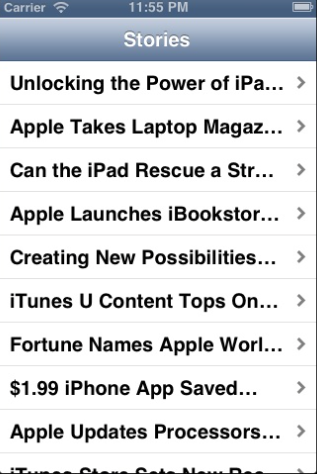
Carrier 11:55 PM Stories Unlocking the Power of iPa... Apple Takes Laptop Magaz Can the iPad Rescue a Str... Apple Launches iBookstor... Creating New Possibilities... iTunes U Content Tops on... Fortune Names Apple Worl... $1.99 iPhone App Saved Apple Updates Processors... Carrier 11:55 PM Stories Unlocking the Power of iPa... Apple Takes Laptop Magaz Can the iPad Rescue a Str... Apple Launches iBookstor... Creating New Possibilities... iTunes U Content Tops on... Fortune Names Apple Worl... $1.99 iPhone App Saved Apple Updates Processors
Step by Step Solution
There are 3 Steps involved in it

Get step-by-step solutions from verified subject matter experts
 Study Help