







Question: Objective: Demonstrate your understanding of basic Java constructs for input, process and output. This assignment is based on the material covered in chapter 9 of
Objective: Demonstrate your understanding of basic Java constructs for input, process and output. This assignment is based on the material covered in chapter of your textbook and the material covered on algorithms Please do not use break, continueexit return Documentation: See your course syllabus addendum file in Canvas for the required heading documentation and other notes. Make sure you have the header section properly created using tags such as @author, @file, etc Write a java program for the question below, Save the file with the following format LastNameFirstNameCitHwAjava Deliverable: Submit your Java file. Use the file format: LastNameFirstNameCitHwAjava for your file name. NOTE: Java class names must begin with a capital letter ieFooBarCITHW#java Submit your file to the assignment dropbox in Canvas Please dont forget to submit UML Assignment: Part Design the UML Diagram: Draw the UML diagram for a Vehicle class based on the requirements outlined in Part below. Save it as lastNameFirstNameUML.docx Part Define the Vehicle Class: Design and write the definition of the Vehicle class named LastNameinitialFirstNameinitialCitVehicle.java Example if first name is John and last name is Smith then the class name will be SLCitVehicle.java with the following public datafields: Make model, year, mileage, fuel type. Create a noarg constructor to initialize these fields with default values refer to the Sample Run Create a second constructor that takes only the model, year, and mileage as parameters and initialize the variables. Create a third constructor that initializes all the data fields Implement a method that calculates and returns the age of the vehicle by subtracting the vehicles year from the current year. The user will input the current year Create a method that displays all the vehicle information, including the age. Hint: Call the method that calculates the vehicles age inside this method. Implement a print method that displays the model, year, and mileage. Part Write a Test Class that include the main method: save it as LastNameFirstNameCitTestHwAjava Show how to create and display information for an object using the noarg constructor. Use hardcoded data to create and display an object using the third constructor without prompting the user for input Please see sample run Create a loop to enter vehicle details using user input prompt the user to enter model, year and mileage Create a second constructor object and use print to display model, year and mileage Ask if the user would like to enter another vehicle detail, please see sample run Save the class with LastNameFirstNameCitHwAjava Note: You can have all classes in one file and have one name for the program as the following LastNameFirstNameCitHwAjava Sample Run: Using default data: Enter current year for model: Camry Make: Toyota Model: Camry Year: Mileage: Fuel Type: Gas Age: years Hardcoded data: Enter current year for model: Model S Make: Tesla Model: Model S Year: Mileage: Fuel Type: Electric Age: years Enter vehicle details: Model: Honda Year: Mileage: Vehicle Details: Model: Honda Year: Mileage: Would you like to enter another vehicle? yesno: yes Enter vehicle details: Model: Toyota Year: Mileage: Vehicle Details: Model: Toyota Year: Mileage: Would you like to enter another vehicle? yesno: no Thank you for using the Vehicle Manager! Press any key to continue LastNameFirstNameCitTestHwAjava
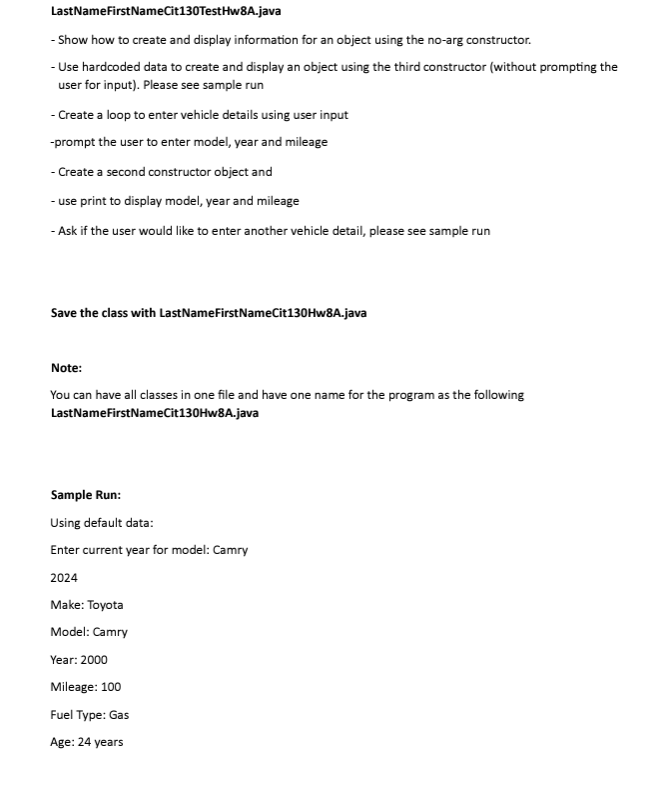
Show how to create and display information for an object using the noarg constructor.
Use hardcoded data to create and display an object using the third constructor without prompting the user for input Please see sample run
Create a loop to enter vehicle details using user input
prompt the user to enter model, year and mileage
Create a second constructor object and
use print to display model, year and mileage
Ask if the user would like to enter another vehicle detail, please see sample run
Save the class with LastNameFirstNameCitHwAjava
Note:
You can have all classes in one file and have one name for the program as the following LastNameFirstNameCitHwAjava
Sample Run:
Using default data:
Enter current year for model: Camry
Make: Toyota
Model: Camry
Year:
Mileage:
Fuel Type: Gas
Age: years Write a java program for the question below, Save the file with the following format LastNameFirstNameCitHwAjava
Deliverable: Submit your Java file. Use the file format: LastNameFirstNameCitHwAjava for your file name. NOTE: Java class names must begin with a capital letter ieFooBarCITHW#java Submit your file to the assignment dropbox in Canvas
Please don't forget to submit UML
Assignment:
Part Design the UML Diagram:
Draw the UML diagram for a Vehicle class based on the requirements outlined in Part below. Save it as lastNameFirstNameUML.docx
Part
Step by Step Solution
There are 3 Steps involved in it
1 Expert Approved Answer
Step: 1 Unlock

Question Has Been Solved by an Expert!
Get step-by-step solutions from verified subject matter experts
Step: 2 Unlock
Step: 3 Unlock
 Study Help