







Question: Objective: In this assignment, you will install the Python interpreter on your workstation and verify its proper installation by running a simple Python program that
Objective:
In this assignment, you will install the Python interpreter on your workstation and verify its proper installation by running a simple Python program that calculates the weekly salary.
Part : Installing Python
Visit python.org and follow the steps provided in class to download and install Python on your workstation.
Once the installation is complete, verify that Python is correctly installed by ensuring you can access both the Interactive shell and Script mode in IDLE.
Remember that when writing long Python programs, you should use IDLE's script mode. After saving and running your program, you may encounter some syntax errors, which is normal at first. Once you've debugged all the errors, you can save and run your program again. During execution, the Shell mode will automatically activate, and you will see the output of your program there.
Part : Weekly Salary Calculation Program
After installing Python, we will confirm the installation by running the following Python program in IDLE's script mode to calculate the weekly salary based on the hours worked and the hourly pay rate. please use the IDLE's script mode for programming exercises in this course
Program Requirements:
User Input:
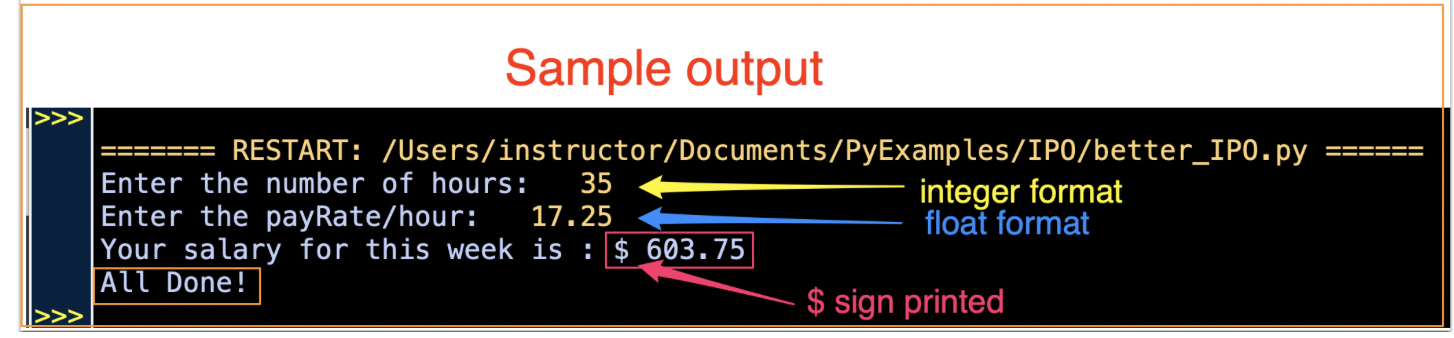
Ask the user to input the number of hours worked in a week as an integer.
Then, prompt them to enter the hourly pay rate as a float.
Calculation:
Calculate the weekly wage by multiplying the hours worked by the hourly pay rate.
Output:
Display the result in a clear message: "Your salary for this week is: $amount
End Message:
Display the message "All Done!" after the salary has been calculated and shown to ensure the program terminates properly.
Submission Requirements:
Submit the py file containing your source code for this and all future assignments.
Include a screenshot of the output showing the interaction with the user and the displayed information, for this and all future assignments
Sample output
Expected Files: two Files
One PNG or JPG file of the screenshot of the output window.
The py file containing your source code.
Step by Step Solution
There are 3 Steps involved in it
1 Expert Approved Answer
Step: 1 Unlock

Question Has Been Solved by an Expert!
Get step-by-step solutions from verified subject matter experts
Step: 2 Unlock
Step: 3 Unlock
 Study Help