







Question: Objective Orented java The purpose of this assignment is to practice OOP with Decisions, Loops and Graphics. This assignment consists of two programming problems. Create
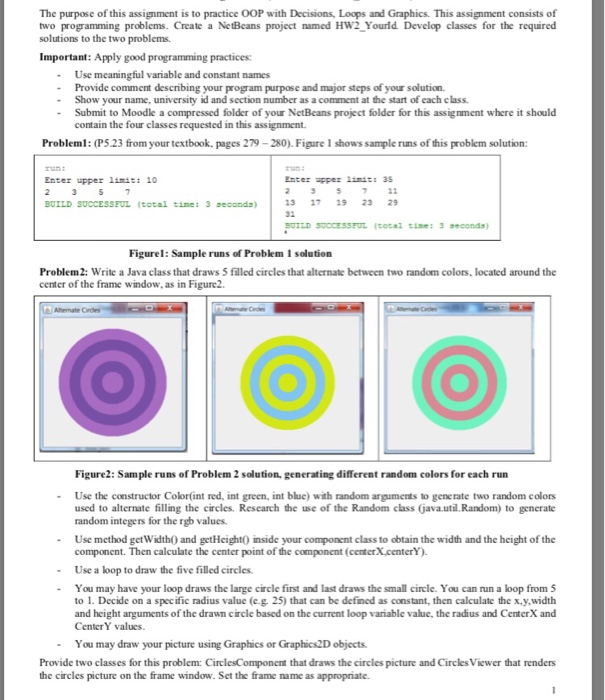
The purpose of this assignment is to practice OOP with Decisions, Loops and Graphics. This assignment consists of two programming problems. Create a NetBeans project named HW2 Yourld. Develop classes for the required solutions to the two problems. Important: Apply good programming practices: Use meaningful variable and constant names Provide comment describing your program purpose and major steps of your solution. -Show your name, university id and section number as a comment at the start of each class Submit to Moodle a compressed folder of your NetBeans project folder for this assignment where it should contain the four classes requested in this assignment Problem: (P5.23 from your textbook, pages 279- 280). Figure 1 shows sample runs of this problem solution: Enter pper liniss 35 13 17 19 2329 BUILD SOCCESSFUL (total cise: 3 seconds Enter upper linit: 10 BUILD SUCCESSFUL (total time: 3 econds) Figurel: Sample runs of Problem 1 solution Problem 2: Write a Java class that draws 5 filled circles that alternate between two random colors, located around the center of the frame window, as in Figure2 Figure2: Sample runs of Problem 2 solution, generating different random colors for each run - Use the constructor Color(int red, int green, int blue) with random arguments to generate two random colors used to alternate filling the circles. Research the use of the Random class javautil. Random) to generate random integers for the rgb values. - Use method getWidth0 and getHeight0 inside your component class to obtain the width and the height of the component. Then calculate the center point of the component (centerX.centerY -Use a oop to draw the five filled circles. -You may have your loop draws the large circle first and last draws the small circle. You can run a loop from 5 to 1. Decide on a specific radius value (c.g. 25) that can be defined as constant, then calculate the x y.width and height arguments of the drawm circle based on the current loop variable value, the radius and CenterX and CenterY values - You may draw your picture using Graphics or Graphics2D objects Provide two classes for this problem: CirclesComponent that draws the circles picture and Circles Viewer that renders the circles picture on the frame window. Set the frame name as appropriate
Step by Step Solution
There are 3 Steps involved in it

Get step-by-step solutions from verified subject matter experts
 Study Help