







Question: Objective: This assignment aims to develop your JavaScript and HTML skills by creating a simple calculator application. You will learn to handle user input, perform
Objective:
This assignment aims to develop your JavaScript and HTML
skills by creating a simple calculator application.
You will learn to handle user input, perform arithmetic
operations, and dynamically generate content on a web page.
Additionally, using GitHub for version control and web
publishing will enhance your ability to manage and share
projects effectively.
Completing this assignment will prepare you to tackle more
complex web development tasks, showcase your technical
abilities, and improve your marketability in the job market.
Requirements:
HTML Document points
Create an HTML file named calculator.html whose
primary purpose is to load and execute a
JavaScript file named calculator.js
The HTML file should load the JavaScript code
which will:
Repeatedly prompt the user for two numbers x
and
Prompt the user for an arithmetic operator
addition subtraction modulus
division or multiplication
Continue the loop if the user clicks OK and
exit the loop if the user clicks "Cancel."
JavaScript Functionality points
User Input Handling points:
Prompt the user for two numbers and and
an arithmetic operator in three separate dialog
boxes.
If the user clicks OK the prompts will appear
again to get more user input.
If the user clicks "Cancel", the loop will exit.
Table Construction points:
Construct a table that displays the numbers, the
operator, and the computation result as a row.
If the operator is not one of
display an error message in the result column.
If nonnumeric characters are entered for x and
use is NaN to check and display an error
message in the result column.
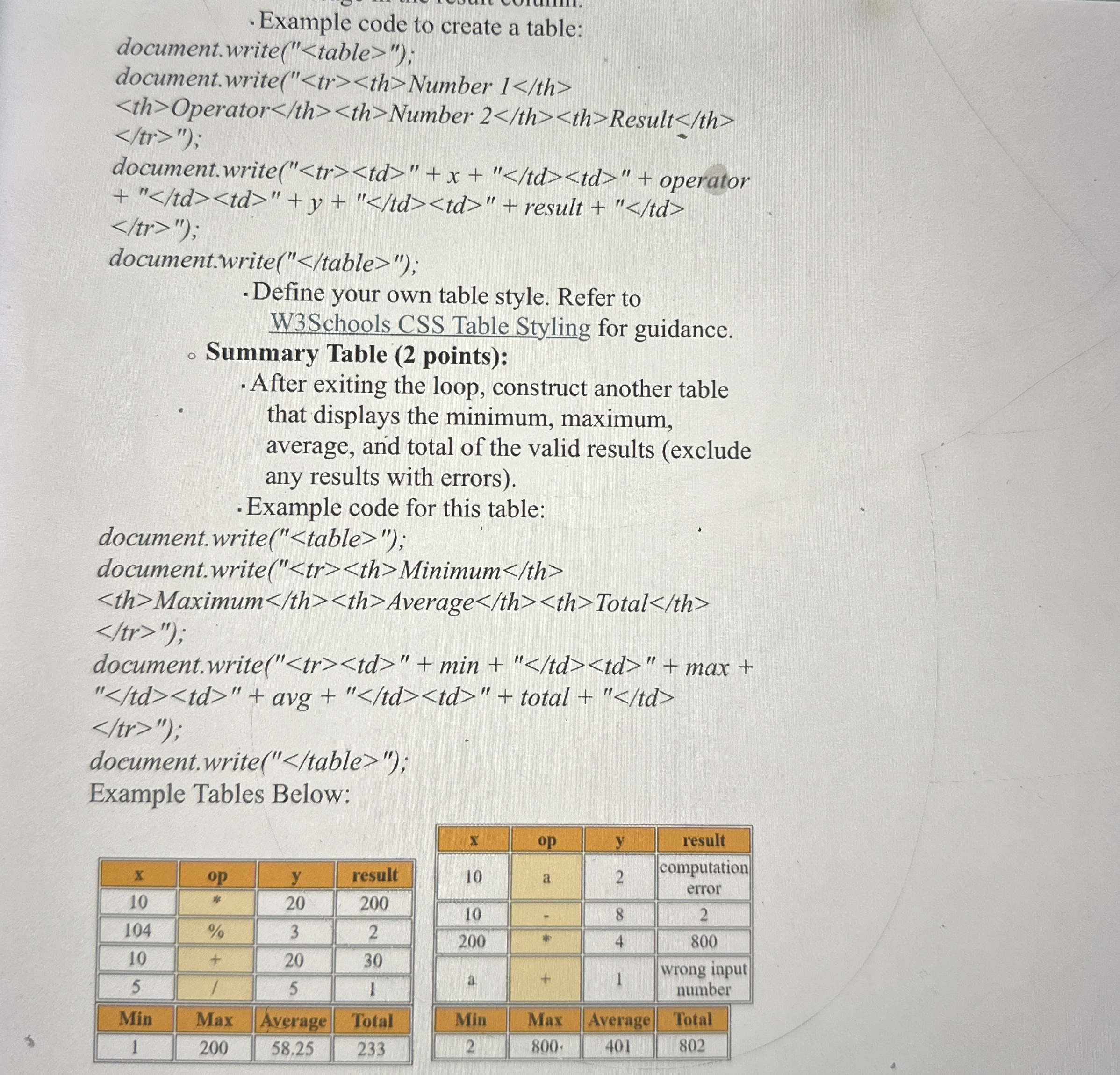
Example code to create a table:
document.write table ;
document.write tr th Number :
Total
Average Total
Maximum Average Total
min max
avg total
Result
Number Result
Operator Number Result
Step by Step Solution
There are 3 Steps involved in it
1 Expert Approved Answer
Step: 1 Unlock

Question Has Been Solved by an Expert!
Get step-by-step solutions from verified subject matter experts
Step: 2 Unlock
Step: 3 Unlock
 Study Help