







Question: Objective Write the codes to control 4 lamps in a specified patten using 2 pushbuttons Process Description To begin the lamp patten Pressing a NO
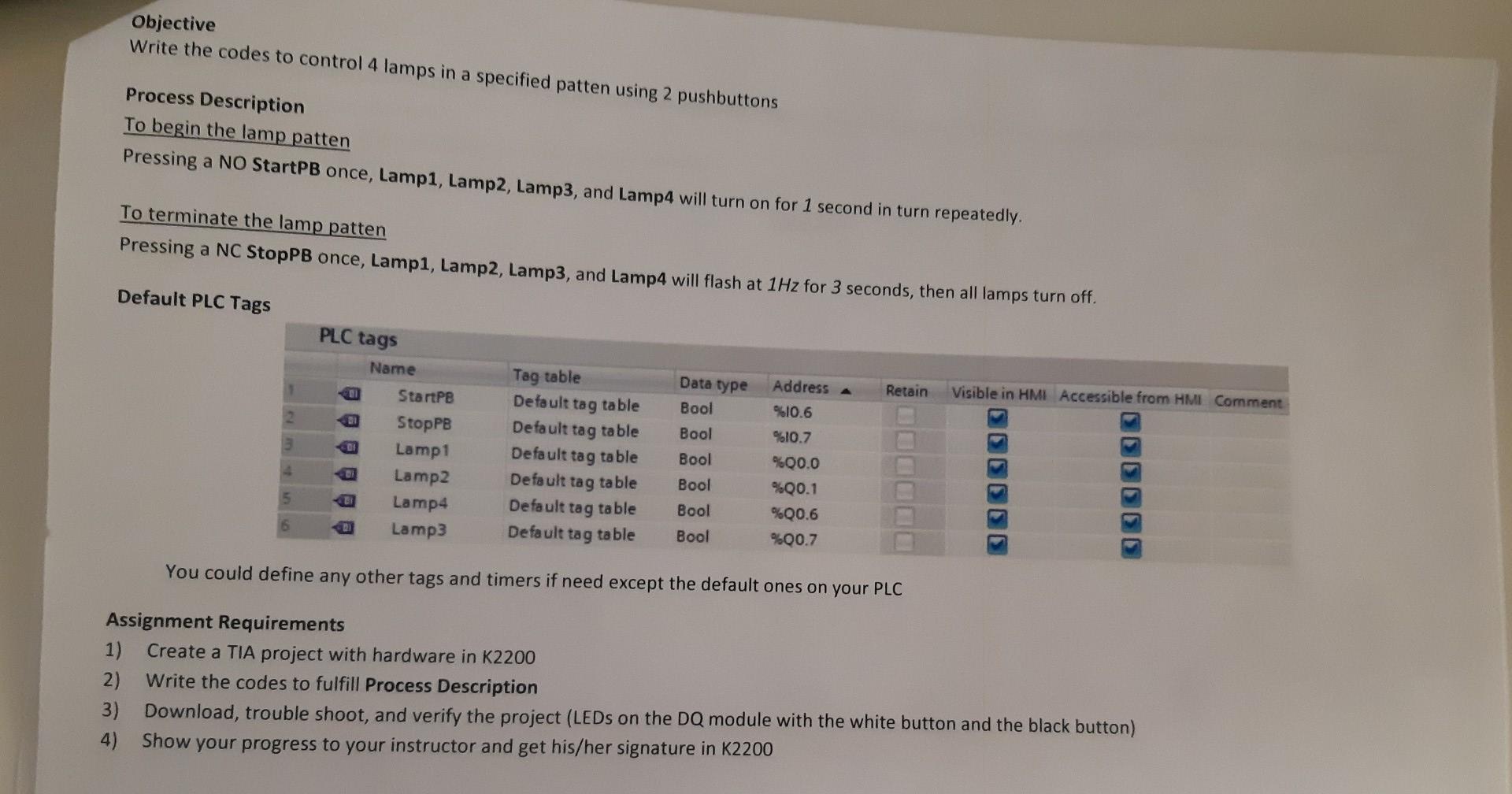
Objective Write the codes to control 4 lamps in a specified patten using 2 pushbuttons Process Description To begin the lamp patten Pressing a NO StartPB once, Lamp1, Lamp2, Lamp3, and Lamp4 will turn on for 1 second in turn repeatedly. To terminate the lamp patten Pressing a NC StopPB once, Lamp1, Lamp2, Lamp3, and Lamp4 will flash at 1Hz for 3 seconds, then all lamps turn off. Default PLC Tags PLC tags Data type Retain Visible in HMI Accessible from HMI Comment 2 Bool Bool 3 Name StartPB StopPB Lamp1 Lamp2 Lamp4 Lamp3 Tag table Default tag table Default tag table Default tag table Default tag table Default tag table Default tag table Bool Address A %10.6 %10.7 %00.0 %Q0.1 %Q0.6 %00.7 5 Bool Bool Bool DO You could define any other tags and timers if need except the default ones on your PLC Assignment Requirements 1) Create a TIA project with hardware in K2200 2) Write the codes to fulfill Process Description 3) Download, trouble shoot, and verify the project (LEDs on the DQ module with the white button and the black button) 4) Show your progress to your instructor and get his/her signature in K2200 Objective Write the codes to control 4 lamps in a specified patten using 2 pushbuttons Process Description To begin the lamp patten Pressing a NO StartPB once, Lamp1, Lamp2, Lamp3, and Lamp4 will turn on for 1 second in turn repeatedly. To terminate the lamp patten Pressing a NC StopPB once, Lamp1, Lamp2, Lamp3, and Lamp4 will flash at 1Hz for 3 seconds, then all lamps turn off. Default PLC Tags PLC tags Data type Retain Visible in HMI Accessible from HMI Comment 2 Bool Bool 3 Name StartPB StopPB Lamp1 Lamp2 Lamp4 Lamp3 Tag table Default tag table Default tag table Default tag table Default tag table Default tag table Default tag table Bool Address A %10.6 %10.7 %00.0 %Q0.1 %Q0.6 %00.7 5 Bool Bool Bool DO You could define any other tags and timers if need except the default ones on your PLC Assignment Requirements 1) Create a TIA project with hardware in K2200 2) Write the codes to fulfill Process Description 3) Download, trouble shoot, and verify the project (LEDs on the DQ module with the white button and the black button) 4) Show your progress to your instructor and get his/her signature in K2200
Step by Step Solution
There are 3 Steps involved in it

Get step-by-step solutions from verified subject matter experts
 Study Help