







Question: OBJECTIVE You will learn how to read numerical data, do simple arithmetic computations, use conditionals, and output formatted results. THE PROBLEM You must write a
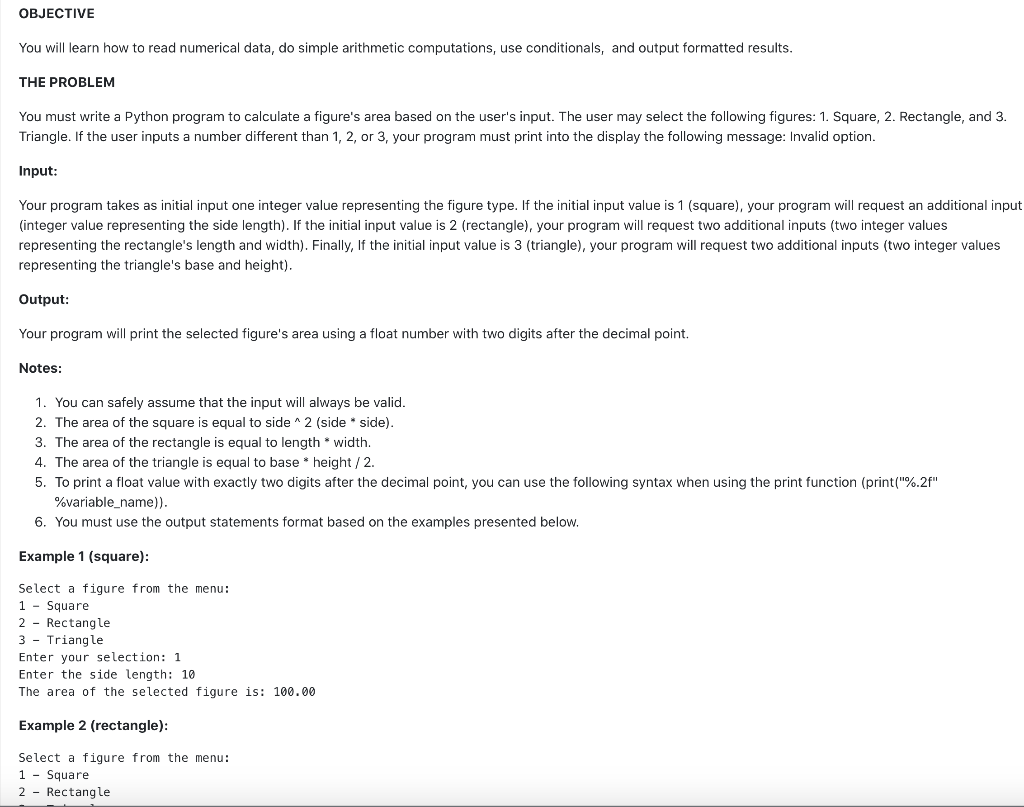
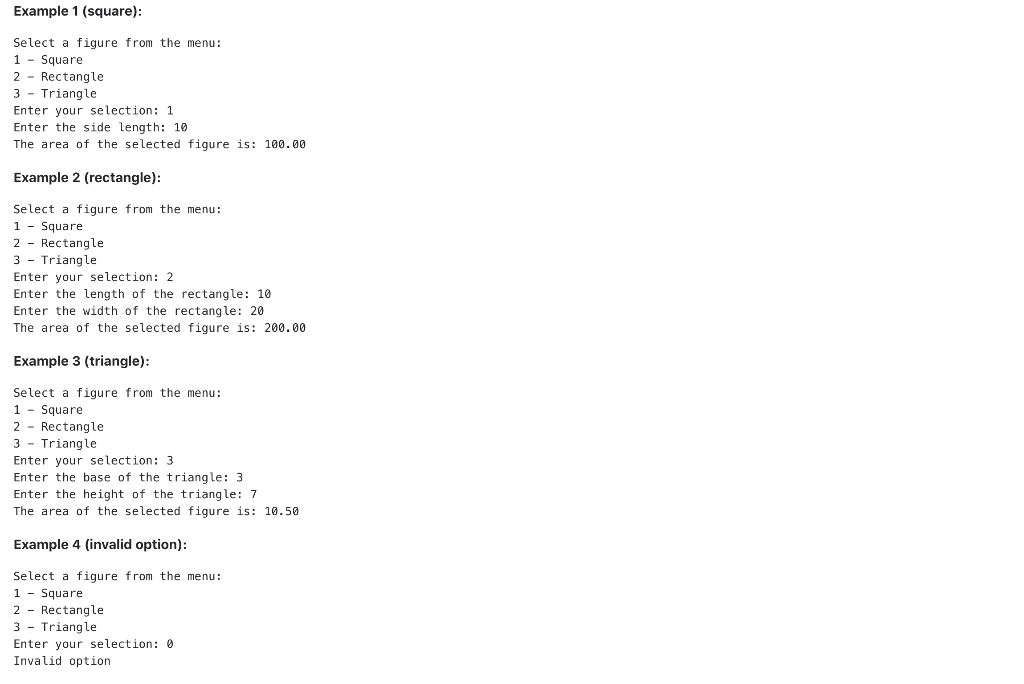
OBJECTIVE You will learn how to read numerical data, do simple arithmetic computations, use conditionals, and output formatted results. THE PROBLEM You must write a Python program to calculate a figure's area based on the user's input. The user may select the following figures: 1. Square, 2. Rectangle, and 3. Triangle. If the user inputs a number different than 1, 2, or 3, your program must print into the display the following message: Invalid option. Input: Your program takes as initial input one integer value representing the figure type. If the initial input value is 1 (square), your program will request an additional input (integer value representing the side length). If the initial input value is 2 (rectangle), your program will request two additional inputs (two integer values representing the rectangle's length and width). Finally, If the initial input value is 3 (triangle), your program will request two additional inputs (two integer values representing the triangle's base and height). Output: Your program will print the selected figure's area using a float number with two digits after the decimal point. Notes: 1. You can safely assume that the input will always be valid. 2. The area of the square is equal to side 2 (side * side). 3. The area of the rectangle is equal to length*width. 4. The area of the triangle is equal to base * height/2. 5. To print a float value with exactly two digits after the decimal point, you can use the following syntax when using the print function (print("%.2f" %variable_name)). 6. You must use the output statements format based on the examples presented below. Example 1 (square): Select a figure from the menu: 1 - Square 2 - Rectangle 3 - Triangle Enter your selection: 1 Enter the side length: 10 The area of the selected figure is: 100.00 Example 2 (rectangle): Select a figure from the menu: 1 - Square 2 - Rectangle Example 1 (square): Select a figure from the menu: 1 - Square 2 - Rectangle 3 - Triangle Enter your selection: 1 Enter the side length: 10 The area of the selected figure is: 100.00 Example 2 (rectangle): Select a figure from the menu: 1 - Square 2 - Rectangle 3 - Triangle Enter your selection: 2 Enter the length of the rectangle: 10 Enter the width of the rectangle: 20 The area of the selected figure is: 200.00 Example 3 (triangle): Select a figure from the menu: 1 - Square 2 - Rectangle 3 - Triangle Enter your selection: 3 Enter the base of the triangle: 3 Enter the height of the triangle: 7 The area of the selected figure is: 10.50 Example 4 (invalid option): Select a figure from the menu: 1 - Square 2 - Rectangle 3 - Triangle Enter your selection: 0 Invalid option
Step by Step Solution
There are 3 Steps involved in it

Get step-by-step solutions from verified subject matter experts
 Study Help