







Question: OBJECTIVE You will use your knowledge of functions OBJECTIVE You will use your knowledge of functions and lists to write a Python program that allows
OBJECTIVE
You will use your knowledge of functions OBJECTIVE
You will use your knowledge of functions and lists to write a Python program that allows the user to manipulate the information from a student list.
THE PROBLEM
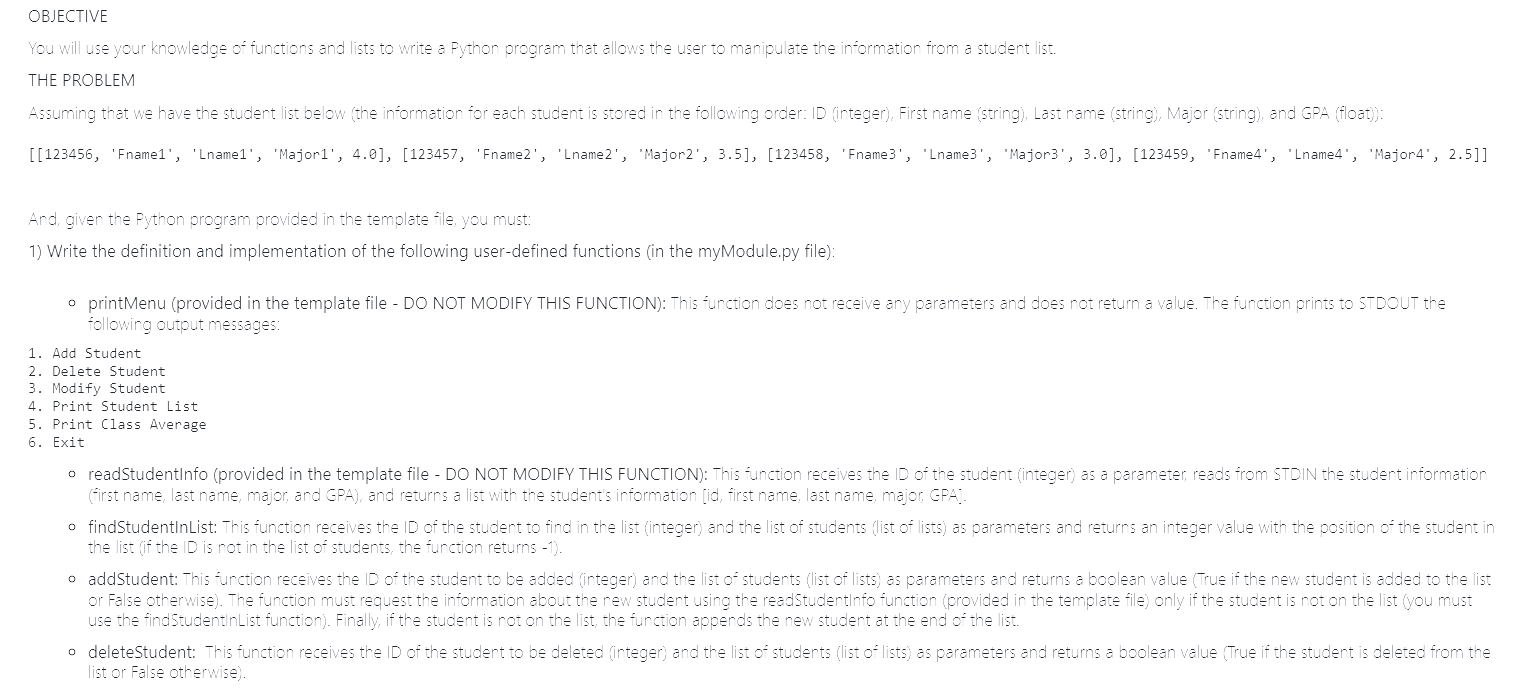
Assuming that we have the student list below the information for each student is stored in the following order: ID integer First name string Last name string Major string and GPA float:
'Fname 'Lname 'Major 'Fname 'Lname 'Major 'Fname 'Lname 'Major 'Fname 'Lname 'Major
And, given the Python program provided in the template file, you must:
Write the definition and implementation of the following userdefined functions in the myModule.py file:
printMenu provided in the template file DO NOT MODIFY THIS FUNCTION: This function does not receive any parameters and does not return a value. The function prints to STDOUT the following output messages:
Add Student
Delete Student
Modify Student
Print Student List
Print Class Average
Exit
readStudentInfo provided in the template file DO NOT MODIFY THIS FUNCTION: This function receives the ID of the student integer as a parameter, reads from STDIN the student information first name, last name, major, and GPA and returns a list with the student's information id first name, last name, major, GPA
findStudentInList: This function receives the ID of the student to find in the list integer and the list of students list of lists as parameters and returns an integer value with the position of the student in the list if the ID is not in the list of students, the function returns
addStudent: This function receives the ID of the student to be added integer and the list of students list of lists as parameters and returns a boolean value True if the new student is added to the list or False otherwise The function must request the information about the new student using the readStudentInfo function provided in the template file only if the student is not on the list you must use the findStudentInList function Finally, if the student is not on the list, the function appends the new student at the end of the list.
deleteStudent: This function receives the ID of the student to be deleted integer and the list of students list of lists as parameters and returns a boolean value True if the student is deleted from the list or False otherwise
modifyStudent: This function receives the ID of the student to be modified integer and the list of students list of lists as parameters and returns a boolean value True if the student is on the list or False otherwise The function does not allow the user to change the student ID You must use the readStudentInfo function provided in the template file to read the new information from STDIN only if the selected student is on the list use the findStudentInList function
printStudentList: This function receives the list with the student list of lists and does not return a value. Given the list of lists above, the function prints to STDOUT contents of the list of students using the following output messages:
Student # : ID: First name: Fname Last name: Lname Major: Major GPA:
Student # : ID: First name: Fname Last name: Lname Major: Major GPA:
Student # : ID: First name: Fname Last name: Lname Major: Major GPA:
Student # : ID: First name: Fname Last name: Lname Major: Major GPA:
calculateClassGPA: This function receives the list of students list of lists as a parameter and returns a float value with the average GPA for the students in the list.
Modify the PApy file to call the userdefined functions implemented in the myModule.py file you only need to modify the provided code based on the comments in the template file
EXAMPLE:
Add Student
Delete Student
Modify Student
Print Student List
Print Class Average
Exit
Enter your option:
Enter the ID of the student to be added:
Enter the First Name: Carlos
Enter the Last Name: Rincon
Enter the Major: CS
Enter the GPA:
Student added to the list
Add Student
Delete Student
Modify Student
Print Student List
Print Class Average
Exit
Enter your option:
Enter the ID of the student to be added:
Enter the First Name: Laura
Enter the Last Name: Castro
Enter the Major: CHEM
Enter the GPA:
Student added to the list
Add Student
Delete Student
Modify Student
Print Student List
Print Class Average
Exit
Enter your option:
Enter the ID of the student to be added:
Enter the First Name: Veronica
Enter the Last Name: Rincon
Enter the Major: ENG
Enter the GPA:
Student added to the list
Add Student
Delete Student
Modify Student
Print Student List
Print Class Average
Exit
Enter your option:
Step by Step Solution
There are 3 Steps involved in it
1 Expert Approved Answer
Step: 1 Unlock

Question Has Been Solved by an Expert!
Get step-by-step solutions from verified subject matter experts
Step: 2 Unlock
Step: 3 Unlock
 Study Help