







Question: Objectives ft This program displays oome output*/ This erercise will focus on creating a basic Java class and using the printlin() method to print information
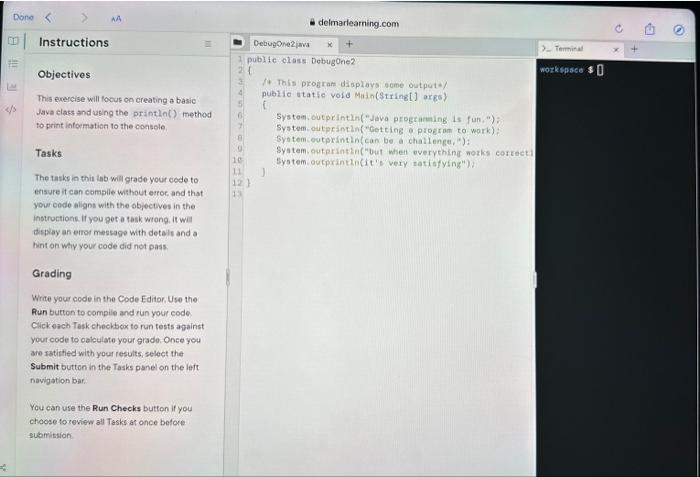
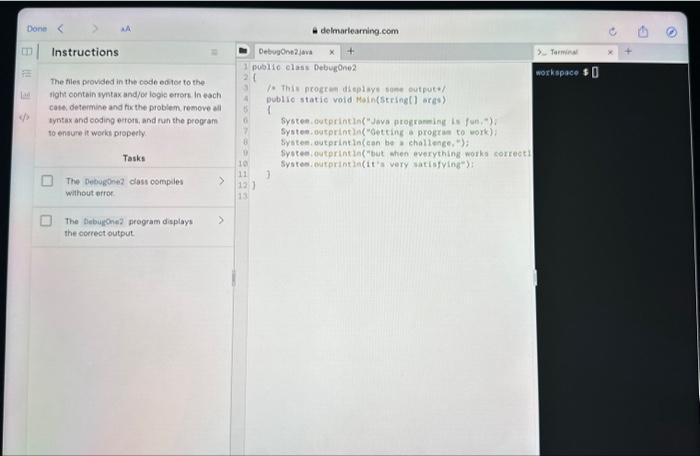
Objectives ft This program displays oome output*/ This erercise will focus on creating a basic Java class and using the printlin() method to print information to the console. Systom. outprintin("java programeing is fun,"); Systam-outprintln ("Getting a progtan to work): Syotem-outprintin(can be a challenge, ) : Tasks: Syatem-outprintln("but when overything norks correct Syotem, outprintin(it's very sati isfyeng"); The tasks in this inb will grade your code to ensure it can complie without error, and that your oode nligns with the objectives in the instructionk. if you got a task wtong. It wal dsplay an error message with detals and a hint on why your code did not pass. Grading Write your code in the Code Editor. Use the Run button to complie and run your code. Click erch Task cheohbox to run tests against your code to cakculate your grade. Once yeu are ratictied with your results, select the Submit button in the Tasks panel on the left navigation bar. You can use the Run Checks button if you choose to review all Tasks at once before submistion The files provided in the codb eotoe to the. ight contbin syntax and/oe logit errors in each fo this neogeken displaye sone output / cate. determine and fix the problem remove all tyntax and eoding ertors, and run the program to ensure it works properly. Systeen outprintin("Java progronming is fon, ) ), Systee-outprintla("oetcing a progran to work)/ Syaten outprintin(can be a challenge, "); Sypteeiouterintia("but ahen everything worke sorrect) Systesieatprint la (it'a very satisfvinge): The Debugone without ofror The bebugone2 program displays she correct output
Step by Step Solution
There are 3 Steps involved in it

Get step-by-step solutions from verified subject matter experts
 Study Help